

All Quiet
All Quiet GmbH · Developer Tools
Independent analytics for this App Store listing. AppTracker is not affiliated with All Quiet GmbH.
Chart standing · US
What changed · US
Listing changes AppTracker has observed for this app in this storefront — new versions, price moves, rating shifts, and store copy.
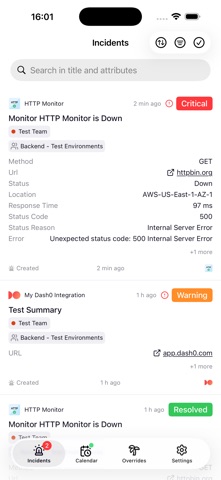
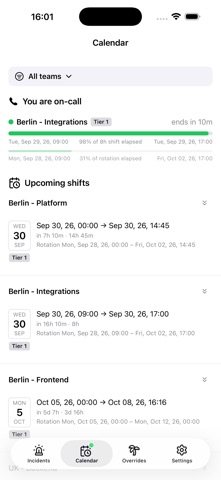
Version 2.0.0 is here! We’ve completely redesigned the app from the ground up to make managing your incidents, shifts, and on-call schedule faster and easier than ever. What’s New in 2.0.0: Complete UI Overhaul: A sleek, brand-new look with a streamlined bottom navigation bar (Incidents, Calendar, Overrides, Settings). You can even check your live on-call status just by glancing at the Calendar tab icon! Real-Time Incidents & Quick Swipe: Incident lists now auto-refresh in real-time. Use new swipe gestures to quickly resolve or archive right from the list, and enjoy a revamped detail screen with a pinned action bar. Repeat Critical Alerts: Never sleep through an emergency again. Enable the new "Repeat Critical Alert Sound" feature to keep the alarm playing continuously until you dismiss it. All-New Calendar View: Replacing the old Availability screen, the new Calendar provides clear, detailed views of your active and upcoming shifts, who is on-call with you, and shift coverage. Full Override Management: Manage your schedule on the go. Create, edit, and delete overrides straight from your Calendar shifts or the brand-new dedicated Overrides tab. In-App Profile Settings: You can now update your profile picture, display name, and time zone directly within the app's Settings. Update now to experience the all-new app!
In-app purchases · US
No in-app purchases.
Screenshots


Keywords this app targets
Search terms AppTracker associates with this app — estimates, not search volume. ❝ = in the app's title; a highlighted number is its current position for that term.
Similar apps
Competitors and close alternatives, as estimated by AppTracker.



About
Incident management, escalation and collaboration app. Collaborate with your team: - Receive push notifications of incidents while you're on-call - Resolve open incidents - Investigate open incidents - Escalate open incidents - Comment on open or closed incidents - Reopen closed incidents - See your on-call shifts and latest on-call hours - Create overrides and redistribute on-call duty with your team
What's new · 2.0.0
Version 2.0.0 is here! We’ve completely redesigned the app from the ground up to make managing your incidents, shifts, and on-call schedule faster and easier than ever. What’s New in 2.0.0: Complete UI Overhaul: A sleek, brand-new look with a streamlined bottom navigation bar (Incidents, Calendar, Overrides, Settings). You can even check your live on-call status just by glancing at the Calendar tab icon! Real-Time Incidents & Quick Swipe: Incident lists now auto-refresh in real-time. Use new swipe gestures to quickly resolve or archive right from the list, and enjoy a revamped detail screen with a pinned action bar. Repeat Critical Alerts: Never sleep through an emergency again. Enable the new "Repeat Critical Alert Sound" feature to keep the alarm playing continuously until you dismiss it. All-New Calendar View: Replacing the old Availability screen, the new Calendar provides clear, detailed views of your active and upcoming shifts, who is on-call with you, and shift coverage. Full Override Management: Manage your schedule on the go. Create, edit, and delete overrides straight from your Calendar shifts or the brand-new dedicated Overrides tab. In-App Profile Settings: You can now update your profile picture, display name, and time zone directly within the app's Settings. Update now to experience the all-new app!
Details