

html+css+js+node+programming
RainbowFactory LTD · Developer Tools
Independent analytics for this App Store listing. AppTracker is not affiliated with RainbowFactory LTD.
Chart standing · US
What changed · US
Listing changes AppTracker has observed for this app in this storefront — new versions, price moves, rating shifts, and store copy.
HTML Designer 26.1 for iPhone and iPad. • No more crash when rotating an iPhone Max between portrait and landscape. • New File is always in view: in the command bar, under the file list, in the empty editor and on the Welcome screen. Without a folder it creates a site in the app’s Documents. • Files shared to the app (HTML, CSS, JS, Markdown, JSON, XML, SVG, text and zip projects) now open in the editor instead of the feedback chat.
Ratings breakdown · US
The star breakdown behind this app's rating in this storefront.
In-app purchases · US
No in-app purchases.
Screenshots



About
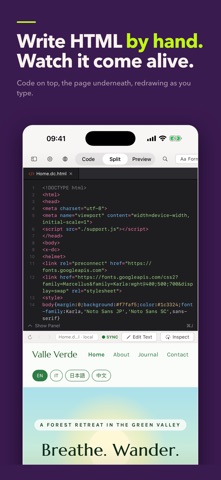
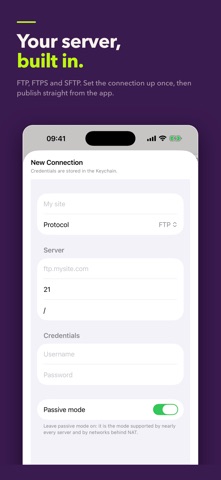
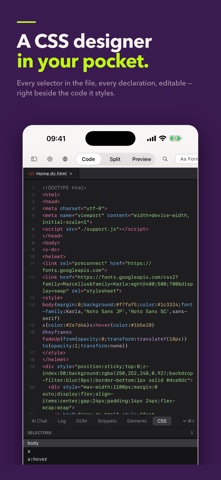
HTML Designer is a complete web workshop for iPhone and iPad: write the code, watch the page render beside it, then publish straight to your own server. WRITE THE CODE • A real code editor, with syntax colouring for HTML, CSS, JavaScript and PHP • Line numbers, re-indent, find and replace, and find across the whole project • Snippets with trigger keys: type a short key, press Tab, get the block • An HTML validator that lists what is wrong and takes you to the line SEE IT AS YOU TYPE • The preview serves your site from a real local web server, so relative links, images, stylesheets and scripts behave exactly as they will online • PHP pages render through that server too, and Markdown files get a properly rendered preview • Code, Split or Preview — panes side by side or stacked, whichever suits the screen • Inspect: tap an element in the preview and land on its tag in the source • Edit Text: retype wording on the rendered page and the source updates with it PUBLISH TO YOUR SERVER • FTP, FTPS and SFTP built in — no separate client, no export step • Every file shows its sync state: to upload, to download, in sync, or changed on both sides • Publish sends everything you changed in one go • Check Online tells you whether the live site is really answering AN ASSISTANT THAT WRITES FILES • Ask for a change in plain words; the assistant creates and updates real files in your project folder — HTML, CSS, JavaScript and SVG • Bring your own key: Claude (Anthropic), Gemini (Google), or Apple Intelligence running entirely on-device • Keys are kept in the iOS Keychain and nowhere else THE TOOLBOX • DOM outline of the open document • Elements library: HTML tags, form controls, CSS properties, PHP and Markdown blocks, ready to insert • CSS Designer: every selector in the file, every declaration, editable • Snippets panel BUILT FOR iPad • Files, editor and preview side by side • Two projects open in two windows at the same time • Hardware keyboard shortcuts throughout A sample site ships with the app, so there is a real project to open the first time you launch it. Universal purchase: buy once, and the Mac version is included.
What's new · 26.1
HTML Designer 26.1 for iPhone and iPad. • No more crash when rotating an iPhone Max between portrait and landscape. • New File is always in view: in the command bar, under the file list, in the empty editor and on the Welcome screen. Without a folder it creates a site in the app’s Documents. • Files shared to the app (HTML, CSS, JS, Markdown, JSON, XML, SVG, text and zip projects) now open in the editor instead of the feedback chat.
Details