

Across: Calendar, Your Way
DayMore Corp. · Productivity
Independent analytics for this App Store listing. AppTracker is not affiliated with DayMore Corp.
Chart standing · US
What changed · US
Listing changes AppTracker has observed for this app in this storefront — new versions, price moves, rating shifts, and store copy.
- Tabs as Buttons: switch views with a floating button instead of the tab bar. (Settings > Tab Settings) - Button mode: option to tap the view button to go to today, long-press for the view menu - Fixed an issue where views occasionally didn't scroll to today on launch - Improved the What's New screen - Improved Week and N Days widgets - Minor bug fixes
Price & rating history · US
Reconstructed from the listing changes AppTracker has observed in this storefront. A field is charted once it has changed more than once, and each line starts at the value it moved from.
Average rating · ★ 4.79 now · 6 changes on record
Ratings breakdown · US
The star breakdown behind this app's rating in this storefront.
In-app purchases · US
What this app sells inside itself, grouped by kind and priced for this storefront.
Screenshots




About
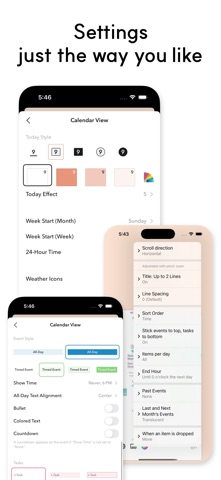
Across is a calendar you can start using right away, then customize as much as you like. With a wide range of views and deep customization, it becomes more your own every day. Across doesn't lock you in. Your events stay safely in Apple and Google, while Across helps you view and manage them the way you want. Our goal is simple: not to keep you locked in, but to be the calendar you'll want to keep using. Across works seamlessly with Apple Calendar, Reminders, and Google Calendar, and stays in sync across iPhone, iPad, and Mac. No ads. Any data we collect is never linked to your identity. What Across offers: * 12+ calendar views * Monthly view with up to two lines per event and adjustable spacing * Weekly and multi-day views with continuous day-by-day scrolling * Deep customization of tabs, views, fonts, colors, and themes * Routine and recurring event management * Event templates, natural language event creation, and more * Anniversary and D-day countdowns * Widgets that show your upcoming events at a glance * Events and tasks managed in one place For those who love to plan, a precise planning tool. For those who don't, a simple way to stay on top of your days. Contact: support@daymore.com Terms of Use (EULA): https://www.apple.com/legal/internet-services/itunes/dev/stdeula/
What's new · 26.10.2
- Tabs as Buttons: switch views with a floating button instead of the tab bar. (Settings > Tab Settings) - Button mode: option to tap the view button to go to today, long-press for the view menu - Fixed an issue where views occasionally didn't scroll to today on launch - Improved the What's New screen - Improved Week and N Days widgets - Minor bug fixes
Details