

Backup Disk
Muharrem Ozkan · Utilities
Independent analytics for this App Store listing. AppTracker is not affiliated with Muharrem Ozkan.
Chart standing · US
What changed · US
Listing changes AppTracker has observed for this app in this storefront — new versions, price moves, rating shifts, and store copy.
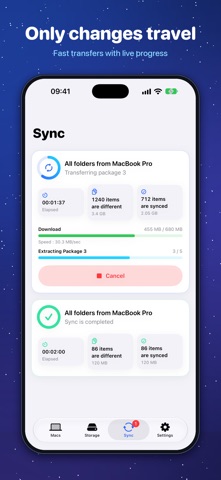
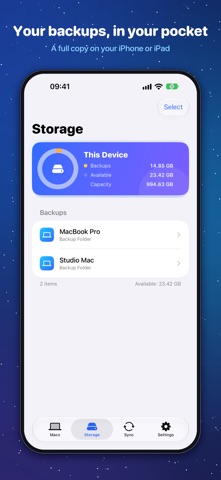
Backup Disk 2.0 is a complete redesign. • All-new design on iPhone, iPad and Mac • Live transfer progress with speed and package details • A clear overview of your device's storage • Drag folders into the Mac app to back them up • Built-in guide to get you started • Purchases are verified on your device • Now available in 10 languages
Screenshots

About
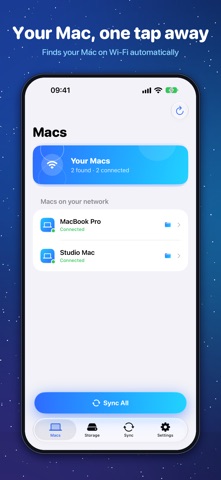
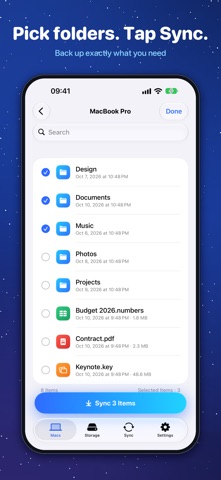
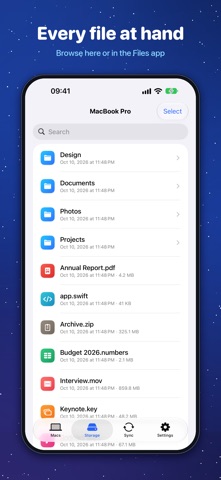
Backup Disk turns your iPhone or iPad into a private backup disk for your Mac. Choose the folders you want to protect on your Mac, open Backup Disk on your iPhone or iPad, and sync them over Wi‑Fi with a single tap. Your files go straight from your Mac to your device — no accounts, no cloud, no tracking. WHY BACKUP DISK • Wireless: your Mac appears automatically on the same Wi‑Fi network, or connect with a cable. • Fast: only changed files are copied, and small files travel in large packages to make the most of your network. • Private: pair with the sync key shown on your Mac. Your files never pass through a server. • Always with you: browse your backups in the app or in the Files app, even offline. • Both ways: download any backed-up folder or file from your iPhone or iPad back to your Mac. • Picks up where it left off: if a sync is interrupted, the next one copies only what's left. HOW IT WORKS 1. Install Backup Disk on your Mac and on your iPhone or iPad. 2. On your Mac, add the folders you want to back up. 3. On your iPhone or iPad, choose your Mac, enter the sync key and tap Sync. BACKUP DISK PRO The free version stores up to 5 GB of backups per device and connects one device at a time. PRO removes the storage limit and lets you connect several iPhones and iPads to your Mac at once. One purchase unlocks PRO on iPhone, iPad and Mac with the same Apple Account. PRO is available as a monthly or yearly subscription, or as a one-time purchase. Payment is charged to your Apple Account at confirmation of purchase. Subscriptions renew automatically unless cancelled at least 24 hours before the end of the current period. You can manage or cancel your subscription in your Apple Account settings. Terms of Use: https://backupdisk.mozkan.com/terms.html Privacy Policy: https://backupdisk.mozkan.com/privacy.html
What's new · 2.0
Backup Disk 2.0 is a complete redesign. • All-new design on iPhone, iPad and Mac • Live transfer progress with speed and package details • A clear overview of your device's storage • Drag folders into the Mac app to back them up • Built-in guide to get you started • Purchases are verified on your device • Now available in 10 languages
Details