

FitBee Calorie & Macro Counter
Cortado Labs, LLC · Health & Fitness
Independent analytics for this App Store listing. AppTracker is not affiliated with Cortado Labs, LLC.
Chart standing · US
What changed · US
Listing changes AppTracker has observed for this app in this storefront — new versions, price moves, rating shifts, and store copy.
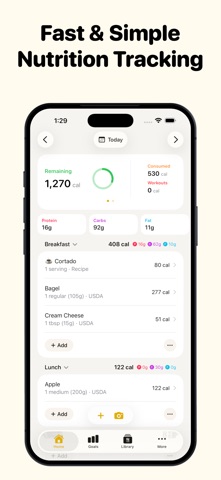
New: Swipe between days on Home, or use the new week picker to move between weeks and quickly select a date. New: Tap a day in goal details to see how it splits across your meals and which foods added the most (Premium). Switch goals from the title, and tap a goal on Home to open it on that day. Improved: Home has a refreshed meal-card layout, with remaining energy visible in the header and better support for larger text sizes. Improved: Meal cards on Home are more compact, making more room for your food. Add and More now sit beside the meal name, and each meal's calories and macros appear right below its name. Improved: Food photos now open in Describe Meal, where you can add more photos and details before getting a nutrition estimate. Improved: Food search shows fewer duplicate results, including foods listed with different serving sizes. Improved: Quick Add keeps food entries separate when food timestamps are enabled. Improved: See scanned foods in a list with a running calorie total, making it easier to scan several items before logging them. Improved: When viewing another day, copy individual foods directly to today’s meals from their swipe or long-press menus. Improved: Swipe through your full goal history in trend charts, and tap a bar to see its value and dates. Improved: Goal details now show your daily average for the selected time period. The week view shows the last 7 days, and the 6-month and year views line up with whole weeks and months. Improved: Top foods on goal details load much faster for longer time periods, and now appear for salt and net carb goals. Improved: The Water widget has a cleaner look in light mode and on tinted Home Screens, and its add button now shows how much water each tap adds. Fixed: Weekly, monthly, and yearly calorie averages on goal details now correctly account for your workouts.
Price & rating history · US
Reconstructed from the listing changes AppTracker has observed in this storefront. A field is charted once it has changed more than once, and each line starts at the value it moved from.
Average rating · ★ 4.78 now · 5 changes on record
Ratings breakdown · US
The star breakdown behind this app's rating in this storefront.
In-app purchases · US
What this app sells inside itself, grouped by kind and priced for this storefront.
Screenshots


About
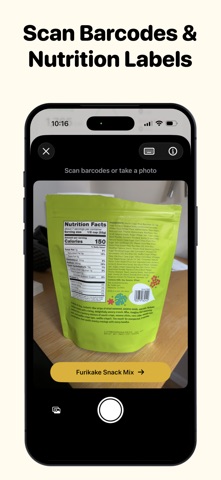
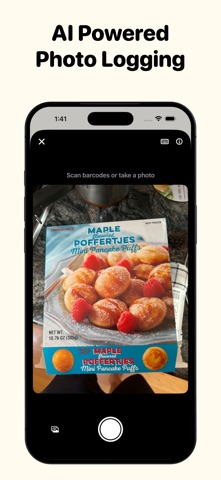
FitBee is the fastest and most accurate way to track your nutrition for free. KEY FEATURES • Large & Accurate food database of over 1 million foods • Ad Free • Free barcode and nutrition label scanning • Snap a photo to log your meal • Create recipes or import them from any website • Syncs with Apple Health • Beautiful Home Screen Widgets • Dark Mode Support • Optimized for iOS 26 ACCURATE FOOD DATABASE • Over 1 million foods with accurate nutrition data • Easily report missing or inaccurate foods AD FREE & PRIVATE • No ads in the product, ever. • Private by default. We do not collect any data for marketing purposes. BARCODE SCANNING • Barcode scanning is always free • Scan nutrition labels to create foods in a snap PHOTO LOGGING • Log your meals by just taking a photo • Uses AI to estimate the calorie and macros of your meal APPLE HEALTH INTEGRATION • Import your workouts from Apple Health • Read/write your nutrition data to Apple Health
What's new · 3.18.3
New: Swipe between days on Home, or use the new week picker to move between weeks and quickly select a date. New: Tap a day in goal details to see how it splits across your meals and which foods added the most (Premium). Switch goals from the title, and tap a goal on Home to open it on that day. Improved: Home has a refreshed meal-card layout, with remaining energy visible in the header and better support for larger text sizes. Improved: Meal cards on Home are more compact, making more room for your food. Add and More now sit beside the meal name, and each meal's calories and macros appear right below its name. Improved: Food photos now open in Describe Meal, where you can add more photos and details before getting a nutrition estimate. Improved: Food search shows fewer duplicate results, including foods listed with different serving sizes. Improved: Quick Add keeps food entries separate when food timestamps are enabled. Improved: See scanned foods in a list with a running calorie total, making it easier to scan several items before logging them. Improved: When viewing another day, copy individual foods directly to today’s meals from their swipe or long-press menus. Improved: Swipe through your full goal history in trend charts, and tap a bar to see its value and dates. Improved: Goal details now show your daily average for the selected time period. The week view shows the last 7 days, and the 6-month and year views line up with whole weeks and months. Improved: Top foods on goal details load much faster for longer time periods, and now appear for salt and net carb goals. Improved: The Water widget has a cleaner look in light mode and on tinted Home Screens, and its add button now shows how much water each tap adds. Fixed: Weekly, monthly, and yearly calorie averages on goal details now correctly account for your workouts.
Details