

SenPlayer - Media Player
Hangzhou Yuesen Vision Technology Co., Ltd. · Entertainment
Independent analytics for this App Store listing. AppTracker is not affiliated with Hangzhou Yuesen Vision Technology Co., Ltd.
Chart standing · US
What changed · US
Listing changes AppTracker has observed for this app in this storefront — new versions, price moves, rating shifts, and store copy.
【Now Supports Native Dolby Vision + Dolby Atmos】 **Added** - Support for hardware deinterlacing - Dolby Atmos support for audio-only files - Vibration feedback for double-tap gestures on the playback screen **Fixed** - Error when connecting to Trakt - Unstable brightness on certain videos - Inability to drag the progress bar after caching completed for certain videos - Inability to select certain audio tracks - Possible crash when playing SMB or ISO files **Optimized** - Mono audio playback experience - VP9 video compatibility - Compatibility with certain WebDAV servers - Updated FFmpeg decoder
Price & rating history · US
Reconstructed from the listing changes AppTracker has observed in this storefront. A field is charted once it has changed more than once, and each line starts at the value it moved from.
Average rating · ★ 4.69 now · 5 changes on record
Ratings breakdown · US
The star breakdown behind this app's rating in this storefront.
In-app purchases · US
What this app sells inside itself, grouped by kind and priced for this storefront.
Screenshots



About
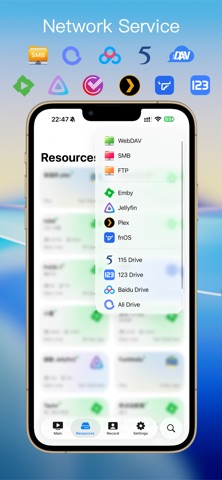
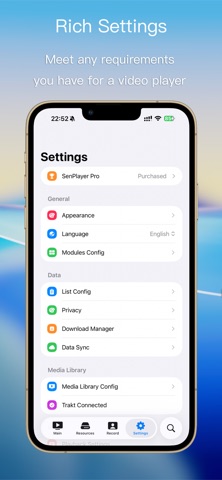
SenPlayer — Your personal media player, wherever you are. Enjoy videos from local storage, cloud drives, NAS, and your favorite media servers on iPhone, iPad, Mac, and Apple TV. From catching up on a series while traveling to movie night at home, make every title in your collection a pleasure to watch. • Your Media, Connected Connect to Emby, Jellyfin, Plex, and fnOS, or access your computer and NAS via SMB, WebDAV, and FTP. Stream from 115, 123 Cloud Drive, Aliyun Drive, and Baidu Netdisk, bringing your media sources together in one place. • Stunning Picture, Immersive Sound Enjoy popular formats including MKV, MP4, and MOV, with support for 4K, 8K, 120fps, hdr high resolution and high-frame-rate video.While Atmos and spatial audio deliver immersive sound with compatible media and devices. • Explore Your Blu-ray Collection Play Blu-ray ISO files, browse disc playlists, and navigate chapters. Switch between the main feature, bonus material, and other included content without extracting or converting files beforehand. • Enhance Your Viewing Experience On supported devices, use AI upscaling to improve clarity, frame interpolation for smoother motion, or SDR-to-HDR conversion to expand brightness range. Choose the ßenhancements that suit your videos and viewing preferences. • Your Collection, Beautifully Organized Browse posters, synopses, ratings, and cast details in your media libraries. Search across servers to find what you want, and bookmark favorite videos and folders for easy access. Keep everyday favorites close at hand as your collection grows. • Subtitles and Danmaku, Your Way Use embedded subtitles, load external files, or search for subtitles online. Display two subtitle tracks at once for movies or language learning. Adjust fonts, size, color, position, and timing during playback, with support for Simplified and Traditional Chinese subtitle conversion. Import danmaku files or connect custom sources, then personalize the style, speed, and display area of on-screen comments. • Flexible Playback, Everyday Convenience Adjust playback speed, switch audio tracks, navigate chapters, and skip intros and credits. Preview the timeline to find a scene, use Picture in Picture while multitasking, or casting and external display support bring your viewing experience to a bigger screen. • Pick Up Across Devices Sync server configurations, favorites, and playback history through iCloud. Add a media source on your iPhone and browse it on your iPad, Mac, or Apple TV. Continue Watching takes you back to where you left off, so it’s easy to move from one screen to another.
What's new · 6.2.3
【Now Supports Native Dolby Vision + Dolby Atmos】 **Added** - Support for hardware deinterlacing - Dolby Atmos support for audio-only files - Vibration feedback for double-tap gestures on the playback screen **Fixed** - Error when connecting to Trakt - Unstable brightness on certain videos - Inability to drag the progress bar after caching completed for certain videos - Inability to select certain audio tracks - Possible crash when playing SMB or ISO files **Optimized** - Mono audio playback experience - VP9 video compatibility - Compatibility with certain WebDAV servers - Updated FFmpeg decoder
Details