

Elf Studio
North Pole Command Centre Limited · Entertainment
Independent analytics for this App Store listing. AppTracker is not affiliated with North Pole Command Centre Limited.
Chart standing · US
What changed · US
Listing changes AppTracker has observed for this app in this storefront — new versions, price moves, rating shifts, and store copy.
Elf Studio 4.0.4 makes it easier to bring your own elf to life, with these improvements and everything introduced since 4.0. Recently Added - Add Christmas and elf-arrival countdowns to your Lock Screen. Your elf's name stays hidden while your iPhone is locked. - Enhance with AI adds Plush, Vinyl Doll, Wooden and Knitted styles for Workshop elves, alongside Classic Toy and Felt. Easier Elf Photos - Save up to four photos of your elf with on-device background removal, without sending them to AI just to create the elf. - Refine a cutout with Keep, Remove and Undo on supported iOS versions. Check transparent areas against checkerboard, light or dark previews. - Choose a photo and adjust its headshot thumbnail. The portrait preview includes the name overlay, so you can see the framing before saving. - Use your approved cutouts for AI photos and videos, or choose an optional AI character sheet for reusable reference views. Keep your original cutouts and switch between saved photos and generated views. Clearer Choices, Smoother Creation - Clearer AI-sharing permission. - Simple centered confirmations for saved scans and AI character sheets, with allowance or cost information before generation. - A refreshed Pro screen, clearer benefits and billing, and improved large-text layouts. Included AI character sheets are separate from AI photos and videos, which use credits. - Better headshot framing, a felt-elf video preview on the Pro card, and fixes to navigation, widgets and Messages stickers. - More reliable generation delivery and recovery after interruptions. Improvements Since 4.0 - A smaller download, with extra props, Workshop parts and previews downloaded when needed. - Welcome videos play from the app without streaming. Faster photo results and reduced background battery and data use. - Simpler Animate a Photo setup, clearer drawing-check information, better prop previews and clearer Pro elf locks. - Accessibility, performance and stability fixes throughout. Explore the 4.0 Studio - Create AI photos and videos with your own elf, a drawing, a description or the ready-made classic and felt cast. - Use Quick Create for a quick scene, or arrange elves, poses and props in Studio. Create photo takes, compare them and animate your favorite, with up to three elves in a scene. - Customize a 3D elf in the Workshop, save different AI-enhanced looks, and scan or describe your own props. - Create stickers and poses, send your elves in Messages, and add countdown widgets for Christmas or your elf's arrival. - Make scanned elves and props AR-ready with a generated 3D model. On compatible devices, place them in your room, draw walking routes, add stops and animations, adjust lighting and record AR photos and videos. - Record reactions as your videos play. Add video looks and filters, organize creations in the Gallery, save to Photos and share. Feature access varies by plan; some features require Pro or Elf Extras. Your library and reaction recordings stay on your device. Elf Studio does not provide cloud library backup, so export memories you want to keep. Santa is no longer a placeable AR character.
Ratings breakdown · US
The star breakdown behind this app's rating in this storefront.
In-app purchases · US
What this app sells inside itself, grouped by kind and priced for this storefront.
Screenshots



About
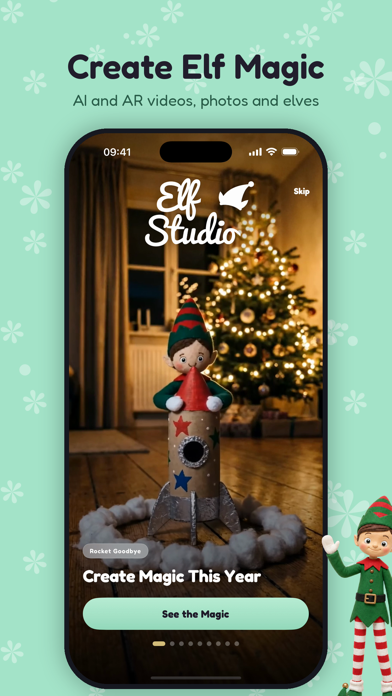
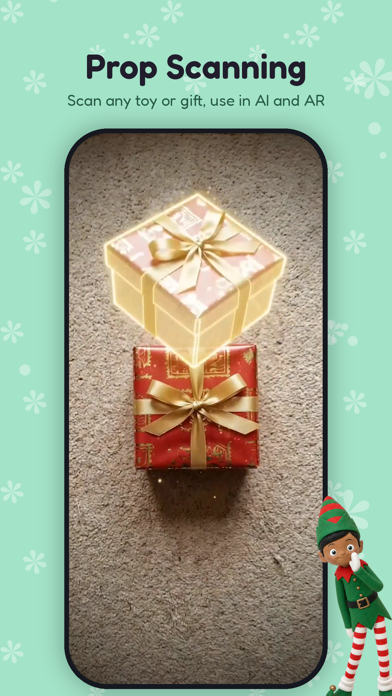
Welcome to Elf Studio®! The latest marvel from the Software Elves here at the North Pole Command Center (Creators of Speak to Santa)! Turn your elf's Christmas mischief into photos and videos set in your own home! Put them under the tree, send them towards the cookie jar, or dream up a surprise of your own. - SCAN YOUR OWN ELF! Start with one photo of your elf toy, with room for up to four views. Every account includes one elf scan. Elf Studio Pro includes ten a month, with no additional credit charge. - NO TOY? DRAW OR DESCRIBE ONE! Sketch your elf on the drawing pad or describe it in words, and the AI turns it into an elf you can cast in any scene. - QUICK CREATE OR STUDIO! Pick an elf and a photo, then describe the action, or stage your photo by dragging elves and props into place, choosing poses and adjusting sizes. - GET HELP WITH THE WORDS! Studio builds a scene script from your layout. Get Ideas suggests actions for your photo, and Improve helps rewrite your prompt. - AI PHOTOS & VIDEOS! Make photo takes, compare them and animate your favorite. Cast up to three elves with their own roles in the scene. - DIRECT THE SHOT! Create five-second AI videos with Natural, Stop Motion or Storybook styling, camera movement, portrait or landscape framing and optional generated sound. Use start and end images to guide the action. - MAKE AN EXAMPLE YOUR OWN! Browse scene ideas and use an example recipe with your chosen elf and your own photo. - THE ELF WORKSHOP! Choose ready-made elves in classic and felt styles, or design one in 3D with hair, hats, outfits, gloves, shoes, glasses and colors, with a live preview. - ENHANCE WITH AI! Give your elf a lifelike look and keep different looks to choose from. - BRING THE PROPS! Pick from the prop shelf, scan a toy or describe a prop for the AI to create reference pictures. - STICKERS & POSES! Make AI stickers of your elf striking new poses, then use those poses in your Studio photos. Add a bust sticker of any custom elf, made right on your device. - SEND THEM IN MESSAGES! Open Elf Studio® in the Messages app drawer to send the cast, your own elves and the stickers you have made. - HOME SCREEN WIDGETS! Count the sleeps until Christmas or until your elf arrives, with a posed elf of your choice keeping watch. - MAKE THEM AR-READY! Generate a 3D model of a scanned elf or prop before placing it in your room. - FILM IN AUGMENTED REALITY! Place AR-ready elves and props on your floor, draw walking routes, add stops and choose animations. Capture AR photos and videos, with Look at Camera, footsteps, lighting and actions you can trigger while filming. AR needs a compatible device. - CATCH THEIR FACES! Record the viewer's reaction as your video plays. Reaction recordings stay on your device and are not uploaded to Elf Studio®. - ADD THE FINISHING TOUCH! Apply eight video looks and filters without changing the original. Find your creations in the Gallery, save them to Photos and share the files. AI generation needs an internet connection. Once a job is sent, it can continue on our servers while you leave the app. Enable notifications to hear when it is ready. Your Gallery is stored on this device. Elf Studio® does not provide cloud library backup, so export the memories you want to keep. AI or AR. Photo or video. Your elf, your home, your Christmas story! Elf Studio® is created by North Pole Command Centre Limited and works with any toy. Elf Studio® is not affiliated with, sponsored by, or endorsed by Elf on the Shelf®, but many families use Elf Studio® alongside their existing Elf on the Shelf traditions. Made by the software elves here at the North Pole Command Center! Elf Studio® is a registered trademark in the United Kingdom, the European Union and the United States. All rights reserved.
What's new · 4.0.4
Elf Studio 4.0.4 makes it easier to bring your own elf to life, with these improvements and everything introduced since 4.0. Recently Added - Add Christmas and elf-arrival countdowns to your Lock Screen. Your elf's name stays hidden while your iPhone is locked. - Enhance with AI adds Plush, Vinyl Doll, Wooden and Knitted styles for Workshop elves, alongside Classic Toy and Felt. Easier Elf Photos - Save up to four photos of your elf with on-device background removal, without sending them to AI just to create the elf. - Refine a cutout with Keep, Remove and Undo on supported iOS versions. Check transparent areas against checkerboard, light or dark previews. - Choose a photo and adjust its headshot thumbnail. The portrait preview includes the name overlay, so you can see the framing before saving. - Use your approved cutouts for AI photos and videos, or choose an optional AI character sheet for reusable reference views. Keep your original cutouts and switch between saved photos and generated views. Clearer Choices, Smoother Creation - Clearer AI-sharing permission. - Simple centered confirmations for saved scans and AI character sheets, with allowance or cost information before generation. - A refreshed Pro screen, clearer benefits and billing, and improved large-text layouts. Included AI character sheets are separate from AI photos and videos, which use credits. - Better headshot framing, a felt-elf video preview on the Pro card, and fixes to navigation, widgets and Messages stickers. - More reliable generation delivery and recovery after interruptions. Improvements Since 4.0 - A smaller download, with extra props, Workshop parts and previews downloaded when needed. - Welcome videos play from the app without streaming. Faster photo results and reduced background battery and data use. - Simpler Animate a Photo setup, clearer drawing-check information, better prop previews and clearer Pro elf locks. - Accessibility, performance and stability fixes throughout. Explore the 4.0 Studio - Create AI photos and videos with your own elf, a drawing, a description or the ready-made classic and felt cast. - Use Quick Create for a quick scene, or arrange elves, poses and props in Studio. Create photo takes, compare them and animate your favorite, with up to three elves in a scene. - Customize a 3D elf in the Workshop, save different AI-enhanced looks, and scan or describe your own props. - Create stickers and poses, send your elves in Messages, and add countdown widgets for Christmas or your elf's arrival. - Make scanned elves and props AR-ready with a generated 3D model. On compatible devices, place them in your room, draw walking routes, add stops and animations, adjust lighting and record AR photos and videos. - Record reactions as your videos play. Add video looks and filters, organize creations in the Gallery, save to Photos and share. Feature access varies by plan; some features require Pro or Elf Extras. Your library and reaction recordings stay on your device. Elf Studio does not provide cloud library backup, so export memories you want to keep. Santa is no longer a placeable AR character.
Details