

Just My Timer
Pavel Gagarin · Health & Fitness
Independent analytics for this App Store listing. AppTracker is not affiliated with Pavel Gagarin.
Chart standing · US
What changed · US
Listing changes AppTracker has observed for this app in this storefront — new versions, price moves, rating shifts, and store copy.
Every signal is now yours to switch off. • New "Signals" screen on Apple Watch — swipe left past the Interval timer. The 10-second pace marks, the final countdown and the end-of-phase signal each have their own switch, set separately for the Basic and Interval timers. • Prefer a quiet workout? Turn off the 10-second marks and only the final countdown remains. Turn those off too, and you get a single signal at the end of each interval — nothing before it. • Stability improvements. Thank you for your feedback — it makes the app better.
Ratings breakdown · US
The star breakdown behind this app's rating in this storefront.
Screenshots



About
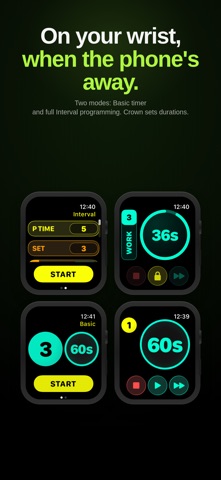
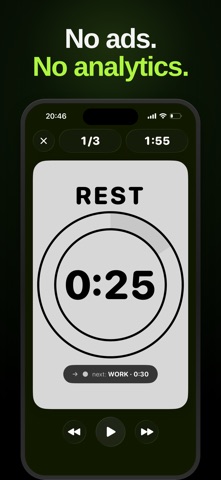
An interval timer that does one thing well and doesn't drift, doesn't track, doesn't ask you to subscribe to keep using it. Build any sequence of work, rest, and prepare steps. Press start. Beeps land exactly when they're supposed to — even on the lock screen, even with music playing. We made it because we got tired of timers that lost the count mid-set. Free. No ads. No subscriptions. No analytics SDK in your pocket. WHAT'S INSIDE Build the train you'll actually run Three step types (work, rest, prepare). Any duration, any order. Tabata, EMOM, boxing rounds, CrossFit WODs, mobility, breathwork — the same three pieces, your sequence. Your last train auto-loads when you open the app. Your own beeps, on every phase Sixteen built-in sounds, plus custom cues per phase. Two kinds of cues: single (once, X seconds before the end) or recurring (every X seconds). Recurring cues are unrolled into an exact schedule before the timer even starts. The trains you actually did Every finished train is auto-saved with a colored timeline showing every work and rest segment exactly as you ran them. Three numbers at the finish — sets, time, work time. Tap any past train to re-load and re-run it in two taps. On your wrist, when the phone's away The Apple Watch companion app runs trains from your wrist with two modes — Basic, for a single round, and Interval, for the full work / rest / prepare sequence. The digital crown sets durations. Tap the lock to keep a sweaty palm from pausing mid-set. And you don't have to watch the screen. A haptic tap on your wrist tells you when the current step is ending and the next is starting. PRIVACY, FOR REAL Everything — your sequences, your history, your custom sounds — lives on your device. There is no server, no account, no sign-up. The app ships with zero analytics SDKs, zero crash reporters, zero advertising identifiers. We do not share data with anyone, because we do not collect it in the first place. PERFECT FOR · HIIT, Tabata, EMOM · Boxing rounds, MMA, kickboxing · CrossFit, AMRAP, time-capped WODs · Mobility, stretching, yoga flows · Breathwork (Wim Hof, box breathing, 4-7-8) · Lap timing, climbing intervals · Anyone who counts seconds for a living WHO MADE THIS Two people, with coffee and a barbell. We use the app every Tuesday, Thursday, and Saturday. If we find a bug, we fix it the same week — not in next quarter's roadmap. If you have a feature in mind, write to us. One of us will read it. — Just Two hi@justtwo.co
What's new · 4.2
Every signal is now yours to switch off. • New "Signals" screen on Apple Watch — swipe left past the Interval timer. The 10-second pace marks, the final countdown and the end-of-phase signal each have their own switch, set separately for the Basic and Interval timers. • Prefer a quiet workout? Turn off the 10-second marks and only the final countdown remains. Turn those off too, and you get a single signal at the end of each interval — nothing before it. • Stability improvements. Thank you for your feedback — it makes the app better.
Details