

ACalcM
ACCESS, K.K. · Utilities
Independent analytics for this App Store listing. AppTracker is not affiliated with ACCESS, K.K.
Chart standing · US
What changed · US
Listing changes AppTracker has observed for this app in this storefront — new versions, price moves, rating shifts, and store copy.
• Preset G: the row menu (tap the selected row again) now has “Split”. It splits a row’s amount into equal rows (2 to 4 rows; an item with a quantity such as “×2” can also be split into one row each). The total stays the same. When several people share a receipt, check only your own rows and the checked subtotal shows your share. • Preset G: new setting “Long-press a row to insert a line”. When it’s on, long-pressing a row inserts an empty line there (off by default). • Simple 9: the operator keys, AC, +/− and % now have the same thin outline as the original A-Calc9. The background when you first use Simple 9 is now black.
Ratings breakdown · US
The star breakdown behind this app's rating in this storefront.
Screenshots


About
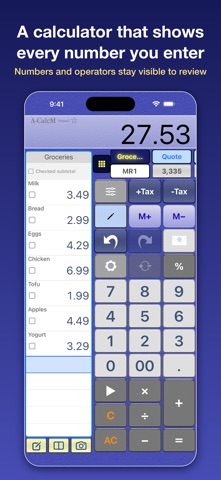
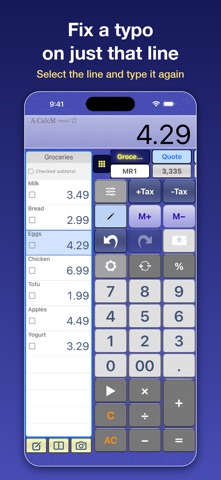
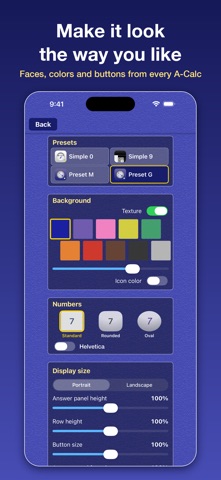
A-CalcM is a calculator that keeps your values and operators in "calculation lists", so you can check every number as you go and fix just one part later. ■ Features • Calculation lists: calculations are recorded in lists (columns) with a running total. Switch between lists with tabs • 4 presets: Simple 0 / Simple 9 / Preset M (classic A-CalcM) / Preset G (everything included) • Compare lists: show two lists side by side (iPhone, portrait) • Subtotal of checked rows, and copy or move checked rows to another list • Text notes: add item names or purposes to cells • Memory (M+ / M− / MR / MC) kept per list • +Tax / −Tax for tax-included and tax-excluded amounts (set the rate in Settings) • Choose rounding and decimal places • Share & export as an image or text. Text is tab-separated, so it pastes straight into spreadsheet apps • Back up by saving to and importing from a file • Customize button layout and size, and font sizes ■ Reading receipts (Preset G) If you already use an AI app, pass it a photo of a receipt, paste its answer, and the rows go into a list. Before importing, you can check that the rows add up to the printed total. • The photo goes directly to the AI app you pick in the share sheet. A-Soft does not receive it • Accuracy depends on the AI model you use. AI is not perfect, so always compare the rows with the receipt before importing ■ Pro (one-time in-app purchase) Available in Settings. • Hides the ad banner area • Up to 31 lists (3 without Pro) • List lock, which protects a list from AC and MC (Preset G) If you bought "Remove ads" before, it works as Pro. Terms of Use: https://www.a-soft.info/en/terms/ Privacy Policy: https://www.a-soft.info/en/policy/
What's new · 10.0.7
• Preset G: the row menu (tap the selected row again) now has “Split”. It splits a row’s amount into equal rows (2 to 4 rows; an item with a quantity such as “×2” can also be split into one row each). The total stays the same. When several people share a receipt, check only your own rows and the checked subtotal shows your share. • Preset G: new setting “Long-press a row to insert a line”. When it’s on, long-pressing a row inserts an empty line there (off by default). • Simple 9: the operator keys, AC, +/− and % now have the same thin outline as the original A-Calc9. The background when you first use Simple 9 is now black.
Details