

Lirum Device Info 2
Lirum Labs Technologies Inc. · Utilities
Independent analytics for this App Store listing. AppTracker is not affiliated with Lirum Labs Technologies Inc.
Chart standing · US
What changed · US
Listing changes AppTracker has observed for this app in this storefront — new versions, price moves, rating shifts, and store copy.
This update adds three brand-new tools and major upgrades to Storage and Local AI. - Display Tool: measure every display your device knows about — diagonal, resolution, pixel density, refresh rate, color gamut, and connection details, with an immersive globe on Vision Pro. - FPS Tool: measure confirmed on-screen frame rates and compare motion at four target rates side by side. - Video Tool: record camera clips or inspect videos from your library with detailed playback, track, and metadata information. - External drives in the Storage Tool: USB sticks, SD cards, and network volumes are detected automatically — grant access and browse them alongside your internal storage, with format and read-only details. - Local AI models: a unified model library powered by the official LiteRT-LM runtime, with an improved model picker and per-model generation settings. - Magnetometer: redesigned with clearer calibration and readings.
Price & rating history · US
Reconstructed from the listing changes AppTracker has observed in this storefront. A field is charted once it has changed more than once, and each line starts at the value it moved from.
Average rating · ★ 4.00 now · 4 changes on record
Ratings breakdown · US
The star breakdown behind this app's rating in this storefront.
Screenshots






About
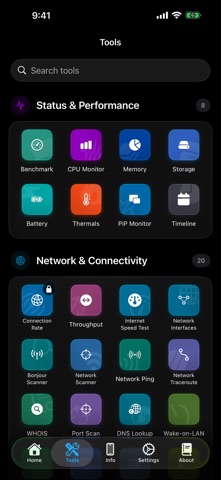
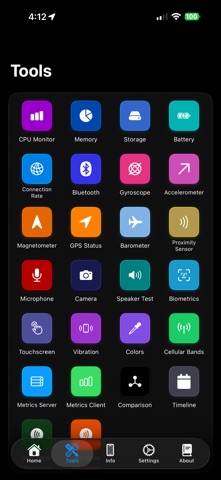
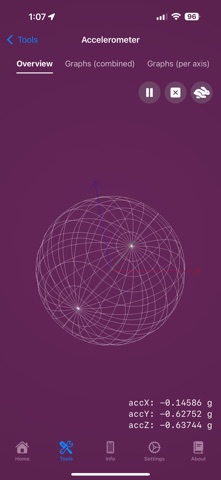
Meet Lirum Info, the ultimate system monitoring and hardware toolkit for your iPhone, iPad, Mac, and Vision Pro. Built for developers, IT professionals, and power users, it’s also friendly for anyone who wants to know their device inside and out. Monitor performance in real time, get detailed hardware insights, and run practical tests – all in one elegant app with more than 55 tools. Feature list: Status & Performance - Benchmark Tool - CPU and Memory Tools with real-time graphs - Storage Tool: usage graphs, per-partition details, and automatic detection of external USB/SD/network drives - Battery Tool - Thermals Tool with thermal pressure alerts - Timeline Tool: interactive history of device generations - PiP Monitor: system metrics in picture-in-picture Network & Connectivity - Internet Speed Test with history - Connection Rate and Throughput monitoring - Network Interface and Cellular Band details - Network Scanner, Bonjour browser, and Port Scan for LAN discovery - Ping, Traceroute, DNS Lookup, and WHOIS - Routing Table, IP Calculator, Wake-on-LAN, UPnP/DLNA discovery, TLS inspection - Bluetooth Tool: automatic BLE device discovery with signal strength - Metrics Client/Server: stream realtime metrics between devices Sensors & Motion - Accelerometer, Gyroscope, and Magnetometer - GPS/Location, Barometer, and Proximity Sensor - Biometrics Tool (Face ID, Touch ID, Optic ID) Media & I/O - Camera Tool - Video Tool: record or inspect clips with playback, track, and metadata details - Microphone Tool: real-time input with waveform and amplitude views - Speaker Tool: audio output and volume level testing - NFC Read/Write Tools: tag scanning, NDEF parsing, and a saved tags library - Vibration (haptics) and Flashlight testing Display & Interaction - Display Tool: diagonal, resolution, pixel density, refresh rate, color gamut, and connection details for every display, with an immersive globe on Vision Pro - FPS Tool: confirmed frame-rate measurement and motion comparison at four target rates - Display Patterns Tool: screen test, dead pixel, and color calibration patterns - Colors Tool - Touchscreen Tool - AR (Augmented Reality) Tool Utilities & Testing - AI Assistant: ask about specs, performance, or how to fix problems – grounded in live system information and running fully on-device - Local AI Model Tool: run LLMs completely offline with the official LiteRT-LM runtime, custom GGUF models, a unified model library, and memory/CPU/performance measurement - Comparison Tool: side-by-side specs against any iPhone, iPad, Mac, or Vision Pro - Device Grid Tool: the complete Apple hardware catalog in a searchable, sortable spreadsheet grid, including every Mac - Manual Test Wizard and a combined device Report Device information fields: General, Hardware Specs, Display, Camera, Network, and Location. Also included: - Home screen widgets in multiple sizes with intelligent refresh scheduling - Apple Watch companion app: shared metrics, streaming iPhone telemetry, and on-watch sensor mode - visionOS: spatial computing, immersive space support, 3D object interaction, and hand tracking – add any usdz model from Files to your 3D space
What's new · 5.3.3
This update adds three brand-new tools and major upgrades to Storage and Local AI. - Display Tool: measure every display your device knows about — diagonal, resolution, pixel density, refresh rate, color gamut, and connection details, with an immersive globe on Vision Pro. - FPS Tool: measure confirmed on-screen frame rates and compare motion at four target rates side by side. - Video Tool: record camera clips or inspect videos from your library with detailed playback, track, and metadata information. - External drives in the Storage Tool: USB sticks, SD cards, and network volumes are detected automatically — grant access and browse them alongside your internal storage, with format and read-only details. - Local AI models: a unified model library powered by the official LiteRT-LM runtime, with an improved model picker and per-model generation settings. - Magnetometer: redesigned with clearer calibration and readings.
Details