

Ear Assist
Overpass Limited · Lifestyle
Independent analytics for this App Store listing. AppTracker is not affiliated with Overpass Limited.
Chart standing · US
What changed · US
Listing changes AppTracker has observed for this app in this storefront — new versions, price moves, rating shifts, and store copy.
This update fixes several things that were not working, and adds more control over how you listen. FIXED • Recording works again. Recordings were not being saved in versions released since mid-2025. They now save correctly, as M4A files. • The volume slider now changes the volume. Before, it moved the level meter but not the sound. • The equaliser keeps working after you stop and start listening, the 14 kHz band now has its own slider, and loading a saved configuration now changes the sound. • Bluetooth headphones no longer drop to phone-call sound quality when the app starts. NEW • Boost: add +6, +12 or +18 dB when listening through headphones. It is switched off on the loudspeaker, where it would cause feedback, and limited on the earpiece. • Speech mode: uses Apple's voice processing to reduce background noise and echo. Natural mode stays the default, for music, birdsong and ambience. • On iOS 26, choose your microphone from the system input menu. REMOVED • The AEC, AGC, NS and VR buttons. They did not change the sound. Speech mode now does what they described. A NOTE ON DELAY Live listening through headphones always has a short delay. It is shortest with wired headphones; Bluetooth adds more. Thank you for sticking with Ear Assist.
Price & rating history · US
Reconstructed from the listing changes AppTracker has observed in this storefront. A field is charted once it has changed more than once, and each line starts at the value it moved from.
Average rating · ★ 4.17 now · 7 changes on record
Ratings breakdown · US
The star breakdown behind this app's rating in this storefront.
In-app purchases · US
What this app sells inside itself, grouped by kind and priced for this storefront.
Screenshots


About
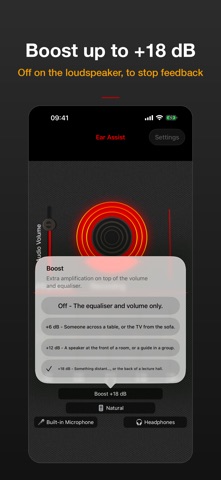
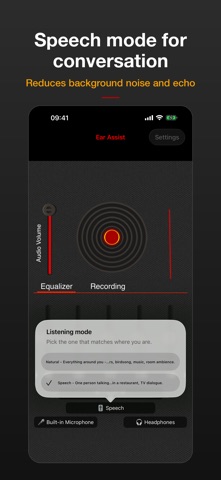
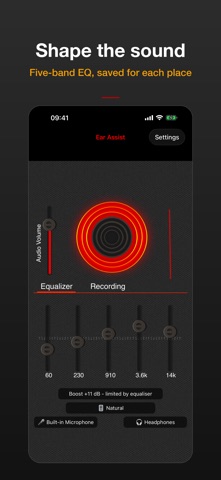
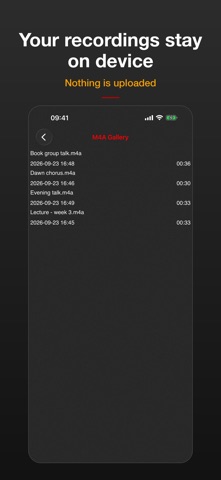
Ear Assist turns your iPhone or iPad and a pair of headphones into a sound amplifier. It picks up sound through the microphone and plays it louder in your ears, so you can follow the lecture from the back row, keep the TV at a volume that suits you, or catch the conversation at a busy table. LOUDER WHEN YOU NEED IT • Volume control plus Boost: add +6, +12 or +18 dB with headphones • Boost is switched off on the loudspeaker, where it would cause a feedback howl, and limited on the earpiece • The Boost button always shows the gain that is actually applied TWO WAYS TO LISTEN • Natural: the sound as the microphone picks it up. Best for music, birdsong and the atmosphere of a room • Speech: uses Apple's voice processing to reduce background noise and echo. Best for conversation, meetings, lectures and TV SHAPE THE SOUND • Five-band equaliser from 60 Hz to 14 kHz • Lift the upper bands to bring voices forward, or cut low rumble • Save settings for different places and load them again later YOUR HEADPHONES, YOUR MICROPHONE • Works with wired headphones, AirPods and other Bluetooth headphones • With Bluetooth headphones, Ear Assist uses your iPhone's microphone and keeps full stereo sound, unless you choose the headset microphone • On iOS 26, choose your microphone from the system input menu. Your choice is remembered RECORD LECTURES AND TALKS • Record what you are listening to, saved on your device as M4A files • Recording starts only when you tap Record, and stops when you tap Stop • Please ask permission before recording other people ABOUT DELAY Listening live through headphones always involves a short delay between the microphone and your ears. It is shortest with wired headphones. Bluetooth headphones add more, and if you can also hear the sound directly you may notice a slight echo. Where delay matters, use wired headphones. GOOD FOR • Lectures, talks and the back of a hall • Meetings and busy restaurants • TV at your own volume without disturbing others • Theatre, places of worship and events from far seats • Birdwatching and nature recording PRIVACY Audio is processed on your device. Ear Assist does not upload what it picks up or what you record. The free version shows ads, and the app uses analytics and crash reporting; the App Privacy section on this page lists what those services collect. PURCHASES Ear Assist is free with ads. Optional in-app purchases unlock recording and remove ads. IMPORTANT Ear Assist is an entertainment and convenience utility for listening through headphones. It is not intended to diagnose, treat or cure any condition, and it is no substitute for professional advice or care. If you have any concerns about your ears, speak to a healthcare provider. Headphones recommended; Boost requires them. Microphone access required. Requires iOS 14 or later.
What's new · 2.9.2
This update fixes several things that were not working, and adds more control over how you listen. FIXED • Recording works again. Recordings were not being saved in versions released since mid-2025. They now save correctly, as M4A files. • The volume slider now changes the volume. Before, it moved the level meter but not the sound. • The equaliser keeps working after you stop and start listening, the 14 kHz band now has its own slider, and loading a saved configuration now changes the sound. • Bluetooth headphones no longer drop to phone-call sound quality when the app starts. NEW • Boost: add +6, +12 or +18 dB when listening through headphones. It is switched off on the loudspeaker, where it would cause feedback, and limited on the earpiece. • Speech mode: uses Apple's voice processing to reduce background noise and echo. Natural mode stays the default, for music, birdsong and ambience. • On iOS 26, choose your microphone from the system input menu. REMOVED • The AEC, AGC, NS and VR buttons. They did not change the sound. Speech mode now does what they described. A NOTE ON DELAY Live listening through headphones always has a short delay. It is shortest with wired headphones; Bluetooth adds more. Thank you for sticking with Ear Assist.
Details