

Countdown Star
Joseph Merrill · Entertainment
Independent analytics for this App Store listing. AppTracker is not affiliated with Joseph Merrill.
Chart standing · US
What changed · US
Listing changes AppTracker has observed for this app in this storefront — new versions, price moves, rating shifts, and store copy.
This update is a small one — a couple of fixes, and support for iOS 27. * Tapping to retry iCloud no longer closes the app when an Apple Watch is paired * Your own photos no longer flash a different wallpaper while they load * Countdown Star is now updated for iOS 27 Thank you for using Countdown Star!
Ratings breakdown · US
The star breakdown behind this app's rating in this storefront.
In-app purchases · US
What this app sells inside itself, grouped by kind and priced for this storefront.
Screenshots




Keywords this app targets
Search terms AppTracker associates with this app — estimates, not search volume. ❝ = in the app's title; a highlighted number is its current position for that term.
Similar apps
Competitors and close alternatives, as estimated by AppTracker.
 Countdown
Find Appiness LLC
1 shared topic · 1 shared title word
Countdown
Find Appiness LLC
1 shared topic · 1 shared title word
 Countdown: Event Countdown
ROOT38 LIMITED
1 shared topic · 1 shared title word
Countdown: Event Countdown
ROOT38 LIMITED
1 shared topic · 1 shared title word
 Countdown & Count Up Timer
Yoji Shimobayashi
2 shared topics · 1 shared title word
Countdown & Count Up Timer
Yoji Shimobayashi
2 shared topics · 1 shared title word
 Countdowner: Event Countdown
Fabian Will
Countdowner: Event Countdown
Fabian Will
 Days Anchor - Countdown Events
Zhiqi Pan
1 shared topic · 1 shared title word
Days Anchor - Countdown Events
Zhiqi Pan
1 shared topic · 1 shared title word
 Countdown to Big Events
Thomas Tsopanakis
1 shared title word
Countdown to Big Events
Thomas Tsopanakis
1 shared title word
 Countdown+++
Thomas Tsopanakis
1 shared title word
Countdown+++
Thomas Tsopanakis
1 shared title word
 Countdown Widget: Days Until
APPLAYERS LTD
Countdown Widget: Days Until
APPLAYERS LTD
About
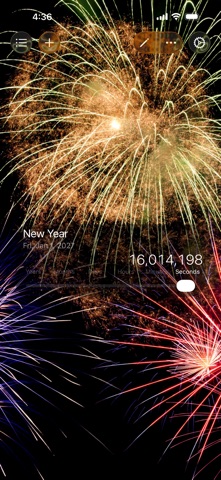
Countdown Star is the best way to countdown to — and count up from — all of your favorite events. Countdown to birthdays, holidays, an upcoming vacation, a wedding, the New Year, parties, sporting events, concerts and more. Count up from anniversaries, the day you were born, and other special events in the past. * How many seconds until your next birthday? * How many months since you were born? * How many days until you graduate from college? * How many hours until your anniversary? * How much time is left until your vacation starts? * How many days until Christmas? * How many minutes until your party begins? * How much time is left until your baby's due date? Countdown Star is the countdown app that lets you choose which events to add, then keeps them in sync across all of your devices. Features: * iCloud Sync — events and wallpapers sync automatically across all your iPhone, iPad, and Apple Watch devices * Celebration Animations — choose Confetti, Fireworks, Balloons, Stars, or Lasers when your countdown reaches zero * Repeating Events — annual events automatically advance to the next year so you never have to update them * Home Screen Widgets — Small, Medium, and Large widgets let you glance at your countdowns without opening the app * Apple Watch — view your events right on your wrist * Add Your Own Events — add as many events as you like * Custom Wallpapers — choose from 15+ built-in wallpapers or use your own photos * Time Zone Support — set each event in any time zone with localized city names * Sort and Search — sort by date, title, or your own custom order; events are sectioned into Countdown and Count Up groups * Favorites and Notifications — mark events as favorites to receive a notification when their countdown reaches zero * Interactive Slider — instantly switch between seconds, minutes, hours, days, weeks, months, or years to see your countdown exactly how you want it * Customizable Timer — choose timer position (Top, Middle, or Bottom), show or hide weeks, and toggle the leading zero * Multiple App Icons — personalize the app icon on your Home Screen Note: Countdown Star is available as a free version (with ads and an optional Remove Ads purchase) and as a paid ad-free version.
What's new · 3.0.10
This update is a small one — a couple of fixes, and support for iOS 27. * Tapping to retry iCloud no longer closes the app when an Apple Watch is paired * Your own photos no longer flash a different wallpaper while they load * Countdown Star is now updated for iOS 27 Thank you for using Countdown Star!
Details