

TaskFire : To-Do List & Tasks
TaskFire, LLC · Productivity
Independent analytics for this App Store listing. AppTracker is not affiliated with TaskFire, LLC.
Chart standing · US
What changed · US
Listing changes AppTracker has observed for this app in this storefront — new versions, price moves, rating shifts, and store copy.
Fixed: a task's Action row showed only the phone option. Contact, location, and link are back, and the icons are the right size on iPad. TaskFire works with the new Siri. Say it once and it's on your list: "Hey Siri, add call the dentist tomorrow at 3pm to my Home list in TaskFire." New in 12.1: location reminders by voice. Say "In TaskFire, remind me to get toilet paper when I get to Costco" and TaskFire reminds you when you get there. Set TaskFire's location access to Always to use it. With Siri you can also: - Add a task with a date, time, list, star, note, or tags - Say several tasks in one sentence - "Hey Siri, add this to TaskFire" from an email, message, or note - Set repeating tasks, make a new list, or delete a task by name - Ask what's on a list, what a task's note says, or what's tagged - Find and open tasks from your iPhone's search The Siri tab shows everything you can say. Requires an iPhone with Apple Intelligence, iOS 27, and the new Siri turned on. On other iPhones, start with "In TaskFire" and Siri works the way it always has. Also in 12.1: - What's New now lives in your notification bell - iPad fixes: every day in the date picker can be picked, the quick menu fits on screen, the checklist Add button shows in full, and search is one tap from the header - Checklist search works on iPhone - The calendar shows today's column again - Siri phrases ready in French, Spanish, Portuguese, Japanese, and Korean for when Apple adds those languages The Apple Watch app is taking a break. We're rebuilding it with Siri AI, and it will be back.
Ratings breakdown · US
The star breakdown behind this app's rating in this storefront.
In-app purchases · US
What this app sells inside itself, grouped by kind and priced for this storefront.
Screenshots




About
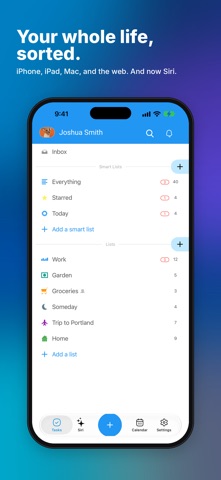
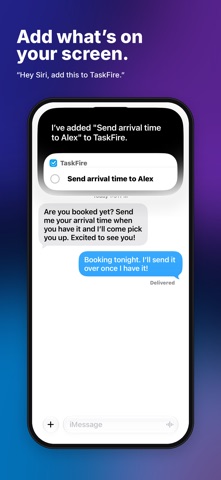
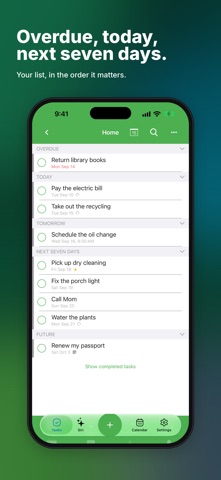
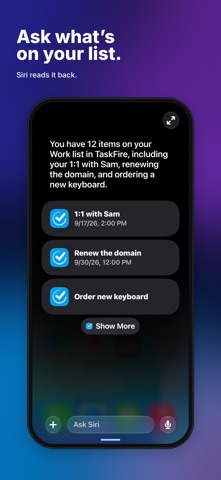
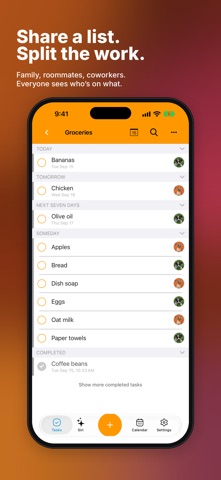
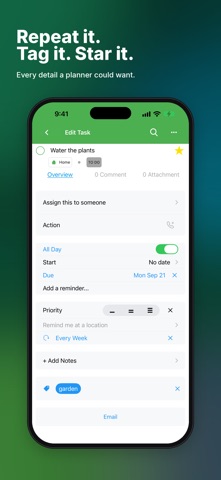
Just say it. TaskFire is the to-do list that works with the new Siri. Say a task with its date and list in one sentence, and it's there. Then open the app and everything is sorted: overdue, today, and the next seven days, shared with the people you share a life with, on your iPhone, iPad, Mac, and the web. SEE WHAT MATTERS Overdue, today, tomorrow, and the next seven days, in the order it matters. Smart lists pull tasks together by due date, star, tag, or person, so the right things are always in front of you. ADD A TASK IN A TAP Type it, pick a date and a list, star it, tag it, done. Add notes, checklists, and attachments when a task needs more. NOW WITH SIRI TaskFire works with the new Siri. Say "Hey Siri, in TaskFire add call the dentist tomorrow at 3pm" and it's on your list with the date and time. Say several tasks in one sentence. Looking at an email, message, or note? "Hey Siri, add this to TaskFire." Ask Siri what's on a list and it reads it back. Ask Siri to remind you when you get somewhere, like "remind me to get toilet paper when I get to Costco." SHARE A LIST Invite family, roommates, or coworkers to a list. Assign tasks so everyone sees who's on what. TASKS AND CALENDAR TOGETHER See your tasks and your week on one screen. Connect Google Calendar for two-way sync. EVERY DETAIL A PLANNER COULD WANT - Repeating tasks, based on the due date or the day you finish - Multiple reminders per task - Location reminders that alert you when you arrive - Start and due dates and times - Notes, comments, and checklists - Email tasks straight into your TaskFire inbox - Dark mode ALWAYS IN SYNC One account on iPhone, iPad, Mac, and the web. Your tasks are backed up to our secure cloud and follow you everywhere. TaskFire is free to use. Try Premium free for 14 days, then keep the basic app free or subscribe monthly or yearly. Siri features require an iPhone with Apple Intelligence running iOS 27 with the new Siri turned on. Terms of Use: https://www.apple.com/legal/internet-services/itunes/dev/stdeula/
What's new · 12.1.1
Fixed: a task's Action row showed only the phone option. Contact, location, and link are back, and the icons are the right size on iPad. TaskFire works with the new Siri. Say it once and it's on your list: "Hey Siri, add call the dentist tomorrow at 3pm to my Home list in TaskFire." New in 12.1: location reminders by voice. Say "In TaskFire, remind me to get toilet paper when I get to Costco" and TaskFire reminds you when you get there. Set TaskFire's location access to Always to use it. With Siri you can also: - Add a task with a date, time, list, star, note, or tags - Say several tasks in one sentence - "Hey Siri, add this to TaskFire" from an email, message, or note - Set repeating tasks, make a new list, or delete a task by name - Ask what's on a list, what a task's note says, or what's tagged - Find and open tasks from your iPhone's search The Siri tab shows everything you can say. Requires an iPhone with Apple Intelligence, iOS 27, and the new Siri turned on. On other iPhones, start with "In TaskFire" and Siri works the way it always has. Also in 12.1: - What's New now lives in your notification bell - iPad fixes: every day in the date picker can be picked, the quick menu fits on screen, the checklist Add button shows in full, and search is one tap from the header - Checklist search works on iPhone - The calendar shows today's column again - Siri phrases ready in French, Spanish, Portuguese, Japanese, and Korean for when Apple adds those languages The Apple Watch app is taking a break. We're rebuilding it with Siri AI, and it will be back.
Details