

CrowFlies
Tony Davis · Lifestyle
Independent analytics for this App Store listing. AppTracker is not affiliated with Tony Davis.
Chart standing · US
What changed · US
Listing changes AppTracker has observed for this app in this storefront — new versions, price moves, rating shifts, and store copy.
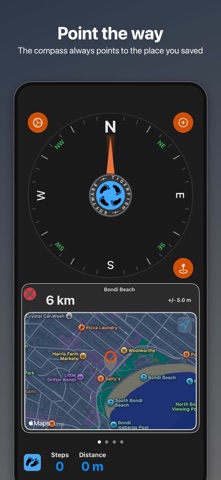
CrowFlies 6.0 has a new compass face and is built for iPhone Duo and iPad. • A quieter compass: a dark dial, a slim needle, and a soft wedge showing how sure the heading is. • Open your iPhone Duo and the map sits beside the compass. Half open, the map takes the top half. Folded, the controls run down the side of the outer display. • iPad gets the same side-by-side layout. • Flick through your waypoints and the map highlights each one. Tap a pin and the list follows. • Add a waypoint straight from the map in the wide layouts. • New Liquid Glass look, and the app follows your light or dark setting. • Step counting now uses Core Motion. • Fixes for layout glitches on iPhone Duo.
In-app purchases · US
What this app sells inside itself, grouped by kind and priced for this storefront.
Screenshots


Similar apps
Competitors and close alternatives, as estimated by AppTracker.
 Direction & GPS Map Compass
Vladislav Zhirnov
Direction & GPS Map Compass
Vladislav Zhirnov
 Bearing: Orienteering Compass
Pixel Management
Bearing: Orienteering Compass
Pixel Management
 Compass 55. Map & GPS kit.
Kalimex-Consulting s.r.o.
Compass 55. Map & GPS kit.
Kalimex-Consulting s.r.o.
 find my way back now
Redkoala Solutions Ltd.
find my way back now
Redkoala Solutions Ltd.
 GPS - Way Home Finder App
Sabrina Holzer
GPS - Way Home Finder App
Sabrina Holzer
 Compass Eye Bearing Compass
Pocket Mariner Ltd.
Compass Eye Bearing Compass
Pocket Mariner Ltd.
 WaypointGo: Point to Navigate
Luniq Pty Ltd
WaypointGo: Point to Navigate
Luniq Pty Ltd
 Orientation: Compass & Map
chaviro software
Orientation: Compass & Map
chaviro software
About
Ever been in a different city and needed to find your car? Or the train station, your hotel, or your tent at a festival? Nobody likes walking in circles. CrowFlies fixes that. Save where you are before you set off and its compass always points straight back, as the crow flies. Or drop a pin anywhere on the map and let the compass show the way there, even with no signal. It tells you how far you have to go, and counts your steps along the way. Great for exploring new places, meeting friends in a park or a crowd, and finding your way home after a run or a ride somewhere new. WHAT'S IN 6.0 • Made for iPhone Duo. Open the device and the map sits beside the compass. Half open, the map takes the top half and the compass the bottom. Folded, everything you need fits the outer display, with the controls down the side. • Made for iPad. The same side-by-side layout, with your waypoints, the compass and the map all on one screen. • The map follows your places. Flick through your saved points and the map highlights each one; tap a pin and the list moves with you. • Add waypoints straight from the map, with an address looked up for you or the exact spot you pressed. • A fresh look with Liquid Glass controls, and it follows your light or dark setting. WHAT YOU GET • A compass that points to any saved place, with distance and bearing. • Save your current spot with one tap. • Long-press anywhere on the map to add a waypoint, snapped to the nearest road or exactly where you pressed. • Step count and walked distance on the compass screen. • True north or magnetic north, metres or feet, your choice. • Works without an internet connection once a place is saved.
What's new · 6.0.1
CrowFlies 6.0 has a new compass face and is built for iPhone Duo and iPad. • A quieter compass: a dark dial, a slim needle, and a soft wedge showing how sure the heading is. • Open your iPhone Duo and the map sits beside the compass. Half open, the map takes the top half. Folded, the controls run down the side of the outer display. • iPad gets the same side-by-side layout. • Flick through your waypoints and the map highlights each one. Tap a pin and the list follows. • Add a waypoint straight from the map in the wide layouts. • New Liquid Glass look, and the app follows your light or dark setting. • Step counting now uses Core Motion. • Fixes for layout glitches on iPhone Duo.
Details