

HinakkoExpense
jang sehoon · Finance
Independent analytics for this App Store listing. AppTracker is not affiliated with jang sehoon.
Chart standing · US
What changed · US
Listing changes AppTracker has observed for this app in this storefront — new versions, price moves, rating shifts, and store copy.
Expense entry and review are now easier. • Notes appear directly in the expense list, and rows expand to fit them. • Save closes the entry screen. Next saves the expense and opens a new entry. • Amounts start blank, and categories can be edited from the entry screen. • The arrows next to the date at the top move to the previous or next month again. • Future months can now be chosen in Select period, so you can check installments and monthly expenses ahead of time. • Calendar date selection is more responsive. • A one-time tip shows how to swipe left to delete an item. • Improved compatibility with the latest iOS.
Screenshots



About
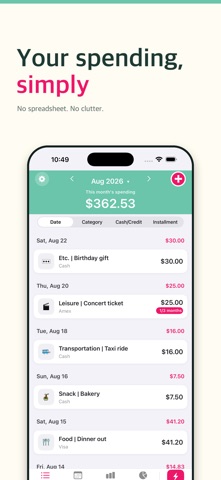
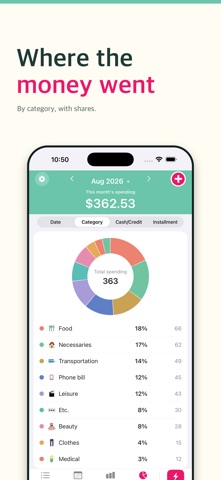
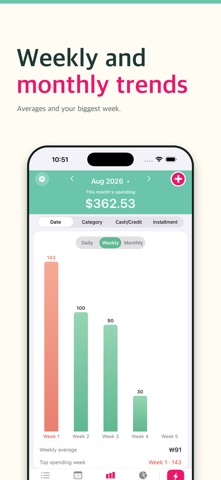
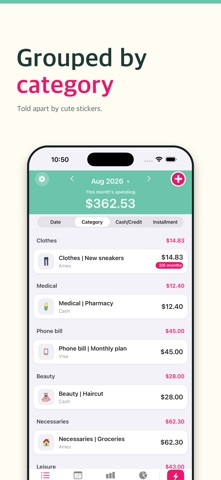
Hinakko is a clean, fast expense manager that shows you exactly where your money goes — without the clutter. Add an expense in just a few taps, then watch your spending come to life with charts and a calendar. WHY YOU'LL LOVE IT • Fast entry — log an expense in seconds • Bar & pie charts — spending by day, week, month, category, or payment • Calendar view — review what you spent, day by day • Flexible periods — day, week, month, year, or a custom range • Cash & card — track payment methods and installments • Categories & icons — organize your way, with iOS system icons • iCloud backup — back up, restore, and enable automatic backup • 13 languages — switch the app language anytime Whether you're budgeting for the month or just keeping an eye on daily expenses, Hinakko keeps your money simple and clear. No sign-up required. Your data stays on your device and in your iCloud. Start tracking today and take control of your spending.
What's new · 1.21
Expense entry and review are now easier. • Notes appear directly in the expense list, and rows expand to fit them. • Save closes the entry screen. Next saves the expense and opens a new entry. • Amounts start blank, and categories can be edited from the entry screen. • The arrows next to the date at the top move to the previous or next month again. • Future months can now be chosen in Select period, so you can check installments and monthly expenses ahead of time. • Calendar date selection is more responsive. • A one-time tip shows how to swipe left to delete an item. • Improved compatibility with the latest iOS.
Details