

Wine Cellar Database
Yan Liong Tan · Food & Drink
Independent analytics for this App Store listing. AppTracker is not affiliated with Yan Liong Tan.
Chart standing · US
What changed · US
Listing changes AppTracker has observed for this app in this storefront — new versions, price moves, rating shifts, and store copy.
5.05: Fixed app crash. 5.04 fixes minor bugs. 5.03 fixes a photograph that arrived from your other device but did not appear until you reopened the app — see FIXED IN 5.03 below. Everything version 5 brought is listed under it. Version 5 is a rebuild. The app has been rewritten for modern iPhones and iPads, and the things that stopped working over the years have been fixed or replaced. NEW • Find a Wine. A catalog of 210,000 wines from 38,000 producers, inside the app. Search it and a wine's producer, region, vineyard and color fill themselves in. It makes no network request, so it works with no signal. • iCloud Sync, in beta. Your iPhone and iPad keep the same cellar: wines, photographs, columns and saved filters, through the private database of your own iCloud account. It stays off until you turn it on, and it will not turn on until you have taken a full backup. • Backup & Transfer. The whole cellar, photographs included, in a single file you can save anywhere or mail to yourself. Open one and look at the wines inside before you restore it. • Saved filters. Build a filter on your columns, by text, number or date, and keep it. • On iPad, your cellar and the wine you are reading sit side by side — and the app is no longer locked to full screen. It runs in Split View and Slide Over, so you can keep your cellar open beside a shop's website, a spreadsheet or your mail. CHANGED • A new look throughout, including a dark appearance and type that scales with the rest of your phone. • The online wine search that stopped working after iOS 14 has been replaced by Find a Wine, which needs no connection at all. • Dropbox transfer has been removed. Backup & Transfer and iCloud Sync do that job now. • Spreadsheet import and export rewritten. Non-Latin text survives an export, your own column headings come back, and a long import tells you how far it has got. • Currency conversion uses current rates. • Every list you pick a value from is now a list you can see, tap and clear, rather than a spinning wheel that always had something selected whether you chose it or not. FIXED IN 5.03 • A photograph added on one device now appears on your other device as soon as it arrives. It was already being downloaded and stored correctly, but the wine kept showing its placeholder picture until the app was closed and reopened. FIXED IN 5.02 • With iCloud Sync on, details typed into a wine shortly after adding it could disappear a few minutes later. The wine remained, but entries such as notes, prices, drinking dates and bottle counts could revert to an earlier state on both devices. That is fixed, and values now stay put. Anything already lost has to be entered again; the app could not recover it. • If you are on iOS 18, version 5.0 opened on an empty screen with no menu and no way forward. That is fixed. The app opens on your cellar, and the menu works, on every iOS version it supports. • Your columns are repaired automatically. If a backup restore or a sync ever left your cellar without one of the app's built-in columns, it is put back on the next launch — added quietly and hidden, so nothing you renamed, reordered or hid is disturbed. • The launch and column problems above put nothing at risk: no wine was deleted and nothing had to be re-entered because of them. FIXED IN 5.0 Too many to list. If something in this app has not worked for you since 2018, it is worth another look. If it still does not, FAQ in the menu, or Settings → About → Email Support, reaches me directly.
Price & rating history · US
Reconstructed from the listing changes AppTracker has observed in this storefront. A field is charted once it has changed more than once, and each line starts at the value it moved from.
Average rating · ★ 3.80 now · 6 changes on record
Ratings breakdown · US
The star breakdown behind this app's rating in this storefront.
In-app purchases · US
What this app sells inside itself, grouped by kind and priced for this storefront.
Screenshots


About
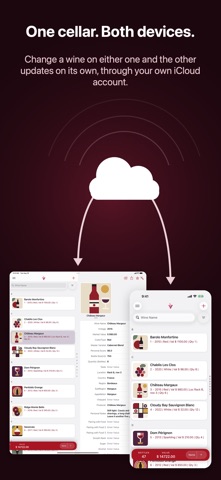
Every cellar is kept differently. This one lets you keep yours your way. Wine Cellar Database is an inventory app for a real collection: what you own, how many bottles, where it is stored, what you paid, what you thought of it. You decide which of those it asks about. Add a column, rename one, hide one, put them in the order you want, and every wine in the cellar picks up the change. Version 5 is a rebuild. Everything below is new or rewritten. FIND A WINE WITHOUT TYPING IT OUT A catalog of 210,000 wines from 38,000 producers ships inside the app. Search it, tap a wine, and the producer, region, sub-region, vineyard, designation and color are filled in for you. It makes no network request. It works on a plane, and in a cellar with no signal. YOUR COLUMNS, NOT OURS • Add columns of your own: text, large text, number, yes/no, year or date • Rename and reorder the ones that came with the app, and hide the ones you never use • Choose which columns appear under a wine's name in the list • Your own spreadsheet headings are remembered, so an export comes back the way you sent it ONE CELLAR ON TWO DEVICES (BETA) Turn on iCloud Sync and your iPhone and iPad keep the same cellar: wines, photographs, columns and saved filters. It goes to the private database of your own iCloud account, not to a server of ours, because there isn't one. It stays off until you turn it on, and it will not turn on until you have taken a full backup. A BACKUP YOU CAN HOLD One file holds the whole cellar: every wine, every column, every photograph. Save it to Files or iCloud Drive, put it on a Mac, or mail it to yourself. Open one later and look at the wines inside it before you restore anything. Spreadsheets too. Import a CSV from Cellar Tracker or from a spreadsheet you keep yourself, and export the cellar back out under your own headings. FIND THE BOTTLE • Search as you type • Filters you build and save, on your columns, by text, number or date • Favourites and Wishlist, each its own list • Sort by name or vintage, in either direction AND • As many photographs per wine as you like: the label, the back label, the receipt • Prices in your own currency, converted at current rates • A dark appearance, and type that scales with the rest of your phone • On iPad, your cellar and the wine side by side — and it shares the screen, in Split View or Slide Over WHAT IT COSTS Ten spaces are free. A space is one unique wine, however many bottles of it you have: a 2007 and a 2008 of the same wine are two spaces, and twenty-eight bottles of the 2008 are still one. More spaces are a one-time purchase, and any purchase also removes the ad at the bottom of the list. No account. No subscription. No sign-in. Your cellar lives on your device and goes nowhere you do not send it.
What's new · 5.05
5.05: Fixed app crash. 5.04 fixes minor bugs. 5.03 fixes a photograph that arrived from your other device but did not appear until you reopened the app — see FIXED IN 5.03 below. Everything version 5 brought is listed under it. Version 5 is a rebuild. The app has been rewritten for modern iPhones and iPads, and the things that stopped working over the years have been fixed or replaced. NEW • Find a Wine. A catalog of 210,000 wines from 38,000 producers, inside the app. Search it and a wine's producer, region, vineyard and color fill themselves in. It makes no network request, so it works with no signal. • iCloud Sync, in beta. Your iPhone and iPad keep the same cellar: wines, photographs, columns and saved filters, through the private database of your own iCloud account. It stays off until you turn it on, and it will not turn on until you have taken a full backup. • Backup & Transfer. The whole cellar, photographs included, in a single file you can save anywhere or mail to yourself. Open one and look at the wines inside before you restore it. • Saved filters. Build a filter on your columns, by text, number or date, and keep it. • On iPad, your cellar and the wine you are reading sit side by side — and the app is no longer locked to full screen. It runs in Split View and Slide Over, so you can keep your cellar open beside a shop's website, a spreadsheet or your mail. CHANGED • A new look throughout, including a dark appearance and type that scales with the rest of your phone. • The online wine search that stopped working after iOS 14 has been replaced by Find a Wine, which needs no connection at all. • Dropbox transfer has been removed. Backup & Transfer and iCloud Sync do that job now. • Spreadsheet import and export rewritten. Non-Latin text survives an export, your own column headings come back, and a long import tells you how far it has got. • Currency conversion uses current rates. • Every list you pick a value from is now a list you can see, tap and clear, rather than a spinning wheel that always had something selected whether you chose it or not. FIXED IN 5.03 • A photograph added on one device now appears on your other device as soon as it arrives. It was already being downloaded and stored correctly, but the wine kept showing its placeholder picture until the app was closed and reopened. FIXED IN 5.02 • With iCloud Sync on, details typed into a wine shortly after adding it could disappear a few minutes later. The wine remained, but entries such as notes, prices, drinking dates and bottle counts could revert to an earlier state on both devices. That is fixed, and values now stay put. Anything already lost has to be entered again; the app could not recover it. • If you are on iOS 18, version 5.0 opened on an empty screen with no menu and no way forward. That is fixed. The app opens on your cellar, and the menu works, on every iOS version it supports. • Your columns are repaired automatically. If a backup restore or a sync ever left your cellar without one of the app's built-in columns, it is put back on the next launch — added quietly and hidden, so nothing you renamed, reordered or hid is disturbed. • The launch and column problems above put nothing at risk: no wine was deleted and nothing had to be re-entered because of them. FIXED IN 5.0 Too many to list. If something in this app has not worked for you since 2018, it is worth another look. If it still does not, FAQ in the menu, or Settings → About → Email Support, reaches me directly.
Details