

Quick Money Recorder: Expense
Smart Idea inc. · Finance
Independent analytics for this App Store listing. AppTracker is not affiliated with Smart Idea inc.
Chart standing · US
What changed · US
Listing changes AppTracker has observed for this app in this storefront — new versions, price moves, rating shifts, and store copy.
~ Announcing the 8.4.0 Update ~ Thank you for using Quick Money Recorder. This update improves display speed and fixes several bugs. [Update] This release includes the following improvements and bug fixes. ・Improved the display speed of the calendar, list, and graph screens. ・Fixed an issue where the screen could appear to freeze when switching household books. ・Fixed an issue where today's or this month's totals in the "Today's summary" notification and the screen shown right after entering an expense could differ from the list screen. ・Fixed an issue where the date, day of the week, and remaining days on the budget screen were displayed incorrectly between 0:00 and 9:00 a.m. Japan time. ・Fixed an issue where active Premium members could receive an incorrect subscription expiration notice. ・Other minor bug fixes. If you experience any issues, please let us know via "Settings" → "Feedback & Requests", or email feedback@smart-idea.jp. [A Note from the Team] Please remember to back up your household book data regularly! As a Premium member, you can save a manual backup anytime from "Settings" → "Data" → "Data Backup / Restore". Even if you use cloud sync, we kindly recommend keeping an additional manual backup as well. For any questions, issues, or requests, please contact us at: feedback@smart-idea.jp
Ratings breakdown · US
The star breakdown behind this app's rating in this storefront.
In-app purchases · US
What this app sells inside itself, grouped by kind and priced for this storefront.
Screenshots

Keywords this app targets
Search terms AppTracker associates with this app — estimates, not search volume. ❝ = in the app's title; a highlighted number is its current position for that term.
Similar apps
Competitors and close alternatives, as estimated by AppTracker.
 Money Tracker:Expense & Budget
奎 郑
2 shared topics · 2 shared title words
Money Tracker:Expense & Budget
奎 郑
2 shared topics · 2 shared title words
 Budget app - spending tracker
InnerGrow
3 shared topics
Budget app - spending tracker
InnerGrow
3 shared topics
 Money Manager: Budget Pro
Nirav Zalavadiya
3 shared topics · 1 shared title word
Money Manager: Budget Pro
Nirav Zalavadiya
3 shared topics · 1 shared title word
 Money manager, expense tracker
Orange dog d.o.o.
2 shared topics · 2 shared title words
Money manager, expense tracker
Orange dog d.o.o.
2 shared topics · 2 shared title words
 Money Pro: Personal Finance AR
iBear LLC
2 shared topics · 1 shared title word
Money Pro: Personal Finance AR
iBear LLC
2 shared topics · 1 shared title word
 Expense Tracker - Money Note
Komorebi Inc.
1 shared topic · 2 shared title words
Expense Tracker - Money Note
Komorebi Inc.
1 shared topic · 2 shared title words
 Best Budget Planner-Money Book
永文 胡
2 shared topics · 1 shared title word
Best Budget Planner-Money Book
永文 胡
2 shared topics · 1 shared title word
 Money Manager (Remove Ads)
Realbyte Inc.
2 shared topics · 1 shared title word
Money Manager (Remove Ads)
Realbyte Inc.
2 shared topics · 1 shared title word
About
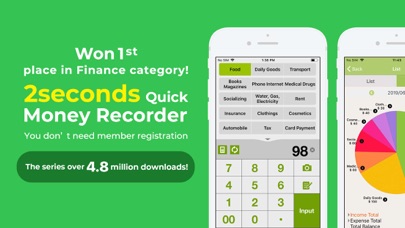
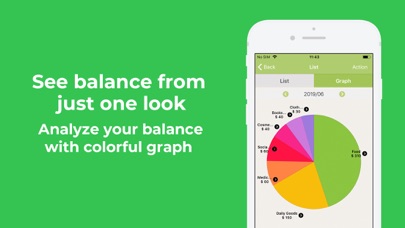
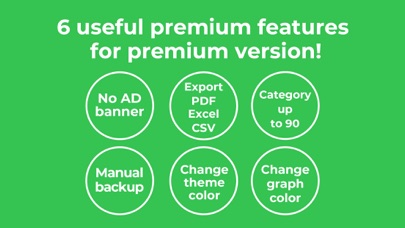
A QUICK AND SMART BUDGET MANAGEMENT TOOL "Quick Money Recorder" is a simple and pleasant to use personal finance and budget management app that comes with many handy features. Managing a budget and tracking what you spend has never been so easy! **NOW over 5 million App Downloads** Struggling with managing your money? Always wondering where it went? Start a budget management revolution with Quick Money Recorder! What do I get? 1.A super easy to use app, you can start to record expenses on the go in a few seconds! 2.Customizable categories to keep your budget organized and under control 3.Clear visualization with simple expense graphs and calendar view, set your income and start managing your money like a pro! 4.Take a picture of your receipts within the app and add the spending details later! 5.A free calculator and a choice between 113 international currencies ***** Simple! This app was just what I was looking for. Something quick and easy. ***** I use this amazing program to control my spending habits. It's great! ***** QMR is exactly what I needed. It allows you to categorize your spendings and to start saving some cash for a rainy day! Awesome!!! Excellent way to stay organized on my day to day expenses. Download Quick Money Recorder and start tracking your spending to SAVE MONEY the smart way!! *** Why not trying the Premium Upgrade of "Quick Money Recorder " with more handy features? Check it out: 1) More customization with theme color personalization, more categories to add... 2) Convenient data and graph export to Excel and PDF funtion 3) Essential Dropbox/Evernote backup for secure data and peace of mind 4) Dropbox/Evernote backup to ensure your data is always available AND MUCH MORE! Also We offer in-app purchases for "QMR Magazine/Cloud subscription", which includes 7 premium feature, magazine article, mainly on personal finance for user and use cloud sync feature! Are you ready to graduate and to take a step further on your money saving journey? *** *** About QMR Magazine/ Cloud Subscription (This applies only to subscribers*) Information about the auto-renewable nature of the subscription: – Title of publication or service: "Magazine subscription" – Length of subscription: monthly or yearly – Price of subscription: $3.99USD monthly, $24.99USD yearly – Payment will be charged to iTunes Account at confirmation of purchase –Subscription automatically renews unless auto-renew is turned off at least 24-hours before the end of the current period – Account will be charged for renewal within 24-hours prior to the end of the current period, and identify the cost of the renewal – Subscriptions may be managed by the user and auto-renewal may be turned off by going to the user's Account Settings after purchase – Any unused portion of a free trial period, if offered, will be forfeited when the user purchases a subscription to that publication, where applicable Terms and Conditions: http://smart-idea-apps.com/qmr/term/ Privacy Policy: http://smart-idea-apps.com/qmr/privacy/ ***
What's new · 8.4.0
~ Announcing the 8.4.0 Update ~ Thank you for using Quick Money Recorder. This update improves display speed and fixes several bugs. [Update] This release includes the following improvements and bug fixes. ・Improved the display speed of the calendar, list, and graph screens. ・Fixed an issue where the screen could appear to freeze when switching household books. ・Fixed an issue where today's or this month's totals in the "Today's summary" notification and the screen shown right after entering an expense could differ from the list screen. ・Fixed an issue where the date, day of the week, and remaining days on the budget screen were displayed incorrectly between 0:00 and 9:00 a.m. Japan time. ・Fixed an issue where active Premium members could receive an incorrect subscription expiration notice. ・Other minor bug fixes. If you experience any issues, please let us know via "Settings" → "Feedback & Requests", or email feedback@smart-idea.jp. [A Note from the Team] Please remember to back up your household book data regularly! As a Premium member, you can save a manual backup anytime from "Settings" → "Data" → "Data Backup / Restore". Even if you use cloud sync, we kindly recommend keeping an additional manual backup as well. For any questions, issues, or requests, please contact us at: feedback@smart-idea.jp
Details