

TripREC Driving Recorder Lite
正选 董 · Navigation
Independent analytics for this App Store listing. AppTracker is not affiliated with 正选 董.
Chart standing · US
What changed · US
Listing changes AppTracker has observed for this app in this storefront — new versions, price moves, rating shifts, and store copy.
The recording screen, trip list, route details and settings now adapt to portrait and landscape. Landscape Lock is on by default and can be changed in Settings.
Ratings breakdown · US
The star breakdown behind this app's rating in this storefront.
In-app purchases · US
What this app sells inside itself, grouped by kind and priced for this storefront.
Screenshots



About
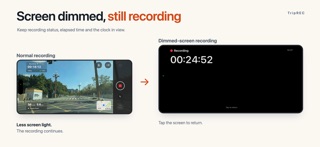
Turn your iPhone into a simple, practical dash cam. TripREC is made for daily drives and road trips. Record the road ahead while saving your route, distance and speed, so every journey has a record. Features · Video stabilization: capture steadier footage on the road · Video quality options: 1080p by default, with 720p available · Custom video stamps: show the time if you choose · Overheating alerts: get a prompt when your phone becomes too hot · Automatic recording recovery: the app attempts to continue after an unexpected interruption · Dimmed-screen recording: keep recording status, elapsed time and the clock visible when the screen dims · Audio control: turn audio on or off while recording · Focus lock and torch: adjust the camera to suit your needs · Trip history: replay recordings and view routes, distance, duration and average speed · Video export: save to Photos or export to another app · Local storage: recordings, audio and trip data stay on your device The free version has ads and keeps up to 5 trips. Watch an ad to use loop recording for 24 hours. Purchase the Full Version to remove ads and unlock ultra-wide capture, 4K, 1080p at 60 fps, automatic impact saving, and speed and location stamps.
What's new · 3.2.0
The recording screen, trip list, route details and settings now adapt to portrait and landscape. Landscape Lock is on by default and can be changed in Settings.
Details