

Interior Design PRO
Black Mana Studios Group LLC · Lifestyle
Independent analytics for this App Store listing. AppTracker is not affiliated with Black Mana Studios Group LLC.
Chart standing · US
What changed · US
Listing changes AppTracker has observed for this app in this storefront — new versions, price moves, rating shifts, and store copy.
WHAT’S NEW AI ROOM BUILDER IS HERE Create an editable room in seconds using a room photo and/or a detailed description. AI Room Builder can automatically: • Create the room shape and walls • Detect ceiling height when possible • Add and position windows and doors • Apply the primary wall color • Add recessed lighting for proper illumination Your generated room remains fully editable, giving you a strong starting point to continue designing with Interior Design PRO EDU. NEW SNAPSHOT FEATURE Create a high-resolution image of any model, imported model, or grouped object directly from the Model Shelf or Preview toolbar. Snapshot captures the model exactly as you have it positioned in the Preview window, then lets you: • Add your logo • Use a custom logo with a qualifying subscription • Mark up or enhance the image using Apple’s photo editing tools • Share or save the finished image to Photos or Files It’s an easy way to create polished presentation images directly from Interior Design PRO. 78 NEW HOME FURNISHING MODELS We’ve expanded the model library with 65 new items, including: • 21 drapery trims • 19 sectional components • 26 decorative pillows • Plus additional sofas and other furnishings Find the newest models quickly under the RECENTLY ADDED tab on the Model Shelf.
Ratings breakdown · US
The star breakdown behind this app's rating in this storefront.
In-app purchases · US
What this app sells inside itself, grouped by kind and priced for this storefront.
Screenshots



About
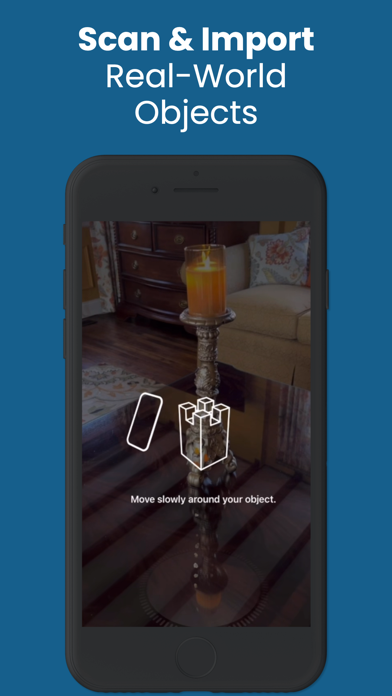
"Interior Design for iPad" is now "Interior Design PRO" – a cutting-edge app meticulously crafted for Professional Interior Designers, yet effortlessly intuitive for everyone. Seamlessly bring your visions to life by designing any space with an extensive array of real-life objects and materials. Elevate your creativity and showcase your designs in unparalleled detail with stunning 8k photo-realistic images, setting a new standard in interior design innovation. We've maintained the familiar look and feel of its predecessor to eliminate any learning curve, ensuring you can seamlessly enjoy all the new features in this release, with much more to come. :new: Now available on Mac! Enjoy all the features you love about Interior Design PRO on your Mac, with full support for trackpad and mouse. Compatible with any Mac using an Apple Silicon processor (M1, M2 and higher) and running macOS 12 or higher. Access Interior Design PRO across your Mac, iPad, and iPhone with a single subscription and the same iCloud ID. Interior Design PRO offers auto-renewal subscription. The app itself and its content is completely free, while renders and a few professional features like 8K renders, model scanner and custom logo require a subscription which auto-renews every 30 days unless cancelled. Please read the following about the auto-renewable nature of subscriptions: • Payment will be charged to your iTunes Account at confirmation of purchase. • Subscription automatically renews at the end of your current subscription period unless auto-renewal is turned off at least 24 hours prior to end of the current period. • You can manage or turn off auto-renewal in your Apple ID Account Settings any time after purchase. • Any unused portion of a free trial period, if offered, will be forfeited when the user purchases a subscription to that publication, where applicable. • Privacy policy - https://www.tapglance.com/privacy/ • Terms of use - https://www.tapglance.com/terms/
What's new · 6.6
WHAT’S NEW AI ROOM BUILDER IS HERE Create an editable room in seconds using a room photo and/or a detailed description. AI Room Builder can automatically: • Create the room shape and walls • Detect ceiling height when possible • Add and position windows and doors • Apply the primary wall color • Add recessed lighting for proper illumination Your generated room remains fully editable, giving you a strong starting point to continue designing with Interior Design PRO EDU. NEW SNAPSHOT FEATURE Create a high-resolution image of any model, imported model, or grouped object directly from the Model Shelf or Preview toolbar. Snapshot captures the model exactly as you have it positioned in the Preview window, then lets you: • Add your logo • Use a custom logo with a qualifying subscription • Mark up or enhance the image using Apple’s photo editing tools • Share or save the finished image to Photos or Files It’s an easy way to create polished presentation images directly from Interior Design PRO. 78 NEW HOME FURNISHING MODELS We’ve expanded the model library with 65 new items, including: • 21 drapery trims • 19 sectional components • 26 decorative pillows • Plus additional sofas and other furnishings Find the newest models quickly under the RECENTLY ADDED tab on the Model Shelf.
Details