

PocketCAS lite for Mathematics
Timing Software GmbH · Education
Independent analytics for this App Store listing. AppTracker is not affiliated with Timing Software GmbH.
Chart standing · US
What changed · US
Listing changes AppTracker has observed for this app in this storefront — new versions, price moves, rating shifts, and store copy.
This is the biggest PocketCAS update in years, with a new design and new ways to understand your results. - Under a function's result, suggestions show its derivative with the answer, and a small plot sits next to it. Tap one to add it to your document. - Results look like a math textbook, and long results wrap to the width of the screen. - Clearer 2D plots with a finer grid, and 3D surfaces with soft light and shading. Plots in a document pan, turn and zoom right where they are. - A new keyboard look, with your recent functions right above it. - A short welcome for new users, and the function reference now lists every function, with a PRO badge on the ones that PocketCAS Pro adds. - On iOS 26 and later, PocketCAS uses Apple's new design, Liquid Glass, and has a new icon. - Brackets close by themselves. If something works differently from what you are used to, or you find a problem, please write to us.
Ratings breakdown · US
The star breakdown behind this app's rating in this storefront.
In-app purchases · US
No in-app purchases.
Screenshots




About
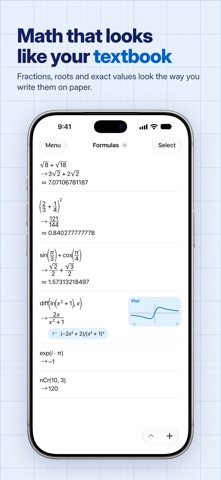
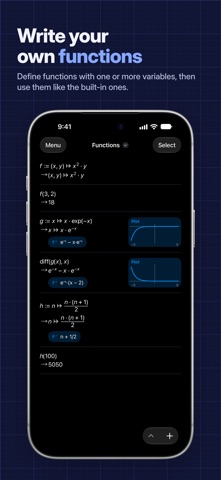
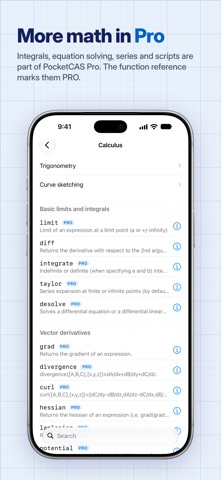
PocketCAS Lite is a graphing calculator for iPhone and iPad. It graphs your functions, finds derivatives and works with exact fractions and roots. Everything runs on your device, so it works without internet or an account. Graphs - 2D plots of functions, implicit equations, polar and parametric curves and vector fields, two functions per plot. PocketCAS marks zeros, extrema and intersections. In full screen, tap a mark to read its coordinates. - 3D surfaces with soft light and shading. Drag to turn them, pinch to zoom. Derivatives - Under each function, a suggestion shows its derivative, already worked out, and a small plot sits beside the result. Tap one to add it to your document. - Exact derivatives of products, quotients, roots and chains, written the way your textbook writes them. Exact results - Arithmetic with exact fractions and roots, trigonometric, exponential and logarithmic functions. - Matrices: determinants, inverses and products. - Your own functions, with conditions and recursion. - Common units and physical constants. Reads like your textbook - Results look the way they do in a textbook: fractions, roots, powers and matrices. - A math keyboard with every function in reach, and a hint shows what goes between the brackets. Made for daily work - Documents keep your calculations and plots together, and iCloud syncs them between your devices. - Export and print plots, entries or whole documents (with a PocketCAS Lite watermark). - Help built in: the function reference explains every function with examples, and tutorials get you started. More with PocketCAS Pro PocketCAS Pro is a separate app. It adds calculation steps that name the rule behind each step, integrals, limits, series and sums, equation and system solving, factoring and simplifying, eigenvalues, differential equations, scripts, plots with more than two functions, imports of documents and CSV data, larger matrices in the editor, exports without a watermark, and suggestions with zeros, extrema and integrals. The function reference in Lite marks the functions of Pro with a PRO badge. Questions or ideas? Write to us at https://pocketcas.com/support.
What's new · 2026.1
This is the biggest PocketCAS update in years, with a new design and new ways to understand your results. - Under a function's result, suggestions show its derivative with the answer, and a small plot sits next to it. Tap one to add it to your document. - Results look like a math textbook, and long results wrap to the width of the screen. - Clearer 2D plots with a finer grid, and 3D surfaces with soft light and shading. Plots in a document pan, turn and zoom right where they are. - A new keyboard look, with your recent functions right above it. - A short welcome for new users, and the function reference now lists every function, with a PRO badge on the ones that PocketCAS Pro adds. - On iOS 26 and later, PocketCAS uses Apple's new design, Liquid Glass, and has a new icon. - Brackets close by themselves. If something works differently from what you are used to, or you find a problem, please write to us.
Details