

PhotoSendr: send photos via email to a mailing list
Francesco Bertocci · Photo & Video
Independent analytics for this App Store listing. AppTracker is not affiliated with Francesco Bertocci.
Chart standing · US
What changed · US
Listing changes AppTracker has observed for this app in this storefront — new versions, price moves, rating shifts, and store copy.
Copy a share link in one tap: it publishes the gallery if the set hasn't got one and puts the address straight on your clipboard. You can also make a tracking link per person — the same gallery at a slightly different address, named privately on your iPhone, so you can see whose copy was opened. Nobody who receives one ever sees the name. Pinch to zoom in the camera, anywhere between the lens stops, with the factor shown as you go — and the front camera zooms too. Sending to another app now sends each app what it can take: AirDrop and Save to Files get the full-size files; Mail, Messages and everything else get the gallery link. Also in 5.8: • Shared galleries keep your order — a video stays where you put it • The cover frame you pick for a video is the one recipients see • The PDF switch means one thing everywhere, and updating a gallery honours it • Updating a large gallery no longer crashes • Fixed: "Share link" on the gallery-ready screen shared the message without the link
Price & rating history · US
Reconstructed from the listing changes AppTracker has observed in this storefront. A field is charted once it has changed more than once, and each line starts at the value it moved from.
Average rating · ★ 3.67 now · 3 changes on record
Screenshots



About
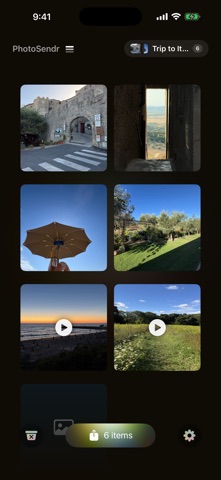
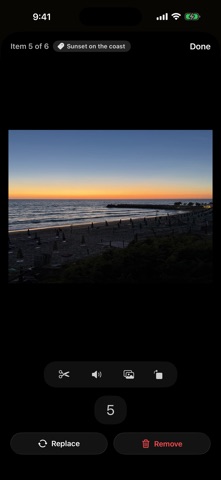
PhotoSendr is the fastest way to get photos, videos and files to your favorite people, again and again. Set your recipients once — family, a client, your team — then snap, tap, send. Built for the recurring photo chore: sending receipts to the bookkeeper, job-site photos to a contractor, kid pictures to grandparents. HOW IT WORKS • Fill the grid from your camera, photo library, or Files — many at once • Keep shooting: the camera stays up and collects shots in a tray — 4:3, 3:2 or Square, with real zoom, flash and a front/back flip • Tidy each photo: crop, rotate, or one-tap black & white • Drag to reorder — the grid's order is the order in every email, PDF and link • Tap Share — your recipients, subject, and message are pre-filled • Send as photo attachments or combined into a single PDF • Auto-save what you capture: photos and videos to your Photos library, scans to Files — both on by default, both switchable in Settings SCAN & PASTE • Scan paper into a single PDF — any number of pages, straight into a slot • Swipe through a PDF's pages in the app; rotate, crop or black & white any page • Paste from the clipboard: copied text becomes a .txt file, images become photos, files become attachments VIDEO TOOLS • Trim any video to the exact range you want, with a frame-accurate preview • Mute or unmute in one tap; rotate losslessly with no quality lost • Pick any frame as the video's cover image AUDIO CLIPS • Record a voice note right in the app, or import any audio file • Trim to the exact range you want, with a waveform to guide you • Recipients get a real audio player with a waveform, right in the browser CARDS • Turn any gallery into a card: pick a design and photos, add a greeting • The back carries a code that opens the gallery — no app needed to view it • Print it at home, send the print-ready PDF to a print shop, or email it • Every card is kept, ready to send again or edit • Fronts can also be made with Image Playground (iOS 27, Apple Intelligence) SEND YOUR WAY • Email pre-addressed to your saved list — edit before sending • PDF mode merges every photo into one tidy attachment — your own files ride alongside it • Or use AirDrop, Messages, WhatsApp and more via the share sheet • One iCloud share link at a time: an expiring link anyone can open in a browser, no app needed. Track views, stop sharing any time. PHOTOSENDR PRO • Unlimited sets — keep properties, projects, and people separate; swipe between them • Sets grow as you fill them, up to 100 items • Full-length videos, no 30-second cap — and as many per set as fit • Links without limits: as many live links as you like, each lasting 7, 30 or 90 days, updated or extended at the same address PRIVATE BY DESIGN • No account, no sign-up • Photos stay on your phone until YOU send them • No analytics, no tracking, no ads • Email goes out through your own Mail app • Share links live behind unguessable addresses, expire on their own, and are yours to revoke PRICING PhotoSendr is free for 3 sets of up to 10 items each — photos and files alike — with one video up to 30 seconds per set and one live share link at a time (7 days). Pro is $1.99/month, $14.99/year with a 7-day free trial, or a $34.99 one-time lifetime purchase. Bought PhotoSendr before v5? Pro is included — free, forever, as our thank-you. Pro Monthly ($1.99) and Pro Yearly ($14.99) are auto-renewable subscriptions. Payment is charged to your Apple Account at confirmation of purchase. Subscriptions renew automatically unless auto-renew is turned off at least 24 hours before the end of the current period, and you can manage or cancel any time in Settings > your name > Subscriptions. Any unused portion of a free trial is forfeited when you buy a subscription. Pro Lifetime is a one-time purchase and does not renew. Terms of Use (EULA): https://www.apple.com/legal/internet-services/itunes/dev/stdeula/ Privacy Policy: https://photosendr.com/privacy.html Full terms: https://photosendr.com/terms.html
What's new · 5.8
Copy a share link in one tap: it publishes the gallery if the set hasn't got one and puts the address straight on your clipboard. You can also make a tracking link per person — the same gallery at a slightly different address, named privately on your iPhone, so you can see whose copy was opened. Nobody who receives one ever sees the name. Pinch to zoom in the camera, anywhere between the lens stops, with the factor shown as you go — and the front camera zooms too. Sending to another app now sends each app what it can take: AirDrop and Save to Files get the full-size files; Mail, Messages and everything else get the gallery link. Also in 5.8: • Shared galleries keep your order — a video stays where you put it • The cover frame you pick for a video is the one recipients see • The PDF switch means one thing everywhere, and updating a gallery honours it • Updating a large gallery no longer crashes • Fixed: "Share link" on the gallery-ready screen shared the message without the link
Details