

My CheckBox - Todo Calendar
jang sehoon · Productivity
Independent analytics for this App Store listing. AppTracker is not affiliated with jang sehoon.
Chart standing · US
What changed · US
Listing changes AppTracker has observed for this app in this storefront — new versions, price moves, rating shifts, and store copy.
- On iPhone Duo, the app now uses the full unfolded display. With enough room, your calendar and tasks appear side by side, and folding returns to the single-column layout. - The layout adjusts when you rotate iPhone Duo in either direction. - On iPad and iPhone Duo, the calendar and task list fit the window when you use the app alongside another app in Split View. - Stability and display improvements.
Ratings breakdown · US
The star breakdown behind this app's rating in this storefront.
Screenshots



About
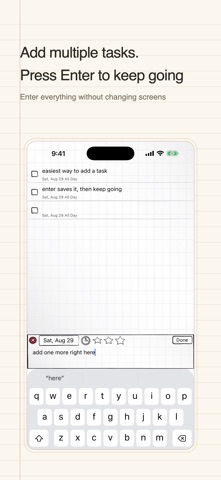
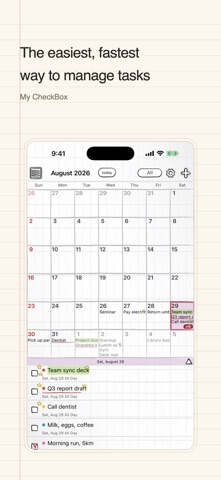
Tired of complicated calendar apps? My CheckBox is the simplest way to manage your day: write a task on the calendar, check it off when it's done. The warm, hand-drawn design makes your daily calendar feel like a paper diary. ■ How people use it - Jot down today's tasks in one line, then check them off - Didn't finish? Move unfinished tasks to today or tomorrow with one tap - Set birthdays and anniversaries to repeat every year ■ Features - Calendar + tasks: tap a date and see that day's checklist instantly - Repeating events: weekly, monthly, yearly (plus lunar repeat in Korea) - National holidays: automatically displayed for your country - Reminders: from right on time to 2 days before - App icon badge: see how many tasks are left today - D-Day calculator: count 100-day and 1000-day anniversaries - Backup: iCloud backup/restore with auto backup - Passcode lock: keep your schedule private (upgrade) - 10 handwriting fonts to make it feel like your own diary - Available in 14 languages ■ Perfect for you if… - You want a light to-do list instead of a heavy calendar app - You love the feel of a paper diary - You just want to write, check, and get on with your day Contact: crazydashdev@gmail.com Privacy Policy: https://dashhoon.github.io/nbros-privacy/ Terms of Service: https://dashhoon.github.io/terms_of_service/
What's new · 1.79
- On iPhone Duo, the app now uses the full unfolded display. With enough room, your calendar and tasks appear side by side, and folding returns to the single-column layout. - The layout adjusts when you rotate iPhone Duo in either direction. - On iPad and iPhone Duo, the calendar and task list fit the window when you use the app alongside another app in Split View. - Stability and display improvements.
Details