

Knit - knitting counter
TORU YAMAGUCHI · Lifestyle
Independent analytics for this App Store listing. AppTracker is not affiliated with TORU YAMAGUCHI.
Chart standing · US
What changed · US
Listing changes AppTracker has observed for this app in this storefront — new versions, price moves, rating shifts, and store copy.
- You can now move your projects to the new "Knit2" app. Tap "Move to Knit2" at the bottom left of the home screen. Knit2 is available on the App Store. - Fixed layout problems on the latest iPhones and iPads. - Fixed the Close button not responding on the settings and memo screens. - Fixed a crash when opening the image screen for a project without an image. - Now requires iOS 15.0 or later. - Removed the social sharing buttons (due to changes in those services).
Ratings breakdown · US
The star breakdown behind this app's rating in this storefront.
In-app purchases · US
No in-app purchases.
Screenshots

About
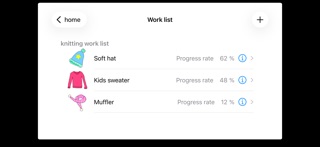
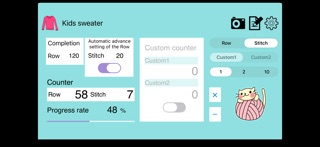
[Notice] The new "Knit2" is now available. This app is no longer planned to receive updates. Knit2 will keep supporting the latest iOS and iPhone models. Tap "Move to Knit2" on the home screen to bring all your projects over. Requires iOS 15.0 or later (iPhone / iPad). Knit is a free knitting support app. Count rows and stitches, and save the counts for each project. Because counts are saved per project, you can see the progress of several projects at a glance. Launch Knit in a moment, keep counting, and enjoy your knitting! A simple knitting counter - the one you always wanted. It's free, so please download it and give it a try. Main features - Count rows and stitches *1 - Save and manage counts for each project *2 - Progress rate for each project - Button to keep the screen from sleeping (ON/OFF) - Move your projects to the new Knit2 *1: You can choose to count by 1, 2 or 10. *2: Counts and settings are saved automatically whenever you count or change an option, so you can start counting with the same settings next time. Thank you very much for your reviews and ratings! We appreciate your support and kind advice. To keep this app free, ads (AdMob) are displayed where possible. Thank you for your understanding.
What's new · 2.4
- You can now move your projects to the new "Knit2" app. Tap "Move to Knit2" at the bottom left of the home screen. Knit2 is available on the App Store. - Fixed layout problems on the latest iPhones and iPads. - Fixed the Close button not responding on the settings and memo screens. - Fixed a crash when opening the image screen for a project without an image. - Now requires iOS 15.0 or later. - Removed the social sharing buttons (due to changes in those services).
Details