

Snapseed: Photo Editor
Google · Photo & Video
Independent analytics for this App Store listing. AppTracker is not affiliated with Google.
Chart standing · US
What changed · US
Listing changes AppTracker has observed for this app in this storefront — new versions, price moves, rating shifts, and store copy.
Capture the feeling of speed with our new Motion Blur tool. Turn everyday photos into dynamic moments with effortless control: • Instant motion presets: Automatically isolate your subject or background to simulate professional panning photography and high-speed motion in seconds. • Directional precision and subregions: Adjust blur along any angle, customize speed and acceleration, or add subregions directly onto your image to fine-tune the effect exactly where you need it. set your moments in motion, team snapseed
Ratings breakdown · US
The star breakdown behind this app's rating in this storefront.
In-app purchases · US
No in-app purchases.
Screenshots




Keywords this app targets
Search terms AppTracker associates with this app — estimates, not search volume. ❝ = in the app's title; a highlighted number is its current position for that term.
Similar apps
Competitors and close alternatives, as estimated by AppTracker.
 Fine - Photo Editor
巧霞 詹
3 shared topics · 3 shared title words
Fine - Photo Editor
巧霞 詹
3 shared topics · 3 shared title words
 SnapEdit: Photo Editor AI
SilverAI Joint Stock Company
1 shared topic · 3 shared title words
SnapEdit: Photo Editor AI
SilverAI Joint Stock Company
1 shared topic · 3 shared title words
 Photo Editor+
Axiem Systems
1 shared topic · 3 shared title words
Photo Editor+
Axiem Systems
1 shared topic · 3 shared title words
 Colourtone: Photo Editor
CEE ENTERPRISES PTY LTD
1 shared topic · 3 shared title words
Colourtone: Photo Editor
CEE ENTERPRISES PTY LTD
1 shared topic · 3 shared title words
 Facetune: Photo & Video Editor
Lightricks Ltd.
1 shared topic · 2 shared title words
Facetune: Photo & Video Editor
Lightricks Ltd.
1 shared topic · 2 shared title words
 Bloom Studio: Photo Editor App
Digital Hole Pvt. Ltd.
1 shared topic · 3 shared title words
Bloom Studio: Photo Editor App
Digital Hole Pvt. Ltd.
1 shared topic · 3 shared title words
 Lightleap by Lightricks
Lightricks Ltd.
2 shared topics
Lightleap by Lightricks
Lightricks Ltd.
2 shared topics
 Photomator – Photo Editor
Apple Inc.
1 shared topic · 3 shared title words
Photomator – Photo Editor
Apple Inc.
1 shared topic · 3 shared title words
About
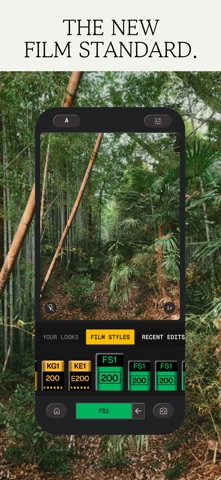
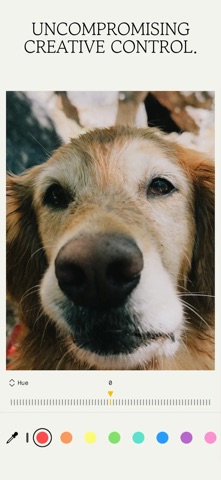
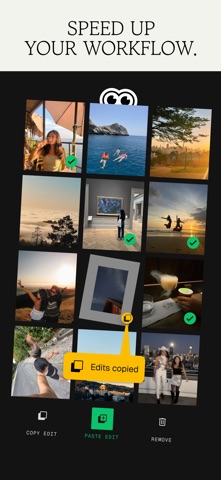
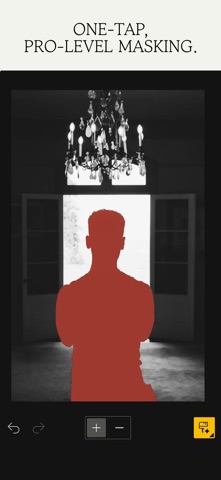
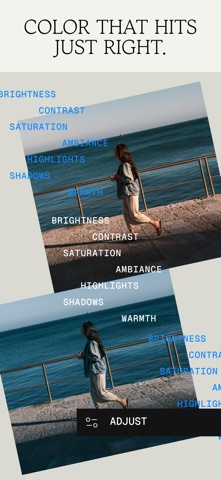
Snapseed is a complete and professional photo editor developed by Google. Pro-level tools, authentic film simulations, smart masking and more — all with no strings attached. == KEY FEATURES == • No Strings Attached: Get 30+ pro tools and filters - no subscriptions, purchases, ads, or watermarks • Vintage Styles: realistic film filters, plus Halation, Bloom, and Grain tools • Smart Masking: Instantly and intelligently isolate subjects or backgrounds with a single tap for fast, targeted edits • Batch Editing: Quickly apply your favorite looks and edits to multiple photos • Snapseed Camera: Capture using custom styles or film looks. Save time with real-time effects that can be edited or reset later • Non-destructive Editing: Easily undo changes or revert to your original photo at any time • RAW Support: Open and edit JPG and RAW files with precise control == PRO TOOLS & FILTERS == • Snapseed Camera: shoot directly in your favorite film simulations or custom looks to capture your unique style in real-time and skip the editing step • Adjust: adjust exposure and color automatically or manually with fine, precise control • One-Touch Masking: instantly select subjects or backgrounds with smart precision for seamless targeted edits • Selective: precisely adjust brightness, contrast, or saturation in specific areas without affecting the rest of your photo • Healing: remove the uninvited neighbor from a group picture • Film: get beautiful looks with our completely updated, realistic film simulations of historic film stocks • Batch Edit: apply your custom looks and edits to an entire batch of photos instantly • Halation: add an authentic highlight glow to replicate classic analog lens effects • Bloom: create a soft, dreamy optical diffusion to light sources for a cinematic finish • RAW Develop: open and tweak some RAW file types • Double Exposure: combine two photos using blend modes inspired by film and digital processing • Portrait: modern tools to quickly enhance lighting, adjust poses, and refine facial features • Details: magically brings out surface structures in images • Crop and rotate: crop to standard sizes, rotate by 90°, or straighten a skewed horizon. • Perspective: fix skewed lines and perfect the geometry of horizons or buildings • White Balance: adjust the colors so that the image looks more natural • Brush: selectively retouch exposure, saturation, brightness or warmth • Vignette: darken image corners for a classic photographic effect • Curves: have precise control over the brightness levels in your photos • Color HSL: precisely adjust hue, saturation, and luminance of any color • Dehaze: instantly clear haze, fog, or glare for better contrast and detail • Expand: increase the size of your canvas • Lens Blur: add a beautiful Bokeh to images (background softening) • Glow: add a fine glow to images, great for fashion or portraits • Tonality: boost details selectively in the shadows, midtones and highlights • Black & White: classic Black and White look straight out of the darkroom • and more!
What's new · 4.1.5
Capture the feeling of speed with our new Motion Blur tool. Turn everyday photos into dynamic moments with effortless control: • Instant motion presets: Automatically isolate your subject or background to simulate professional panning photography and high-speed motion in seconds. • Directional precision and subregions: Adjust blur along any angle, customize speed and acceleration, or add subregions directly onto your image to fine-tune the effect exactly where you need it. set your moments in motion, team snapseed
Details