

SoSoCamera Beauty
kitamura hira · Photo & Video
Independent analytics for this App Store listing. AppTracker is not affiliated with kitamura hira.
Chart standing · US
What changed · US
Listing changes AppTracker has observed for this app in this storefront — new versions, price moves, rating shifts, and store copy.
Price & rating history · US
Reconstructed from the listing changes AppTracker has observed in this storefront. A field is charted once it has changed more than once, and each line starts at the value it moved from.
Average rating · ★ 0.00 now · 25 changes on record
In-app purchases · US
What this app sells inside itself, grouped by kind and priced for this storefront.
Screenshots


Similar apps
Competitors and close alternatives, as estimated by AppTracker.
 Beauty Camera Fill Light
友健 高
Beauty Camera Fill Light
友健 高
 Camera+ Legacy
LateNite Apps
Camera+ Legacy
LateNite Apps
 SkyCamera: Use Various Filters
智帆 钟
SkyCamera: Use Various Filters
智帆 钟
 Auto Photo Camera
Johan Olsson
Auto Photo Camera
Johan Olsson
 Camare Experimental Camera
Tristan Zand
Camare Experimental Camera
Tristan Zand
 BeautyCam-Digicam&Photo Editor
Meitu Technology Co., Ltd.
BeautyCam-Digicam&Photo Editor
Meitu Technology Co., Ltd.
 Camera Plus Pro
Global Delight Technologies Pvt. Ltd
Camera Plus Pro
Global Delight Technologies Pvt. Ltd
 ProCam - Pro Camera
Tinkerworks Apps
ProCam - Pro Camera
Tinkerworks Apps
About
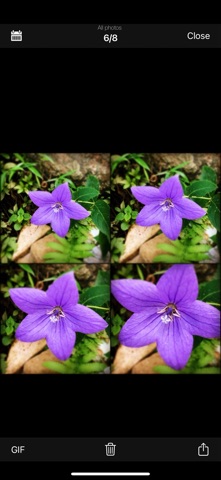
SosoCamera is a Multishot App.Compared to iPhone’s original App of taking photographs, it has two new functions: Multishot and photo filter. How to use: Below the main screen is the toolbar. - The button in the center of the toolbar is the photo capture button. Press it to start taking pictures. If you long-press it, a countdown button will appear, allowing you to choose between a 3-second or 10-second countdown for taking pictures. - The button on the left of the toolbar is the album button. Pressing it will open your album. In the album, you can effortlessly share photos with friends and convert photos into GIF images. - The first button on the right side of the toolbar is the photo style button. After pressing it, you can set photo styles and color filters. - The second button on the right side of the toolbar is the button to set the number of shots and the interval time between shots. You can adjust the number of rows and columns using the plus and minus signs. Besides adjusting the number of shots here, you can also quickly change the number of continuous shots and their arrangement by swiping up, down, left, or right on the capture screen. About the number of shots: - The free version can capture up to 16 shots (4x4), while upgrading to the full version allows up to 64 shots (8x8). * When set to 1x1, it resembles a Polaroid style (the frame can be removed in the settings). * When set to 1xN or Nx1, it resembles a film strip style (the frame can be removed in the settings). About Beauty filter: - Currently, only supported by the front camera. About GIFs: - After generating, you can click the interval time button at the lower-right corner to adjust the interval time for each frame. Then click the share button at the top-left corner to save it to the album or share it with friends. About In-App Purchases: - Upgrading removes ads and increases the number of shots. * This in-app purchase is a one-time buy, so you can purchase with confidence.
What's new · 8.4
- Fix bugs.
Details