

Hokusai Audio Editor
Wooji Juice Ltd · Music
Independent analytics for this App Store listing. AppTracker is not affiliated with Wooji Juice Ltd.
Chart standing · US
What changed · US
Listing changes AppTracker has observed for this app in this storefront — new versions, price moves, rating shifts, and store copy.
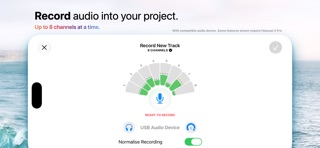
Hokusai 3 is our biggest update yet! Check out “What's New” in the User Guide for a detailed list, but here are some highlights: • Fresh new design that is beautiful while still remaining Hokusai's familiar layout. • Add markers to your projects. • Support for multichannel recording. • Support for creating MP3 files. • Projects can be synced via iCloud Drive. • Support for 48 kHz projects. • And compatibility with our all-new Hokusai for Mac! 3.0.4 includes various user-experience, performance and reliability improvements.
Ratings breakdown · US
The star breakdown behind this app's rating in this storefront.
In-app purchases · US
What this app sells inside itself, grouped by kind and priced for this storefront.
Screenshots



About
Hokusai is your multitrack audio editor on-the-go. Record or import a track, and make it sound the way you want it to: not just trimming the ends, but full cut, copy, paste and delete, and a suite of filters and special effects available. "Beautiful clutter-free interface" — TouchProducer.com "Hokusai will convince you that audio was meant to be edited with a touch screen — it's just so natural within this app that you’ll find yourself consistently coming back to it." — iOS Music And You Edit many tracks side-by-side, mix them together, and export to popular audio formats — then transfer them to your computer, send them to another app on your device, or upload to cloud services. Hokusai is streamlined to give you a clean, clear view of your tracks. Use the familiar pinch and swipe gestures to zoom right in and fiddle with fine detail, or step back to see the big picture. Select pieces of audio. Live "scrubbing" means you can hear the sound under your fingertip as you make your adjustments. And you needn't fear a bad edit with full undo/redo support — even after closing your project. Hokusai includes a set of useful tools for free, such as fade in/out, normalise volume levels, reverse time, and basic synthesis. If you need more power, Hokusai 3 Pro adds more than 50 new tools and effects, including: Multi-microphone recording, per-track volume/panning, solo/mute, track and final mix level meters, time ruler markers and tempo-based time rulers, selecting across multiple tracks at once, presets and favourites, 48kHz project support, and additional export features — like creating MP3s, or splitting a project up by tracks or markers. Effects include noise reduction, time-stretching, pitch-bending, echo, reverb, grain synthesis, modulation (AM & FM), resonance, distortion, grunge, vocal levelling, monster voice, high/low/band-pass/notch-cut filter, multi-band EQ and more — many of which can be previewed live. And you can sync your effect settings and favourites through iCloud for quick access from any of your devices. Projects can also be synced through iCloud, and are compatible with Hokusai for Mac. Whether you want to take your Mac projects with you, or make field recordings as you travel, to be available on your computer at home, Hokusai has you covered. Terms of Service: https://www.apple.com/legal/internet-services/itunes/dev/stdeula/ Privacy Policy: https://www.wooji-juice.com/privacy
What's new · 3.0.4
Hokusai 3 is our biggest update yet! Check out “What's New” in the User Guide for a detailed list, but here are some highlights: • Fresh new design that is beautiful while still remaining Hokusai's familiar layout. • Add markers to your projects. • Support for multichannel recording. • Support for creating MP3 files. • Projects can be synced via iCloud Drive. • Support for 48 kHz projects. • And compatibility with our all-new Hokusai for Mac! 3.0.4 includes various user-experience, performance and reliability improvements.
Details