

Carats – Gem Weight & Jewelry
Verosocial Studio · Utilities
Independent analytics for this App Store listing. AppTracker is not affiliated with Verosocial Studio.
Chart standing · US
What changed · US
Listing changes AppTracker has observed for this app in this storefront — new versions, price moves, rating shifts, and store copy.
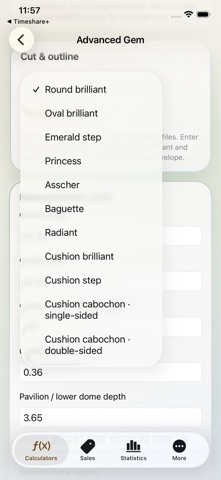
You bring care and a good eye to every stone. Thank you for using Carats for your work and collection. This update gives you more gemstone choices, detailed custom cut measurements and a separate, standalone Apple Watch app. CARATS ON APPLE WATCH - Convert carats, grams, points and milligrams at your wrist. - Use Gauge Sizes to compare inches, millimeters and gauge. - Open Gauge Guide for a thickness reference. - Browse gemstone specific gravity and cut factor charts. - Explore calculator graphs and share results. - Use all Watch tools without a usage limit or subscription. - Calculate without an iPhone companion or a saved history. MORE GEMSTONES AND SPECIES - Choose from 118 gemstone and material entries. - Find tanzanite, kunzite, hiddenite, iolite, amber and ametrine. - Select species including beryl, corundum, spodumene and zoisite. - Filter the picker by All, Gem varieties or Species. - Search names, species and specific gravity. - See species beside gemstone varieties. MORE CUT CHOICES - Try Asscher, baguette, princess and radiant cut options. - Compare brilliant cushion and step cushion variations. - Use reference cut factors for a standard weight estimate. - Open Advanced Gem when you want to describe the stone's proportions. - Choose single or double sided cabochons, including cushion shapes. A NEW ADVANCED GEM VIEW - Enter length and width in millimeters. - Measure height above the girdle, girdle thickness and depth below it. - Choose a faceted taper, dome, straight sides or a custom volume factor. - Set upper and lower profiles separately. - Add table and culet dimensions. - Describe a cushion outline with its corner radius. - Review total depth, outline area, estimated volume and carat weight. - See how the depth is divided above, at and below the girdle. MEASURE YOUR OWN CUSTOM CUT - Name an unusual cut and choose the outline that fits. - Enter a measured outline area for a unique shape. - Use a directly measured volume when you have one. - Add a custom gemstone or material name, species and density. - Keep notes on your measurement method. - Adjust taper fullness to describe the profile you are estimating. SAVE AND REVISIT ADVANCED GEMS - Save an Advanced Gem with Carats Pro. - Keep its cut, species, density, dimensions and custom measurements together. - Open a record to review those details and linked sale counts. - Reuse the measurements to start another estimate. - Edit the saved title or notes without replacing the original measurements. - Keep advanced gem details in JSON backups and calculation CSV exports. - Continue viewing, sharing and exporting existing records without Pro. THREE WAYS TO REVIEW YOUR GEMS - Regular Gems shows your saved standard estimates. - Advanced Gems shows detailed measurements and custom cuts. - Combined Gems brings both groups into an overview. - Compare gem counts, estimated carats, average weight and weight ranges. - Explore gemstone, species and cut charts. - Follow monthly gemstone activity and open the records behind an overview. CALCULATORS THAT ARE EASIER TO FIND - Browse calculator sections with familiar titles and descriptions. - Search for the tool you need. - Find Help, Share, Reset and Randomize in the top right menu. - Read usage help written for the calculator you have open. - Try an example with Randomize or restore starting values with Reset. - Open Advanced Gem from its link below the Gem Estimator. - Explore graphs to compare inputs and outputs. Carats Pro is required to save or edit calculations, add or edit sales, and import records on iPhone or iPad. Choose monthly or lifetime access. Gem weights remain estimates, so use a scale for actual weight.
Price & rating history · US
Reconstructed from the listing changes AppTracker has observed in this storefront. A field is charted once it has changed more than once, and each line starts at the value it moved from.
Average rating · ★ 3.67 now · 2 changes on record
Ratings breakdown · US
The star breakdown behind this app's rating in this storefront.
In-app purchases · US
What this app sells inside itself, grouped by kind and priced for this storefront.
Screenshots



Keywords this app targets
Search terms AppTracker associates with this app — estimates, not search volume. ❝ = in the app's title; a highlighted number is its current position for that term.
Similar apps
Competitors and close alternatives, as estimated by AppTracker.
 Gem Genius AI
Trisphere Apps LLC
1 shared topic · 1 shared title word
Gem Genius AI
Trisphere Apps LLC
1 shared topic · 1 shared title word
 Jewelry Identifier: Ring & Gem
Nhat Dinh
2 shared title words
Jewelry Identifier: Ring & Gem
Nhat Dinh
2 shared title words
 Jewelry identifier : Gemly
BASAK GEDIK
1 shared title word
Jewelry identifier : Gemly
BASAK GEDIK
1 shared title word
 MyIntelliGem - Gemology App
MyIntelliSource, Inc.
MyIntelliGem - Gemology App
MyIntelliSource, Inc.
 Jewelry identifier : Price
Batuhan Tarhanacioglu
1 shared title word
Jewelry identifier : Price
Batuhan Tarhanacioglu
1 shared title word
 Jewelry Identifier : Gemfy
DIDEM URAS
Jewelry Identifier : Gemfy
DIDEM URAS
 CalConvert: Currency Converter
Maple Media Apps, LLC
1 shared topic
CalConvert: Currency Converter
Maple Media Apps, LLC
1 shared topic
 Diamond and Gem Price Guide
Klaas Kremer
1 shared title word
Diamond and Gem Price Guide
Klaas Kremer
1 shared title word
About
Thank you for using Carats. Your care with every stone and measurement deserves tools that make the work easier. For jewelers, gemstone collectors and lapidary enthusiasts, Carats brings gem weight estimates, conversions and sales records to iPhone and iPad, with useful tools on Apple Watch. GEMSTONE WEIGHT ESTIMATES - Choose from 118 gemstone and material entries. - Find diamond, ruby, sapphire, emerald, tanzanite and more. - Enter length, width and depth in millimeters. - Select a cut and review its reference factor. - Account for girdle, pavilion and outline proportions. - See estimated carats as measurements change. - Save your estimate and illustrated preview with Carats Pro. ADVANCED GEM AND CUSTOM CUTS - Measure above, through and below the girdle separately. - Choose brilliant, step, princess, Asscher, baguette and radiant cuts. - Explore brilliant and step cushion cut options. - Describe single or double sided cabochons and cushions. - Enter table and culet dimensions and a cushion corner radius. - Adjust the upper and lower profiles independently. - Give a unique custom cut a name and measured outline area. - Enter custom volume factors or directly measured volume. - Add species, specific gravity and measurement notes. - Save an Advanced Gem with Carats Pro. CONVERSIONS FOR YOUR JEWELRY BENCH - Convert carats, grams, points and milligrams. - Compare wire gauge sizes in inches and millimeters. - Convert mils, micrometers, millimeters, centimeters and inches. - Work with square inches, centimeters, feet, yards and meters. - Convert US gallons, Imperial gallons and liters. - Compare cubic inches, centimeters, feet, yards and meters. - Explore graphs to see how changing a value affects a result. APPLE WATCH TOOLS - Explore the separate Carats app for Apple Watch. - Convert weight at your wrist. - Calculate gauge sizes and browse the gauge guide. - Consult gemstone density and cut factor charts. - View calculator graphs and share results. - Use every Watch tool without a usage limit or subscription. - Calculate without an iPhone companion or a saved history. SALES AND CUSTOMERS Keep gemstone sale details together with Carats Pro. - Record gemstone names, carat weights, prices, currencies and dates. - Save unfinished sales as drafts. - Link a sale to a saved calculation and assign a customer. - Choose a percentage or fixed commission. - Track pending and earned commissions. - Record partial payments and review remaining balances. - Keep commission adjustments and payment history. - Add customers or import selected details from Contacts. GEMSTONE STATISTICS - Review Regular Gems, Advanced Gems and Combined Gems separately. - Compare saved gem counts, total estimated weight, averages and ranges. - Browse gemstone, species, cut and monthly activity charts. - Open records to review measurements and linked sale counts. - Explore sale weights, revenue and price per carat. - Compare sales by month, quarter or year, with currencies kept separate. KEEP YOUR WORK TOGETHER - Search calculator sections. - Open Help, Share, Reset and Randomize from the calculator menu. - Save records locally on iPhone or iPad. - Share results and export CSV files for a spreadsheet. - Back up customers, calculations and sales in JSON. - Reuse saved advanced measurements. Carats Pro is required to save or edit calculations, add or edit sales, and import records. Choose monthly access or a one-time lifetime purchase. Monthly access renews automatically until canceled. Viewing, sharing and exporting existing records remain available without Pro. For monthly subscriptions: Monthly Pro is a 1-month auto-renewable subscription. Terms of Use (EULA): https://www.apple.com/legal/internet-services/itunes/dev/stdeula/ Gemstone weights are estimates based on measurements, density and cut. Use a scale for actual weight.
What's new · 9.1
You bring care and a good eye to every stone. Thank you for using Carats for your work and collection. This update gives you more gemstone choices, detailed custom cut measurements and a separate, standalone Apple Watch app. CARATS ON APPLE WATCH - Convert carats, grams, points and milligrams at your wrist. - Use Gauge Sizes to compare inches, millimeters and gauge. - Open Gauge Guide for a thickness reference. - Browse gemstone specific gravity and cut factor charts. - Explore calculator graphs and share results. - Use all Watch tools without a usage limit or subscription. - Calculate without an iPhone companion or a saved history. MORE GEMSTONES AND SPECIES - Choose from 118 gemstone and material entries. - Find tanzanite, kunzite, hiddenite, iolite, amber and ametrine. - Select species including beryl, corundum, spodumene and zoisite. - Filter the picker by All, Gem varieties or Species. - Search names, species and specific gravity. - See species beside gemstone varieties. MORE CUT CHOICES - Try Asscher, baguette, princess and radiant cut options. - Compare brilliant cushion and step cushion variations. - Use reference cut factors for a standard weight estimate. - Open Advanced Gem when you want to describe the stone's proportions. - Choose single or double sided cabochons, including cushion shapes. A NEW ADVANCED GEM VIEW - Enter length and width in millimeters. - Measure height above the girdle, girdle thickness and depth below it. - Choose a faceted taper, dome, straight sides or a custom volume factor. - Set upper and lower profiles separately. - Add table and culet dimensions. - Describe a cushion outline with its corner radius. - Review total depth, outline area, estimated volume and carat weight. - See how the depth is divided above, at and below the girdle. MEASURE YOUR OWN CUSTOM CUT - Name an unusual cut and choose the outline that fits. - Enter a measured outline area for a unique shape. - Use a directly measured volume when you have one. - Add a custom gemstone or material name, species and density. - Keep notes on your measurement method. - Adjust taper fullness to describe the profile you are estimating. SAVE AND REVISIT ADVANCED GEMS - Save an Advanced Gem with Carats Pro. - Keep its cut, species, density, dimensions and custom measurements together. - Open a record to review those details and linked sale counts. - Reuse the measurements to start another estimate. - Edit the saved title or notes without replacing the original measurements. - Keep advanced gem details in JSON backups and calculation CSV exports. - Continue viewing, sharing and exporting existing records without Pro. THREE WAYS TO REVIEW YOUR GEMS - Regular Gems shows your saved standard estimates. - Advanced Gems shows detailed measurements and custom cuts. - Combined Gems brings both groups into an overview. - Compare gem counts, estimated carats, average weight and weight ranges. - Explore gemstone, species and cut charts. - Follow monthly gemstone activity and open the records behind an overview. CALCULATORS THAT ARE EASIER TO FIND - Browse calculator sections with familiar titles and descriptions. - Search for the tool you need. - Find Help, Share, Reset and Randomize in the top right menu. - Read usage help written for the calculator you have open. - Try an example with Randomize or restore starting values with Reset. - Open Advanced Gem from its link below the Gem Estimator. - Explore graphs to compare inputs and outputs. Carats Pro is required to save or edit calculations, add or edit sales, and import records on iPhone or iPad. Choose monthly or lifetime access. Gem weights remain estimates, so use a scale for actual weight.
Details