

Decide Now! Lite
Gleb Kotov · Entertainment
Independent analytics for this App Store listing. AppTracker is not affiliated with Gleb Kotov.
Chart standing · US
What changed · US
Listing changes AppTracker has observed for this app in this storefront — new versions, price moves, rating shifts, and store copy.
This is the biggest release since version 2.0. Decide Now! Lite has been rebuilt from the ground up. A NEW LOOK • Refreshed wheel screen with translucent glass controls and new typography • Brand new app icon • On iOS 26, buttons adopt the new system glass look HIDE OPTIONS INSTEAD OF DEACTIVATING THEM Deactivated options used to stay on the wheel, grayed out, and hand the result to the nearest active option — which quietly gave some options better odds than others. They are now hidden completely, so every option left on the wheel has exactly the same chance. • Long-press a slice to hide it — handy for taking someone out of the running without losing them • A badge shows how many options are hidden; tap it to look through them and bring any back • Reset all restores every hidden option at once • Slices animate as they disappear and return FRESHER WHEELS • All the built-in wheels have been reworked, with better options across the board NEW LANGUAGES • Japanese and Czech • Translations completed and corrected across every other language • Labels are now called options throughout the app BETTER ON IPAD • Navigation reworked for the bigger screen FIXES AND POLISH • Buttons sit correctly in landscape • Various crash fixes and smoother animations throughout Want to build your own wheels? That's what the full Decide Now! is for.
Ratings breakdown · US
The star breakdown behind this app's rating in this storefront.
In-app purchases · US
No in-app purchases.
Screenshots



About
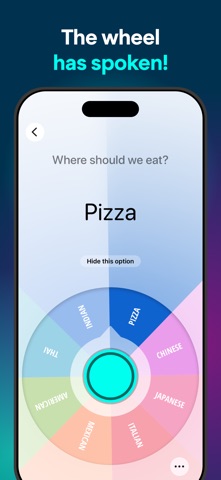
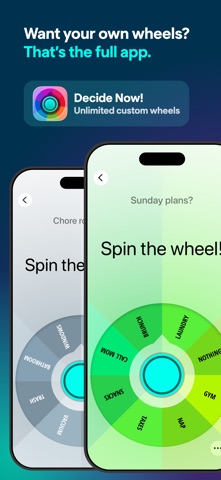
Spin first. Decide fast. No setup. Decide Now! Lite is a taste of the original decision wheel: 11 ready-made wheels, zero setup. Open the app, pick a wheel, spin — the argument is over before it starts. WHAT'S ON THE WHEELS • Where should we eat? — the classic • What to watch, who goes first, chore roulette • Random names for class, games and giveaways • Yes or no, for when you just need a push • Workouts, desserts, date nights and more THE HONEST PART (READ THIS BIT) Lite comes with ready-made wheels only. You can spin them, narrow them down and enjoy them — but you can't edit them or create your own. Building custom wheels with your own options is what the full app, Decide Now!, is for. If you install Lite expecting a wheel editor, you'll be grumpy, and we'd rather you weren't. Think of Lite as the test drive: same wheel, same spin, same "the wheel has spoken" moment — with the keys to the factory in the full app. WHAT YOU GET • All the preset wheels, ready in seconds • Not feeling an option? Hide it and spin again — nothing gets deleted • Shake to spin • Color themes, dark mode included • Works completely offline • No ads, no account, no sign-up LIKE IT? GO FULL The full app adds unlimited custom wheels, unlimited options, list import straight from your clipboard, plus export and backup. Still no ads, still no account — on the App Store since 2010. Spin the demo. Keep the habit.
What's new · 2.3
This is the biggest release since version 2.0. Decide Now! Lite has been rebuilt from the ground up. A NEW LOOK • Refreshed wheel screen with translucent glass controls and new typography • Brand new app icon • On iOS 26, buttons adopt the new system glass look HIDE OPTIONS INSTEAD OF DEACTIVATING THEM Deactivated options used to stay on the wheel, grayed out, and hand the result to the nearest active option — which quietly gave some options better odds than others. They are now hidden completely, so every option left on the wheel has exactly the same chance. • Long-press a slice to hide it — handy for taking someone out of the running without losing them • A badge shows how many options are hidden; tap it to look through them and bring any back • Reset all restores every hidden option at once • Slices animate as they disappear and return FRESHER WHEELS • All the built-in wheels have been reworked, with better options across the board NEW LANGUAGES • Japanese and Czech • Translations completed and corrected across every other language • Labels are now called options throughout the app BETTER ON IPAD • Navigation reworked for the bigger screen FIXES AND POLISH • Buttons sit correctly in landscape • Various crash fixes and smoother animations throughout Want to build your own wheels? That's what the full Decide Now! is for.
Details