

McDonald's Japan
McDonald's JAPAN · Food & Drink
Independent analytics for this App Store listing. AppTracker is not affiliated with McDonald's JAPAN.
Chart standing · US
What changed · US
Listing changes AppTracker has observed for this app in this storefront — new versions, price moves, rating shifts, and store copy.
• Improved app performance and stability. • Fixed minor bugs and fine-tuned the design.
Ratings breakdown · US
The star breakdown behind this app's rating in this storefront.
In-app purchases · US
No in-app purchases.
Screenshots


Keywords this app targets
Search terms AppTracker associates with this app — estimates, not search volume. ❝ = in the app's title; a highlighted number is its current position for that term.
Similar apps
Competitors and close alternatives, as estimated by AppTracker.
 McDonald's
 USA
1 shared topic · 1 shared title word
McDonald's
McDonald's USA
1 shared topic · 1 shared title word
 McDonald’s
McDonald's Global Markets LLC
2 shared topics · 1 shared title word
McDonald’s
McDonald's Global Markets LLC
2 shared topics · 1 shared title word
 McDonald's Offers and Delivery
ARCOS DORADOS ARGENTINA S.A.
1 shared title word
McDonald's Offers and Delivery
ARCOS DORADOS ARGENTINA S.A.
1 shared title word
 サブウェイ ジャパン公式モバイルアプリ
WATAMI FAST CASUAL MANAGEMENT LIMITED LIABILITY COMPANY
2 shared topics
サブウェイ ジャパン公式モバイルアプリ
WATAMI FAST CASUAL MANAGEMENT LIMITED LIABILITY COMPANY
2 shared topics
 Daimaru Matsuzakaya Mobile App
Daimaru Matsuzakaya Department Stores Co.Ltd.
Daimaru Matsuzakaya Mobile App
Daimaru Matsuzakaya Department Stores Co.Ltd.
 Rocket Now: Food Delivery
CP One Japan G.K.
Rocket Now: Food Delivery
CP One Japan G.K.
 Tabelog - Food Guide in Japan
Kakaku.com, Inc.
1 shared title word
Tabelog - Food Guide in Japan
Kakaku.com, Inc.
1 shared title word
 Japan Eats
Aleksandr Murashkin
1 shared title word
Japan Eats
Aleksandr Murashkin
1 shared title word
About
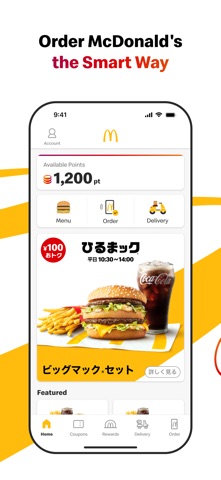
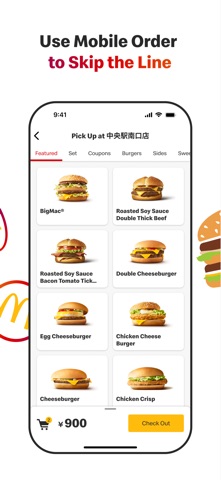
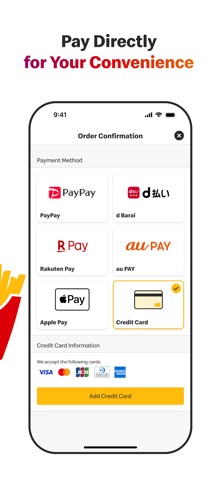
McDonald's Official App for Japan The McDonald's official app offers not only daily coupons and latest information but also allows you to complete your order and payment seamlessly. Features Available: • Access to the Latest Coupons Enjoy exclusive coupons that can be used in-store or through mobile orders. Show the coupon number to the staff by selecting "Use in Store" or choose a coupon from the mobile order menu category. • Check McDonald’s Menu Access detailed information about McDonald's products, including ingredients, allergy information, and nutritional content. • Discover the Latest News Find recommended news and products tailored to you right on the home screen. • Order and pay via the App with Mobile Order You can complete your order and payment entirely through the app. Skip the line and receive your food directly at your table (not available in certain restaurants or hours). • Order from home and have your meal delivered by McDelivery® Service via the App. How to Use Mobile Order: Step 1: Log In To use coupons or place an order, you need to register and log in. If you've forgotten your password, you can reset it via the "Forgot Password" option. Please ensure that you can receive emails from info@nsp.mdj.jp. Step 2: Choose a Restaurant Select the restaurant where you would like to receive your order. Please check the available restaurants in the app. Step 3: Select Your Menu Choose your favorite menu items. Coupons can also be used. Please note that some coupons available for mobile orders may differ from those available at the Front Counter. Step 4: Choose Your Pickup Method Select from table delivery (table service), counter pickup, takeout, or Drive-Thru. Pickup options may vary by restaurant and time. Table service, park & go, and drive-thru are not available at all locations. Step 5: Choose Your Payment Method You can pay with a credit card (VISA, Master, JCB, Diners, American Express), d-Barai, PayPay, Rakuten Pay, au PAY, or Apple Pay . Please Complete the Following Step After Arriving at the Restaurant Step 6: Receive Your Order Once you arrive at the restaurant, confirm your payment to start the preparation of your order. Enjoy your freshly prepared food. How to Use McDelivery® Service: Step 1: Log In To place an order, you need to register and log in. If you've forgotten your password, you can reset it via the "Forgot Password" option. Please ensure that you can receive emails from info@nsp.mdj.jp. Step 2: Select Delivery Address and Time Choose whether you want to order now or reserve a delivery time. Reservations can be made from one day to two hours prior to the desired delivery time. Step 3: Select Your Menu Choose your favorite menu items. Step 4: Choose Your Payment Method You can pay with cash, credit card (VISA, Master, JCB, Diners, American Express), d-barai, PayPay, Rakuten Pay, au PAY, or Apple Pay . Please note that cash payments are not available at some locations. Step 5: Receive Your Order Our delivery staff will bring your freshly prepared meal to your specified address. If you prefer a no-contact delivery, you can select the "Leave at the Door" option when ordering. • Please note: • Delivery times vary by location. • Orders for the breakfast menu must be placed by 10:20 AM. • Minimum order value is ¥1,500. • A delivery fee of ¥300 applies.
What's new · 5.5.70
• Improved app performance and stability. • Fixed minor bugs and fine-tuned the design.
Details