

HachiCalendar2 Pro
加明 严 · Productivity
Independent analytics for this App Store listing. AppTracker is not affiliated with 加明 严.
Chart standing · US
What changed · US
Listing changes AppTracker has observed for this app in this storefront — new versions, price moves, rating shifts, and store copy.
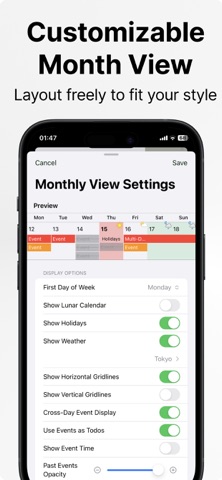
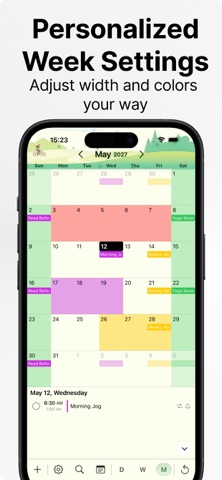
• Added date range filters to Statistics, with an option to include all-day events. • Added a setting to hide blank space at the beginning of the month in the vertically scrolling Month View. • When using Japanese, added an option to display Gregorian and Japanese era dates together. • Fixed custom colors not displaying correctly in Week View. • Fixed the end-time display in the Day View timeline when the start and end times are the same. • Fixed an issue where tapping Cancel did not respond in Event Trash and Duplicate Event Cleanup. • Fixed other known issues and improved the overall experience.
Ratings breakdown · US
The star breakdown behind this app's rating in this storefront.
In-app purchases · US
What this app sells inside itself, grouped by kind and priced for this storefront.
Screenshots




Keywords this app targets
Search terms AppTracker associates with this app — estimates, not search volume. ❝ = in the app's title; a highlighted number is its current position for that term.
Similar apps
Competitors and close alternatives, as estimated by AppTracker.
 BusyCal: Calendar & Tasks
Busy Apps FZE
3 shared topics
BusyCal: Calendar & Tasks
Busy Apps FZE
3 shared topics
 Awesome Calendar
YunaSoft Inc.
3 shared topics
Awesome Calendar
YunaSoft Inc.
3 shared topics
 Tiny Calendar Pro
TinyWork Apps
3 shared topics · 1 shared title word
Tiny Calendar Pro
TinyWork Apps
3 shared topics · 1 shared title word
 Cal2Todo
Yasuko Shikiuchi
3 shared topics
Cal2Todo
Yasuko Shikiuchi
3 shared topics
 CCal 11 Pro
Catalystwo, LLC
2 shared topics · 1 shared title word
CCal 11 Pro
Catalystwo, LLC
2 shared topics · 1 shared title word
 Fantastical Calendar
Flexibits Inc.
3 shared topics
Fantastical Calendar
Flexibits Inc.
3 shared topics
 AnySchedule - Calendar & Todo
ReleCompany
1 shared topic
AnySchedule - Calendar & Todo
ReleCompany
1 shared topic
 Simple Calendar: ToDo Planner
Komorebi Inc.
2 shared topics
Simple Calendar: ToDo Planner
Komorebi Inc.
2 shared topics
About
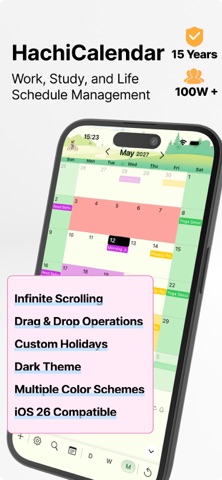
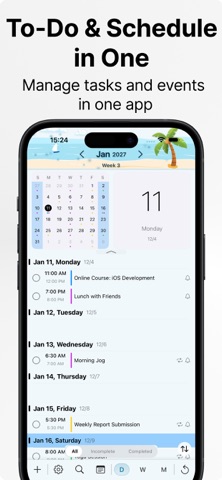
Your faithful friend, making life more organized. 15 years, over 1 million users. Contact: hachi.iphone@gmail.com Scroll endlessly through your past and future. Turn events into checkable to-dos. AI helps you create and analyze events naturally. Floating cards keep countdowns and key dates always in view. Hachi Calendar combines Calendar + To-Do + AI Assistant + Floating Date Cards into one powerful, seamless interface. Browse vertically without switching views. Check off events like tasks. Let AI create, complete, and analyze your schedule. Supports Gregorian / Lunar calendars, seasonal terms, and traditional date references to help you plan smarter. ####Key Features Infinite Vertical Scrolling Browse past and future smoothly without switching pages. One-Page Operation Flow View, add, drag, copy, move, and complete — all on one screen. Events as To-Dos Mark events as completed and keep a record of progress. Integrated AI Assistant Create events from natural speech or text; AI parses times, reminders, repeats, and provides summaries, analytics, and free-time suggestions. Floating Countdown Cards Display countdowns, elapsed days, or key dates. Auto-highlights when deadlines approach. Time Insights & Analytics Discover active hours, time usage trends, and weekday/weekend differences. Quick Voice Input Long press to record → real-time transcription → release to create. Countdown indicator before recording ends. Smart Gap & Conflict Detection Detects available slots and prevents overlapping events. Key Dates Always Visible Floating cards + countdowns + quick jumps keep important days front and center. Emojis & Categories Add emojis and tags for quick visual identification. Multiple Reminders Standard alerts, countdown highlights, and completion feedback. Privacy First Local analytics only — no data uploaded. ####Typical Use Cases Say “Review meeting at 3 PM Friday, remind me 10 minutes before” → instantly created. Check off daily study or workout goals. Keep countdowns for exams, trips, or milestones visible. Ask AI for “next week’s free time” to schedule meetings. Review your time structure with automatic visual insights. Track lunar birthdays or seasonal events easily. ####Highlights True one-page vertical scrolling experience Events double as to-dos AI-powered creation, analysis, and scheduling suggestions Floating cards for countdowns & key dates Long-press voice input with dynamic countdown Supports Gregorian / Lunar / Solar Terms / Almanac Time usage insights and rhythm optimization Lightweight, fast, and information-dense ####Perfect For Users who want to manage schedules and tasks in one screen Heavy planners who love AI or quick voice entry Those who follow both modern and traditional calendars Anyone who needs countdowns and visual goal tracking People who want to analyze time usage to optimize their routines
What's new · 11.7.0
• Added date range filters to Statistics, with an option to include all-day events. • Added a setting to hide blank space at the beginning of the month in the vertically scrolling Month View. • When using Japanese, added an option to display Gregorian and Japanese era dates together. • Fixed custom colors not displaying correctly in Week View. • Fixed the end-time display in the Day View timeline when the start and end times are the same. • Fixed an issue where tapping Cancel did not respond in Event Trash and Duplicate Event Cleanup. • Fixed other known issues and improved the overall experience.
Details