

Scanner App: Genius Scan
The Grizzly Labs · Business
Independent analytics for this App Store listing. AppTracker is not affiliated with The Grizzly Labs.
Chart standing · US
What changed · US
Listing changes AppTracker has observed for this app in this storefront — new versions, price moves, rating shifts, and store copy.
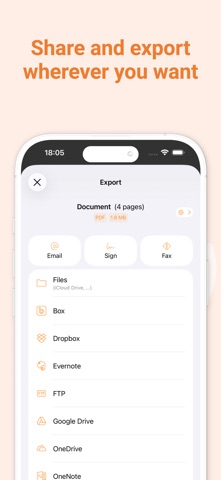
EXPORT IMPROVEMENTS - A4 PDF exports now use the exact ISO page dimensions. - Export shortcuts no longer delete the original document when exporting individual pages. - Documents whose names contain slashes or colons can now be dragged to the Files app. - Export shortcut and Auto-Export rule names now have surrounding spaces removed and default to the destination name when left blank. TEXT RECOGNITION - Recognized text from separate pages is now separated with line breaks. SUPPORT - You can now attach documents, photos, and videos when contacting support. - The support form now explains which required information is missing before sending a message. RELIABILITY - Fixed a crash that could affect users with a legacy Email Auto-Export configuration. - Fixed a rare issue that could prevent Genius Scan from opening on some devices.
Ratings breakdown · US
The star breakdown behind this app's rating in this storefront.
In-app purchases · US
What this app sells inside itself, grouped by kind and priced for this storefront.
Screenshots



Keywords this app targets
Search terms AppTracker associates with this app — estimates, not search volume. ❝ = in the app's title; a highlighted number is its current position for that term.
Similar apps
Competitors and close alternatives, as estimated by AppTracker.
 PDF Scanner App: Scanner+ Docs
Codeway Dijital Hizmetler Anonim Sirketi
2 shared topics · 3 shared title words
PDF Scanner App: Scanner+ Docs
Codeway Dijital Hizmetler Anonim Sirketi
2 shared topics · 3 shared title words
 Scanner App: Scan Documents
UNITEMAN TECHNOLOGY (HK) LIMITED
3 shared topics · 4 shared title words
Scanner App: Scan Documents
UNITEMAN TECHNOLOGY (HK) LIMITED
3 shared topics · 4 shared title words
 Scan App +
Sarrada Software Inc
3 shared topics · 2 shared title words
Scan App +
Sarrada Software Inc
3 shared topics · 2 shared title words
 Scanner App - Scan PDF & Docs
TAPSUITE YAZILIM HIZMETLERI ANONIM SIRKETI
2 shared topics · 4 shared title words
Scanner App - Scan PDF & Docs
TAPSUITE YAZILIM HIZMETLERI ANONIM SIRKETI
2 shared topics · 4 shared title words
 Scanner App. JPG, Photo to PDF
Municorn Limited
2 shared topics · 3 shared title words
Scanner App. JPG, Photo to PDF
Municorn Limited
2 shared topics · 3 shared title words
 Scanner: Scan Documents·
Vipacademy Cambridge SL.
3 shared topics · 2 shared title words
Scanner: Scan Documents·
Vipacademy Cambridge SL.
3 shared topics · 2 shared title words
 Photo to PDF Convert Scanner +
JatApp LLC
2 shared topics · 1 shared title word
Photo to PDF Convert Scanner +
JatApp LLC
2 shared topics · 1 shared title word
 CamScanner - PDF Scanner App
INTSIG Information Co., Ltd
2 shared topics · 3 shared title words
CamScanner - PDF Scanner App
INTSIG Information Co., Ltd
2 shared topics · 3 shared title words
About
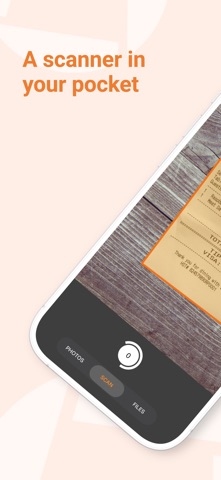
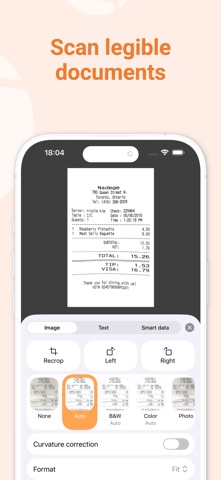
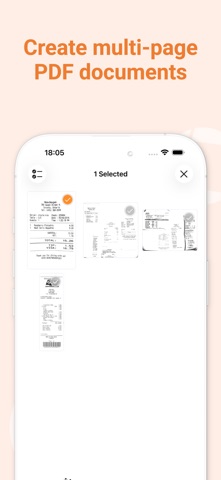
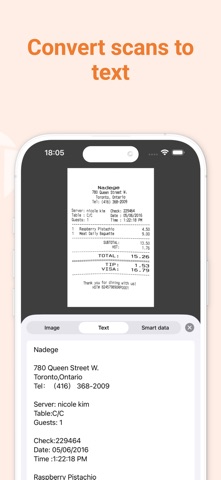
Genius Scan is a document scanner app in your pocket. Quickly scan your paper documents on the go and export them as multi-page PDF files. *** Apple App of the Week *** 20+ million users *** 1000s of small businesses *** Place any document in front of your device’s camera: our scanner app automatically recognizes the paper against the background, crops it, and cleans up the result. You obtain a crisp, legible scan. Batch scanning lets you scan dozens of pages in a matter of seconds. Powerful tools help you organize, share, or archive your documents. “Next time you plan to hit the road, don’t forget to download Genius Scan to make life easier for yourself and your accounting department.” - AppPicker.com “Camera apps aren’t designed for close-up text scanning, but Genius Scan is.” - The Guardian == KEY FEATURES == Smart Scanning: - Document detection & background removal - Distortion correction - Shadow removal and defect cleanup - Filters (black & white, whiteboard, photo) - Batch scanning PDF Creation & Editing: - Document merging & splitting - Multiple page PDF creation - Photos and PDF import Security & Privacy: - On-device document processing + Face ID locking + PDF password encryption Document Organization: - Document tagging - Metadata and content search + Smart document renaming (custom templates, …) + Backup and multi-device sync with Genius Cloud (separate subscription) Export: - Email + Box, Dropbox, Evernote, Expensify, Google Drive, iCloud Drive, OneDrive, OneNote, FTP, SugarSync, WebDAV. + Any WebDAV compatible service such as Citrix ShareFile, NextCloud, ownCloud, Synology, Yandex. + Automatic background auto-export OCR (Text Recognition): + Text extraction + Searchable PDF creation + Business card scanning & contact creation The features denoted with [+] are available as part of a premium plan. == ABOUT US == It’s in the heart of Paris, France that The Grizzly Labs develops Genius Scan. We take pride in crafting apps that help millions of users throughout the world and hold ourselves to the highest standards in terms of quality and privacy. Get in touch with us @thegrizzlylabs if you have any questions. == PRICING & LEGAL == Genius Scan is free to use for as long as you want. Should you choose to, you can subscribe to the Genius Scan Plus plan for more features. You can subscribe to Genius Cloud for backup & synchronization. In that case, Genius Scan’s store displays the duration and price of each subscription, updated at the time of purchase. Payment will be charged to iTunes account when the order is confirmed. Subscriptions automatically renew unless auto-renew is turned off no later than 24 hours before the end of the current period. Manage subscriptions, disable auto-renewal in the iTunes account settings. Download the best free mobile scanner and scan your documents in a snap. https://www.thegrizzlylabs.com/genius-scan/cloud/terms
What's new · 8.15
EXPORT IMPROVEMENTS - A4 PDF exports now use the exact ISO page dimensions. - Export shortcuts no longer delete the original document when exporting individual pages. - Documents whose names contain slashes or colons can now be dragged to the Files app. - Export shortcut and Auto-Export rule names now have surrounding spaces removed and default to the destination name when left blank. TEXT RECOGNITION - Recognized text from separate pages is now separated with line breaks. SUPPORT - You can now attach documents, photos, and videos when contacting support. - The support form now explains which required information is missing before sending a message. RELIABILITY - Fixed a crash that could affect users with a legacy Email Auto-Export configuration. - Fixed a rare issue that could prevent Genius Scan from opening on some devices.
Details