

Remote Control For Sound Byte Cart Machine Program
Black Cat Systems · Music
Independent analytics for this App Store listing. AppTracker is not affiliated with Black Cat Systems.
Chart standing · US
Screenshots
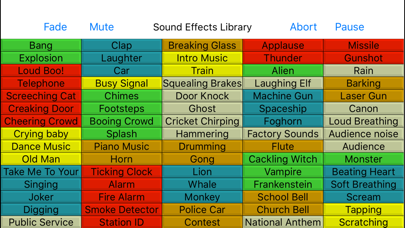
About
Sound Byte Control lets you control a copy of Sound Byte running on a remote computer from your iPad. Now you can run Sound Byte for all your sound clip playback needs, without being tied down to your desktop or laptop computer. Note that this is a remote control app, it does not run by itself. All 75 carts (sound recordings) on the active Sound Byte rack are displayed. Just tap an entry, and playback starts. You can tap it again to immediately stop playback, or let it naturally end. You can also fade out all playing carts, as well as mute or abort them. It's triggering playback of sound clips for sporting events, radio, theater, presentations, and other events. Sound Byte Control requires you to be running a copy of Sound Byte on your computer, which may be downloaded from here: http://www.blackcatsystems.com/download/soundbyte.html Sound Byte is perfect for: Radio, podcast and TV productions - have ads, announcements, songs and sound effects at your fingertips. Theater Productions - play any sound effect on cue. Sports Events - jazz up the commentary for your home team with sound effects each time they score.
What's new · 2.2
This update from Apple will improve the functionality of this app. No new features are included. Updates for iOS 10.3 64 bit application
Details