

Mobile Mouse Remote (Lite)
RPA Tech, INC · Utilities
Independent analytics for this App Store listing. AppTracker is not affiliated with RPA Tech, INC.
Chart standing · US
What changed · US
Listing changes AppTracker has observed for this app in this storefront — new versions, price moves, rating shifts, and store copy.
- Fixes
Price & rating history · US
Reconstructed from the listing changes AppTracker has observed in this storefront. A field is charted once it has changed more than once, and each line starts at the value it moved from.
Average rating · ★ 3.88 now · 6 changes on record
Ratings breakdown · US
The star breakdown behind this app's rating in this storefront.
In-app purchases · US
What this app sells inside itself, grouped by kind and priced for this storefront.
Screenshots


About
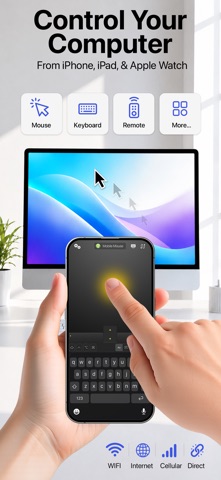
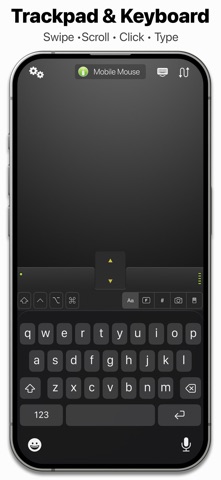
Mobile Mouse instantly transforms your iPhone, iPad, and Apple Watch into a wireless trackpad mouse, remote control, keyboard, and MUCH more for your Mac or Windows PC. Sit back and surf the web, browse your photo library or control your media player from the comfort of your couch. Mobile Mouse works as a fully functional mutitouch trackpad mouse, as well as an AirMouse, allowing you to control your computer with the motion of your hand. The accompanying Apple Watch app includes a trackpad, application switcher, as well as media and presentation remotes, giving you complete control over your computer and advanced presentation controls all on your wrist. Mobile Mouse was the original wireless trackpad app for iOS, launched in 2009, and has been downloaded by over a million users worldwide. Features: • Wireless control over your entire computer • Multi-touch trackpad (full screen vertical and landscape modes) • Air Mouse (works with the motion of your hand) • OS X style application switcher (works just like the dock in OS X) • Automatic local network and peer-to-peer connectivity • Cloud Connect for access over the internet and cellular networks • QR Code Web Remote. Scan a QR code to control your Mac from any mobile web browser without installing an app • Album artwork and track info for current playing song for Apple Music and Spotify • Apple Watch App (Trackpad/Media/Presentation control) • Live text/image scanner. Insert live text, photos, QR/UPC codes, and documents in any application using your iPhone camera. • Photo and text Sync. Send content from your computer directly to your iOS device. Call a phone number on your computer, push an address from your computer to your Maps app. • Remote file Browser • Media Remote & Web Remote • Presentation Remote • Numeric keyboard • Programmable hotkeys • Password protection • Pressure sensitive graphic Tablet for Photoshop, Illustrator, Sketchbook, Pixelmator, and more. (iPad only, requires Apple Pencil) • Control media websites such as YouTube, Pandora, Hulu, Netflix • And much, much, much, much more. Apple Watch App • Trackpad with full mouse control and scrolling • Basic Presentation mode supports next/back with any presentation software • Media remote supports play and volume controls • Apple Music & Spotify remote supports album art and track info • Application switcher lets you switch to any running app. Apps can be filtered to show all running apps, or just the ones that have remotes ** BEFORE YOU RUN THE SOFTWARE ** You will need to download the server application from: mobilemouse.com IMPORTANT: IF YOU HAVE ANY PROBLEMS OR QUESTION, PLEASE CHECK THE TROUBLESHOOTING SECTION ON OUR SITE, OR USE THE CONTACT FORM TO ASK FOR HELP. Privacy Policy: https://mobilemouse.com/privacy.html Terms Of Use: https://mobilemouse.com/terms.html
What's new · 4.0.2
- Fixes
Details