

Trumpet Studio - Practice Hub
Windy Town · Music
Independent analytics for this App Store listing. AppTracker is not affiliated with Windy Town.
Chart standing · US
What changed · US
Listing changes AppTracker has observed for this app in this storefront — new versions, price moves, rating shifts, and store copy.
This update fixes a problem in the Mac version of Trumpet Studio. Nothing changes on iPhone or iPad.
Ratings breakdown · US
The star breakdown behind this app's rating in this storefront.
In-app purchases · US
No in-app purchases.
Screenshots


Keywords this app targets
Search terms AppTracker associates with this app — estimates, not search volume. ❝ = in the app's title; a highlighted number is its current position for that term.
Similar apps
Competitors and close alternatives, as estimated by AppTracker.




About
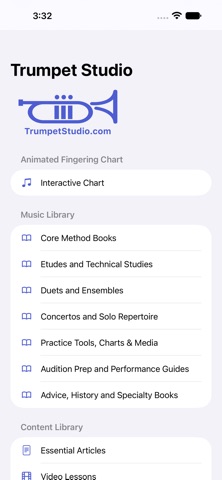
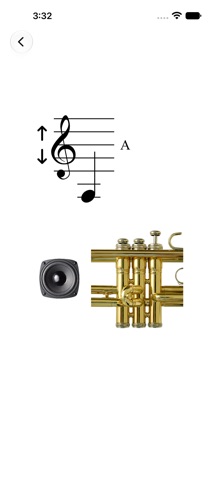
Trumpet Studio has something for every level of player. At its core is an interactive, animated fingering chart with sound — press the arrow up or down to see the fingering, then touch the speaker to hear the pitch. Simple, and genuinely useful for practice. YOUR PRACTICE HUB Trumpet Studio is built to help you practice better, and more often: Practice Timer — set a session of 30, 45, 60, 75, or 90 minutes and stay focused Practice Schedule — a simple weekly view of your practice; finish a timer session and the day is logged automatically Practice Bar — while you read any book in the library, a floating bar puts the practice timer, metronome, and one-tap recording right on top of your music Record Yourself — capture your playing, then slow it down or speed it up (80–120%) in My Recordings without changing the pitch Blues Play-Along — improvise over blues backing tracks, slow them down or speed them up (80–120%) without changing the pitch, and record your take right over the track Metronome — steady time, adjustable tempo THE MUSIC LIBRARY A library of 27 reference documents: • 12 Etudes For Trumpet — Gallay • 36 Etudes — Theo Charlier • All Scales – Major, Minor, Melodic, Harmonic • Blues Charts • Bohme 24 Melodic Studies • Boscher Trompette • Brandt Etudes For Trumpet • Clarke Elementary Studies • Clarke Characteristic Studies • Clarke Solos • Clarke Technical Studies • Clodomir Trumpet Method • Forever Flower — Droste Original • Goldman Practical Studies • High Note/High Range with Exercises • Kopprasch 60 Etudes Book 1 • Kopprasch 60 Etudes Book 2 • Saint Jacome Grand Method • Technical Study Exercises • The Complete Arban Method Book • Trumpet Fingering Chart • Trumpet Staff with Piano Part • Trumpet Wedding Music • WFMT Brass Quintet • Wurm 20 Difficult Studies • Wurm 40 Trumpet Studies • Wurm Duets Every reference document can be printed or shared directly from the app. ARTICLES, VIDEOS & PODCASTS Every article is written in clear, concise language, including: High Note Playing Air Exercises and Aids Method Book List (easy, medium, difficult) Mouthpiece Advice Lip Buzzing Exercises Practice Routines Plus a growing library of Video Lessons, including: • Welcome to Trumpet Studio • How to Practice and Practice Routines • Trumpet Method Books • How to Play in the Upper Register • Performance Tips • Trumpet Lip Buzzing • Picking a Trumpet ...and the latest trumpet podcast episodes, with a mini-player so you can keep listening while you browse. "The animated fingering with pitch is not only very useful but makes practicing more fun... this will save me money in extra lessons." — a parent of a trumpet student Whether you're a beginner learning your first fingerings or an advanced player working through Charlier, Trumpet Studio gives you the music, the tools, and the habit to get better every day.
What's new · 5.0.1
This update fixes a problem in the Mac version of Trumpet Studio. Nothing changes on iPhone or iPad.
Details