

TrafficCamNZ Lite
David Wilson · Navigation
Independent analytics for this App Store listing. AppTracker is not affiliated with David Wilson.
Chart standing · US
What changed · US
Listing changes AppTracker has observed for this app in this storefront — new versions, price moves, rating shifts, and store copy.
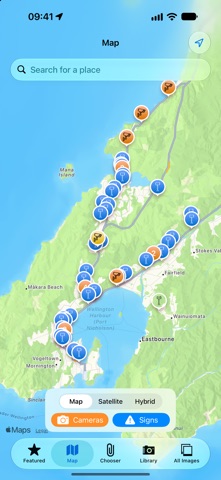
TrafficCamNZ Lite has been rebuilt for today's iPhone and iPad. - Map: every camera on a map. Tap a camera to view it, or star it to feature it. - Live NZTA motorway signs on the map - tap one to read its current message. - A fresh built-in camera list: 570 cameras, every one checked and working. New users start with live Wellington cameras; existing users can merge the new list, remove old cameras that no longer work, and feature the suggested cameras in one tap. - Feature up to 10 cameras (was 4, or 6 on iPad). - Sharper pictures, prepared in the background, using about half the memory. - New Settings (gear button): Automatic Refresh and Keep Camera Proportions. Help is in Settings now. - New What's New screen (sparkles button). - Cameras that can't be loaded show a symbol - press and hold to see why. - Many fixes, including crashes when opening a camera from the Library and when a screen closed before its picture arrived, a clipped switch and hidden labels on Edit Camera, and Use Current Location. - Your camera list is saved more safely and comes across untouched. Requires iOS 17 or later.
Ratings breakdown · US
The star breakdown behind this app's rating in this storefront.
In-app purchases · US
No in-app purchases.
Screenshots




About
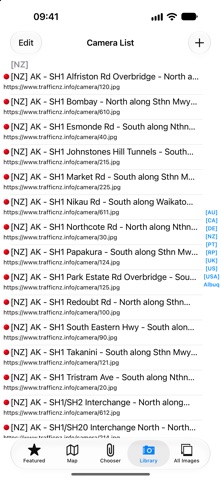
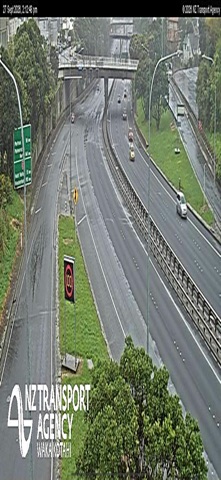
TrafficCamNZ Lite shows live traffic camera pictures from New Zealand and around the world - check the road before you leave. Start with live Wellington motorway cameras, browse 570 built-in cameras - every one checked and working - or add any web camera or image you like - even weather maps. NEW IN 2.0 - Map: see every camera on a map, tap one to view it, and star it to add it to your featured cameras. - Live motorway signs: NZTA electronic signs appear on the map. Tap a sign to read its current message, travel times included. - Sharper pictures: every camera image is cleaned up and sharpened to suit your screen. - Up to 10 featured cameras on iPhone and iPad. - A new Settings screen, automatic refresh, and a What's New screen. FEATURED CAMERAS Your featured cameras sit side by side on the main screen. Swipe between them, double-tap one to see it full screen with pinch to zoom, and tap Refresh for the latest pictures. On iPad, show 1, 4 or 16 cameras at a time. Use Chooser to pick and order them. FIND AND ADD CAMERAS - Library: search the built-in camera list, or add your own camera by entering its web address - test the picture before you save it. - All Images: scroll through every camera in the list with its picture. - Suggested cameras: feature a ready-made set of live New Zealand cameras in one tap. - Merge: bring in cameras from the latest built-in list without losing your own, and clear out old cameras that no longer work. SETTINGS - Automatic Refresh: update your featured cameras every 1 to 10 minutes. - Keep Camera Proportions: show each camera at its true shape instead of filling the screen. WHEN A CAMERA IS DOWN Cameras that can't be loaded show a clear symbol. Press and hold the picture to see what went wrong. GOOD TO KNOW - Pictures come straight from each camera's operator and are not stored by the app. If a picture looks out of date or a camera is offline, that is the camera's source - TrafficCamNZ Lite has no control over it. - Pictures are downloaded each time you refresh, so keep an eye on your mobile data. Wi-Fi is usually faster. - Your location is only used to show where you are on the map and, if you choose, to set a camera's position. WANT MORE? TrafficCamNZ, the full version, shows many more cameras at once and adds live streaming cameras, cameras near you as you drive, iCloud sync across your devices and an Apple Watch app.
What's new · 2.0.0
TrafficCamNZ Lite has been rebuilt for today's iPhone and iPad. - Map: every camera on a map. Tap a camera to view it, or star it to feature it. - Live NZTA motorway signs on the map - tap one to read its current message. - A fresh built-in camera list: 570 cameras, every one checked and working. New users start with live Wellington cameras; existing users can merge the new list, remove old cameras that no longer work, and feature the suggested cameras in one tap. - Feature up to 10 cameras (was 4, or 6 on iPad). - Sharper pictures, prepared in the background, using about half the memory. - New Settings (gear button): Automatic Refresh and Keep Camera Proportions. Help is in Settings now. - New What's New screen (sparkles button). - Cameras that can't be loaded show a symbol - press and hold to see why. - Many fixes, including crashes when opening a camera from the Library and when a screen closed before its picture arrived, a clipped switch and hidden labels on Edit Camera, and Use Current Location. - Your camera list is saved more safely and comes across untouched. Requires iOS 17 or later.
Details