

TideApp
Forrest Grant · Weather
Independent analytics for this App Store listing. AppTracker is not affiliated with Forrest Grant.
Chart standing · US
What changed · US
Listing changes AppTracker has observed for this app in this storefront — new versions, price moves, rating shifts, and store copy.
• Home Screen widgets. Add a Tide widget to your iPhone Home Screen and see the next high or low at a glance — no need to open the app. • Countdown to the next turn. The Today screen now counts down to the next tide change, so you always know how long you've got. • Turn your phone for the full chart. Rotate to landscape and the tide chart fills the screen, edge to edge. • StandBy and split-view layouts. Tide looks right on iPhone StandBy on your nightstand and in Split View, redrawn for every size. • A smoother way back to now. Tap the reading line to glide back to the current moment instead of jumping to it. • Polish and reliability. A bigger, easier-to-spot settings button, and a fix so tide alerts only ever reflect your device's current list.
Price & rating history · US
Reconstructed from the listing changes AppTracker has observed in this storefront. A field is charted once it has changed more than once, and each line starts at the value it moved from.
Average rating · ★ 4.69 now · 11 changes on record
Ratings breakdown · US
The star breakdown behind this app's rating in this storefront.
In-app purchases · US
What this app sells inside itself, grouped by kind and priced for this storefront.
Screenshots


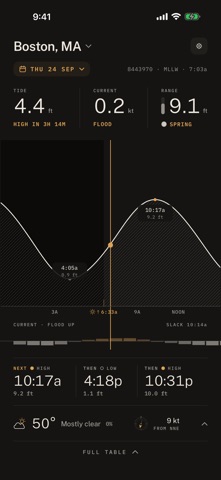
About
TideApp turns your phone into a tide table for 3,486 NOAA stations across the United States — the 1,251 reference stations NOAA publishes full harmonic data for, plus 2,235 subordinate stations derived from them. Drag the chart and the water follows your finger. Predictions are computed on your device from NOAA's published harmonic constants, so once the app has loaded, no signal or connection is needed to read the tide. FREE • Today's tide at any station, with sunrise, sunset and the day's moon • Conditions above the chart — the sky, the temperature, and the day's high and low • Nearest-station lookup from your location, or find any of the 3,486 by name or on the map • Switch between stations any time — starred stations are free, not a Pro feature PRO • Every day, not just today — drag the chart and the day strip as far as you like • Wind and gusts on a compass, pressure and which way it's going, visibility, and the chance of rain • Apple Watch app and complications • Widgets on your home screen • Alerts for high and low tides as well as thresholds The weather needs a connection. The tide does not — it is computed on your phone, so an outage takes the sky off the screen and leaves the water exactly where it was. TideApp Pro is a 4.99 USD/month or 49.99 USD/year auto-renewing subscription with a 7-day free trial for new subscribers. Payment is charged to your Apple ID at purchase confirmation; the subscription renews automatically unless auto-renew is turned off at least 24 hours before the end of the current period. Manage or cancel in your Apple ID account settings. See Terms of Use and Privacy Policy below. Predictions are computed from published NOAA CO-OPS harmonic constants. They are not official NOAA products, are not endorsed by NOAA, and are not a substitute for official navigational sources — they exclude storm surge, wind, and other weather effects and should not be relied on for navigation. Weather data provided by Apple Weather. Terms of Use: https://tideapp.com/terms.html Privacy Policy: https://tideapp.com/privacy.html
What's new · 6.0.4
• Home Screen widgets. Add a Tide widget to your iPhone Home Screen and see the next high or low at a glance — no need to open the app. • Countdown to the next turn. The Today screen now counts down to the next tide change, so you always know how long you've got. • Turn your phone for the full chart. Rotate to landscape and the tide chart fills the screen, edge to edge. • StandBy and split-view layouts. Tide looks right on iPhone StandBy on your nightstand and in Split View, redrawn for every size. • A smoother way back to now. Tap the reading line to glide back to the current moment instead of jumping to it. • Polish and reliability. A bigger, easier-to-spot settings button, and a fix so tide alerts only ever reflect your device's current list.
Details