

Every Word: Audiobook Player
Mike Apurin · Books
Independent analytics for this App Store listing. AppTracker is not affiliated with Mike Apurin.
Chart standing · US
What changed · US
Listing changes AppTracker has observed for this app in this storefront — new versions, price moves, rating shifts, and store copy.
■ New - Keep companion files alongside your audiobooks in the new “Extras” page - Import folders and ZIP archives ■ Improved - Updated layouts with more consistent spacing, colors, and typography ■ Fixed - Chapter start times on the “Chapters” page omit the duration of earlier files in multi-file audiobooks - The “Chapter end” sleep timer continues playing the next file in multi-file audiobooks - Some MP3 files stop near the end without continuing to the next file - Titles stored in iCloud Drive sometimes fail to play until the Player is reopened - A paused player does not update when you continue listening on another device - Player controls can size incorrectly in narrow windows or when the keyboard is visible - The bottom player can shrink too narrow to show the title and artwork on some window sizes - Artwork is too large in expanded player after rotation
Ratings breakdown · US
The star breakdown behind this app's rating in this storefront.
In-app purchases · US
What this app sells inside itself, grouped by kind and priced for this storefront.
Screenshots




About
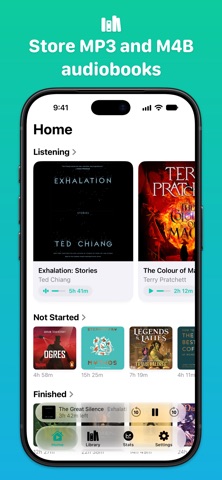
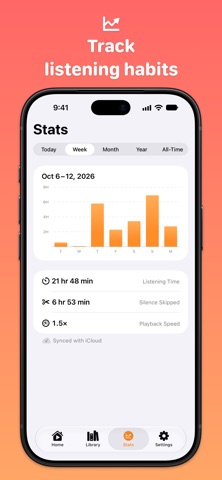
Every Word is a player for your audiobook library. Organize books, keep your place, and fine-tune playback in a friendly interface. ■ Bring Your Library Add M4B, MP3, and other supported audiobook files directly in Every Word, including from folders and ZIP archives. Keep companion PDFs, ebooks, and images with each audiobook in Extras. Use iCloud Drive to sync files and listening progress between devices, or keep books locally on your device. ■ Keep Your Place Use chapters, bookmarks with notes, Quick Skip, and a sleep timer for long books, late nights, and everyday listening. ■ Shorten Silences Shorten Silences reduces long pauses between words or sentences without distorting the narration. Voices stay natural, and some books play up to 20% faster without changing the narrator’s pace. More features: - Playback speed from 0.5× to 3× - Enhance Audio for louder volume and cleaner sound - Library filters, sorting, and editable book details - Listening stats by day, week, month, year, or all time - Automate playback with App Shortcuts - CarPlay browsing and playback - Dark Mode - 10 accent colors ■ Every Word Plus Every Word is free to try. Without a membership, playback has a daily 2-book limit. Every Word Plus membership includes: - Unlimited library: remove the daily 2-book limit and listen to your entire library - Widgets: see and open books quickly - Alternative app icons: choose from 16 icons - Support future development: Every Word is built by a solo developer. Your membership helps fund new features, fixes, and improvements --- Auto-renewing Every Word Plus memberships are charged to your App Store account and can be managed or canceled in App Store account settings. Privacy Policy: https://everywordapp.com/privacy/ Terms of Use: https://www.apple.com/legal/internet-services/itunes/dev/stdeula/
What's new · 3.6
■ New - Keep companion files alongside your audiobooks in the new “Extras” page - Import folders and ZIP archives ■ Improved - Updated layouts with more consistent spacing, colors, and typography ■ Fixed - Chapter start times on the “Chapters” page omit the duration of earlier files in multi-file audiobooks - The “Chapter end” sleep timer continues playing the next file in multi-file audiobooks - Some MP3 files stop near the end without continuing to the next file - Titles stored in iCloud Drive sometimes fail to play until the Player is reopened - A paused player does not update when you continue listening on another device - Player controls can size incorrectly in narrow windows or when the keyboard is visible - The bottom player can shrink too narrow to show the title and artwork on some window sizes - Artwork is too large in expanded player after rotation
Details