

COSMOTE CHRONOS
COSMOTE Telecommunications S.A. · Education
Independent analytics for this App Store listing. AppTracker is not affiliated with COSMOTE Telecommunications S.A.
Chart standing · US
What changed · US
Listing changes AppTracker has observed for this app in this storefront — new versions, price moves, rating shifts, and store copy.
A new look, the same exciting experience! The app is getting a fresh new look and becoming Telekom Chronos, featuring Telekom’s new visual identity and colors. Powered by AR, VR and AI technologies, it continues to bring the greatest monuments of our cultural heritage to life. And Clio, the digital assistant, is always there to answer your questions in real time. Update the app and journey through the history of the Acropolis, wherever you are!
In-app purchases · US
No in-app purchases.
Screenshots


About
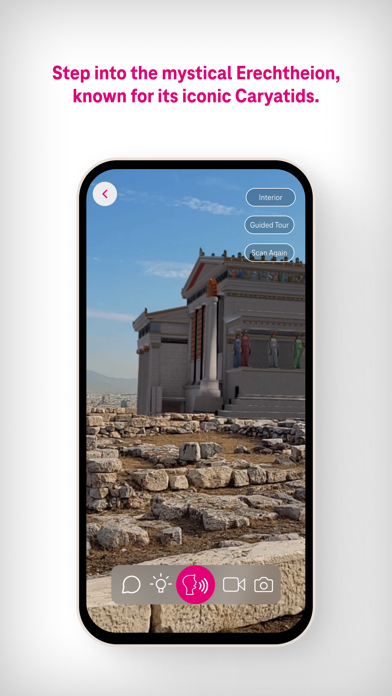
The Telekom Chronos application is a one-of-a-kind free mobile application for smartphones and tablets designed for the archaeological site of the Acropolis of Athens. It combines the capabilities of augmented reality (AR), virtual reality (VR) and artificial intelligence (AI) technologies with the capabilities of the 5G network to make exploring the archaeological site and learning its history immersive, realistic and fun. The application can be downloaded and used by anyone, anywhere! On the rock of the Acropolis, at home, in the school yard, in the park, whether they are in Greece or anywhere else in the world. Digitalisation of culturally significant monuments demonstrates the benefits of technology, enhances digital inclusion and so we conduce to create a better world, for all! 1. What does the Telekom Chronos app offer? • Νavigation through scientifically documented, 3D digital representations of specific monuments on the rock of the Acropolis of Athens and selected exhibits/views from the Acropolis Museum. • Navigation whether you are on the rock of the Acropolis or anywhere else, at home, at school, in the park, anywhere in Greece or the rest of the world. • Self-guided or interactive audio tours. • Tour through a real-time Q&A conversation with Clio, the first-ever digital tour guide of an archaeological site. 2. Tips for best performance • Android device manufactured after 2018, with ARCore and Android OS version 10 or higher. Latest version is recommended. • iOS device manufactured after 2018, with ARKit and iOS version 11.0 or higher. Latest version is recommended. • Use of the avatar (virtual assistant) Clio requirement: 5G network connection with a speed of 200 Mbps and a maximum ping rate (latency) of 40 ms. • Simple auto-guided tour requirement: 4G network connection or connect to a Wi-Fi network with a minimum required internet speed of 48 Mbps. • When you are in a noisy area, we recommend using the headphones of your device. • Make sure the place where you use AR is well lit. If you want to have lighting based on the sun's orbit, your position and the weather conditions, activate the artificial lighting button (+icon) that you will find during the AR experience.
What's new · 2.1
A new look, the same exciting experience! The app is getting a fresh new look and becoming Telekom Chronos, featuring Telekom’s new visual identity and colors. Powered by AR, VR and AI technologies, it continues to bring the greatest monuments of our cultural heritage to life. And Clio, the digital assistant, is always there to answer your questions in real time. Update the app and journey through the history of the Acropolis, wherever you are!
Details