

HyFlow: Awesome Note, Evolved
BRID · Productivity
Independent analytics for this App Store listing. AppTracker is not affiliated with BRID.
Chart standing · US
What changed · US
Listing changes AppTracker has observed for this app in this storefront — new versions, price moves, rating shifts, and store copy.
■ Bug Fixes Fixed the event and task timeline being based on the time the app was opened instead of your Work Time
Price & rating history · US
Reconstructed from the listing changes AppTracker has observed in this storefront. A field is charted once it has changed more than once, and each line starts at the value it moved from.
Average rating · ★ 4.58 now · 11 changes on record
In-app purchases · US
What this app sells inside itself, grouped by kind and priced for this storefront.
Screenshots






About
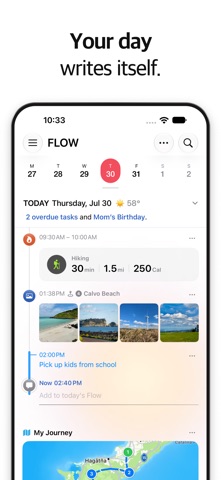
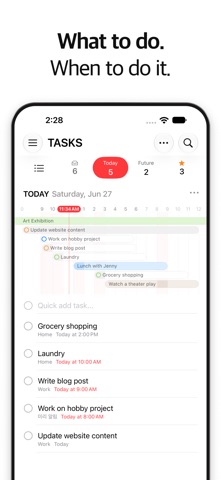
Your whole day. Plan it. Capture it. Calendar · Tasks · Notes · Anniversaries, and Flow. Your day writes itself. What you plan today becomes what you remember tomorrow. Photos and notes, plans and moods gather day by day. This isn't four separate apps stacked in one place. They are stitched into each other along one line of time. So HyFlow isn't somewhere your days are stored. It opens them back up — what your day was actually like. That is what the name means: HyFlow, from Hybrid + Flow — the separate streams of your day, woven into one. And the last stream that name promised is Flow. A Flow is everything that happened in your day, in order. On top of what you planned and wrote down, the day you actually lived is added. You don't have to work at keeping a record — and the only person who can see it is you. ■ Notes Capture anything. Write your way. Text, photos, video, sketches, voice recordings, locations, links. Write as freely as you would on paper, and fold long pieces into collapsible groups. Jot ideas down the moment they come, then organize them by topic with folders, folder groups and #tags. Find and replace inside a note, export to PDF or images, and import Markdown or plain text. Notes in HyFlow stand on their own as a complete notes app. ■ Calendar Move freely between year, month, week and day views. Your month at a glance, and plans that span several days in one seamless view. In the day view, events, tasks, notes and anniversaries appear together on their day, and unfinished tasks from past days gather at the top of today. Drag and drop to reschedule, lunar calendar support, and smart input that reads "meeting tomorrow at 3pm" the way you would say it. ■ Tasks Today / Tomorrow / Upcoming — see what to do, and when to do it. Categories, priority, repeat rules. Completed tasks don't vanish. They stay as what you got done that day. ■ Anniversaries D-day counts and custom alerts for birthdays, anniversaries and memorials. Birthdays show the age, anniversaries the number of years. ■ Flow (iPhone only) · Photos, places you've been, workouts, events and tasks gather in Flow in the order they happened · Works with Apple Health: workouts, sleep, and steps are read and gathered in Flow (read-only — nothing is written to Health) · When a thought passes, one line is enough — Flow remembers the time and the place · Link a memo to a photo or a place, and a moment becomes a story · Where you've been, mapped for you in "My Journey" · At the end of the day, one tap turns today into a journal entry ■ Privacy For an app that records your day on its own, privacy isn't a feature. It is the premise. Your records stay in two places: your iPhone and your iCloud. No servers of our own, no sign-up, no analytics or tracking — not even we can see them. Face ID lock, and hiding for anything you would rather not keep. What stays is always your decision. ■ Widgets · Quick Access Notes and plans, right on your Home Screen. One tap from anywhere to see today and add to it. ■ iPad A sidebar and split-view layout built for the larger screen. ■ Design A clean, modern interface, with Dark Mode. Bring everything you wrote in Awesome Note. One backup file restores folder structure, text color and formatting, images, sketches and voice memos — without loss. Keep the notes you know. Move into a wider day. Calendar · Tasks · Notes · Journal · Life log · Planner — all of it done properly, and all of it on one timeline. Hybrid + Flow. HyFlow. Terms of Use: https://www.apple.com/legal/internet-services/itunes/dev/stdeula/ Privacy Policy: https://www.bridworks.com/privacy
What's new · 6.4.1
■ Bug Fixes Fixed the event and task timeline being based on the time the app was opened instead of your Work Time
Details