

Talking Translator: Text&Voice
Alexey Beschetnikov · Productivity
Independent analytics for this App Store listing. AppTracker is not affiliated with Alexey Beschetnikov.
Chart standing · US
What changed · US
Listing changes AppTracker has observed for this app in this storefront — new versions, price moves, rating shifts, and store copy.
• Dialogue mode: two people take turns, each reading their own half of the screen • Photo translation: snap a menu, a shop sign or a street sign — the translation lands right on top of the text, in its place • Live camera translation: point the camera and the words change as you go • All of this works offline — you only need to download the language once • Support for 59 languages • Better support for iPad • Recognized text can now be edited in both halves of the screen
Price & rating history · US
Reconstructed from the listing changes AppTracker has observed in this storefront. A field is charted once it has changed more than once, and each line starts at the value it moved from.
Average rating · ★ 4.23 now · 4 changes on record
Ratings breakdown · US
The star breakdown behind this app's rating in this storefront.
In-app purchases · US
What this app sells inside itself, grouped by kind and priced for this storefront.
Screenshots


About
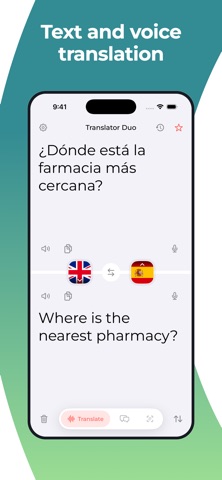
Translator Duo turns your phone into an interpreter for two people. You start talking and the translation appears before you finish the sentence — the other person is already reading. It works with no internet. Speech and text are translated on the device itself, so it holds up on a plane, abroad without a local SIM, and anywhere the signal runs out. What it does • Speech recognition in 59 languages • Translation that keeps pace with your speech • Punctuation added on its own • Dialogue mode: two people take turns, each reads their own half of the screen • Photo translation: snap a menu, a shop sign or a street sign — the translation lands right on top of the text, in its place • Live camera translation: point the camera and the words change as you go • Recognized text can be edited in both halves of the screen • The translation read out loud, automatically if you like • History with search and favorites • Dark theme • No ads How to use it 1. Pick the two languages 2. Tap the bottom microphone for yourself and the top one for the other person 3. Text and translation appear as you speak To use it offline, download the language once — over Wi-Fi, in a few taps. Terms of Use: https://sites.google.com/view/itranslate-app/terms Privacy Policy: https://sites.google.com/view/itranslate-app/privacy-policy
What's new · 2.0
• Dialogue mode: two people take turns, each reading their own half of the screen • Photo translation: snap a menu, a shop sign or a street sign — the translation lands right on top of the text, in its place • Live camera translation: point the camera and the words change as you go • All of this works offline — you only need to download the language once • Support for 59 languages • Better support for iPad • Recognized text can now be edited in both halves of the screen
Details