

GeoPics
Ash Point Ltd. · Photo & Video
Independent analytics for this App Store listing. AppTracker is not affiliated with Ash Point Ltd.
Chart standing · US
What changed · US
Listing changes AppTracker has observed for this app in this storefront — new versions, price moves, rating shifts, and store copy.
• Faster gallery loading and smoother browsing, especially with larger photo libraries. • Green badges show GeoPics that have been exported to Photos. Yellow badges identify photos changed since their last export. • Export warnings and last-exported dates help prevent accidental duplicates. • Batch export only new or changed GeoPics, or choose to export everything again. • Organize exported pictures in a dedicated GeoPics album when Full Photos Access is available. • Optionally export a GeoPic automatically after adding or changing its comment. • Add one shared comment to every photo taken during a camera session. • View a GeoPic’s exact location and open driving directions in Apple Maps or Google Maps. • Use either volume button to take a photo while the GeoPics camera is open on supported iPhones. • Improved camera feedback shows when the shutter is ready, processing, or temporarily unavailable. • Standalone GeoPics users can permanently hide the Collections promotional message. This update also includes reliability, accessibility, camera-session, and Photos export improvements.
Screenshots


About
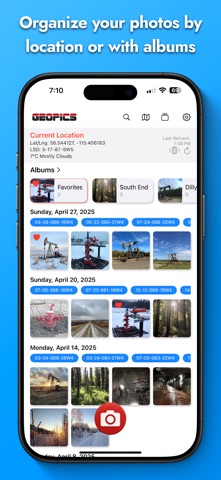
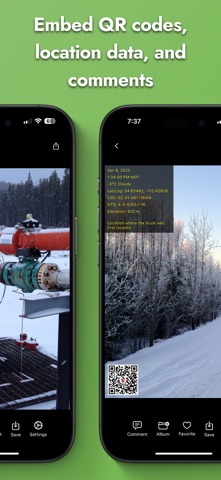
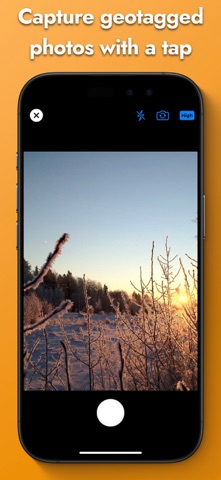
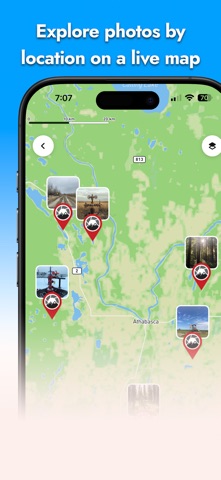
GeoPics transforms your iPhone into a geo-aware field camera—snap, stamp and share location-rich photos in seconds. Snap geotagged photos in one tap • Built-in geo-camera: live preview with flash, gridlines & GPS readout • Automatic stamping: date & time (with seconds + time zone), coordinates & QR code • Custom overlays: customize the overlay, add comments or QR codes Explore on a full-screen map • Interactive map view: browse pins, zoom, pan & tap thumbnails • All your coordinates: GPS, UTM, elevation—and in Western Canada, LSD & NTS Organize & find your shots • Dynamic albums: create, rename or reorder; album cover auto-selects its oldest photo • Favorites: mark top shots and see them in a special “Favorites” album • Search the meta data and jump straight to filtered results Comment & share instantly • Add notes or tags post-capture • Save to Photos or share via iMessage, SMS, Mail Perfect for field engineers, surveyors, inspectors and outdoor photographers who need precise location data baked into every image. Download GeoPics today and never lose track of where your photos were taken.
What's new · 2.4.007
• Faster gallery loading and smoother browsing, especially with larger photo libraries. • Green badges show GeoPics that have been exported to Photos. Yellow badges identify photos changed since their last export. • Export warnings and last-exported dates help prevent accidental duplicates. • Batch export only new or changed GeoPics, or choose to export everything again. • Organize exported pictures in a dedicated GeoPics album when Full Photos Access is available. • Optionally export a GeoPic automatically after adding or changing its comment. • Add one shared comment to every photo taken during a camera session. • View a GeoPic’s exact location and open driving directions in Apple Maps or Google Maps. • Use either volume button to take a photo while the GeoPics camera is open on supported iPhones. • Improved camera feedback shows when the shutter is ready, processing, or temporarily unavailable. • Standalone GeoPics users can permanently hide the Collections promotional message. This update also includes reliability, accessibility, camera-session, and Photos export improvements.
Details