

Reverse Image Search – RIMG
Wios LLC · Utilities
Independent analytics for this App Store listing. AppTracker is not affiliated with Wios LLC.
Chart standing · US
What changed · US
Listing changes AppTracker has observed for this app in this storefront — new versions, price moves, rating shifts, and store copy.
Bug fixes and improvements.
Ratings breakdown · US
The star breakdown behind this app's rating in this storefront.
In-app purchases · US
No in-app purchases.
Screenshots


About
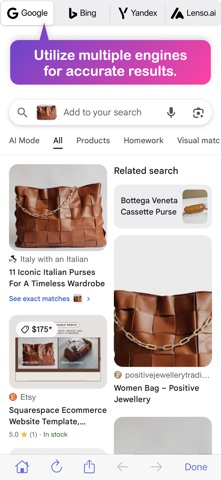
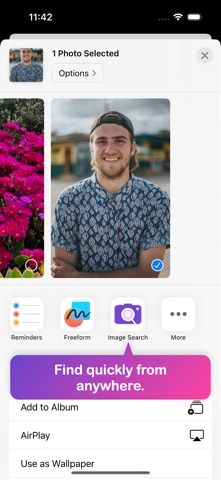
RIMG lets you perform reverse image search for free. Simply upload or select an image to discover useful information, similar images, original sources, products, people, and more across popular reverse image search engines, including Google, Bing, Yandex, and Lenso.ai. Use it to spot potential catfishes, identify plants, jewelry, coins, and products, find original artists and image sources, discover better deals, verify photos, and explore anything you see online. With fast and convenient image search, finding answers from a picture has never been easier. Some features: – Search using images instead of keywords – View and compare results from multiple search engines – Fast, lightweight, and privacy-friendly To begin your search, you can select an image in multiple ways—you can choose one from your photo gallery, import it from a URL, or paste it from your clipboard. You can also take a picture directly within the app and perform a reverse search. By using RIMG, you can identify various objects, including people’s faces, clothing items, monuments, plants, and more. A handy feature in the app allows you to take a picture of what’s right in front of you and find relevant information based on the image. When using this feature for the first time, the app will request access to your camera. The camera is accessed only when you need to take a picture for a reverse image search and is not used for any other purpose. On the results page, you can switch between search engines to find the most relevant results. The accuracy of any reverse image search service may vary depending on the image you input and the search engine you use. With multiple search engines integrated into one app, you can explore their results and dig deeper into the information they retrieve from across the web. Try RIMG today and discover more information about that picture you’re curious about. If you find the app useful, please share it with your friends and family. By downloading and using this app, you acknowledge that you have read and accepted the terms and privacy policy as outlined on the following pages. Terms of service: https://rimg.us/docs/terms.html Privacy policy: https://rimg.us/docs/privacy.html
What's new · 1.3.2
Bug fixes and improvements.
Details