

One / Easy launch app
tomople · Productivity
Independent analytics for this App Store listing. AppTracker is not affiliated with tomople.
Chart standing · US
What changed · US
Listing changes AppTracker has observed for this app in this storefront — new versions, price moves, rating shifts, and store copy.
Rebuilt from the ground up. • A new home screen of big buttons • "How they are doing": a daily check-in for the family • Set up from afar: build the screen on your phone and send it • Medicine and appointment reminders, magnifier, read aloud • No more ads Your existing buttons carry over.
Screenshots





About
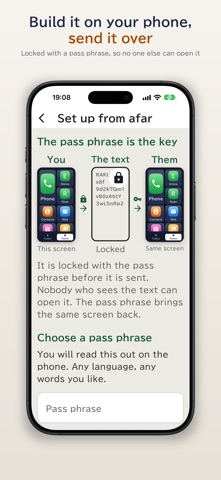
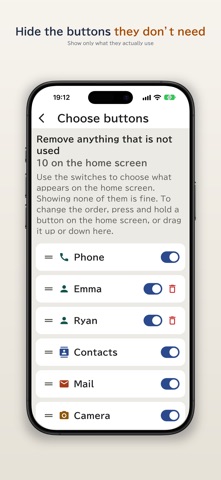
Set up your parent's phone from wherever you are, then hand it over. "The text is too small." "Which button do I press?" "I touched something and can't get back." "Are they even using the phone?" Home Sweet Phone answers the problems families hit when a parent gets their first smartphone. ■ A home screen of big buttons Only what they use, on large buttons: a big Phone button and the faces of family next to it. Every call is confirmed once before it is placed, so there are no wrong numbers. ■ "How they are doing" — a daily check-in Turn it on on your parent's phone. Open the app on yours and you see "Opened the app at 7:12" and "Used the phone 8 times today". If a day passes with no use at all, or the emergency button is pressed, your phone gets an alert. Only usage times and counts, "Taken" taps, battery level and the emergency button are shared. Never location, calls, notes, photos or medicine names. Their screen says "Letting your family know you are OK", and they can stop it at any time. ■ Set up from afar Arrange buttons, family photos and medicine reminders on your own phone, then send it with any messaging app. On their phone, enter the pass phrase you tell them on a call, and it becomes the same screen. Nobody else can open it on the way. ■ Hide what they don't need Switch each button on or off. Press and hold to reorder. "Prevent mistakes" stops buttons moving by accident. ■ Only family can change settings A 4-digit number locks the settings. ■ Medicine and appointment reminders Daily, on chosen weekdays, or once. A big "Taken" button appears on the Today screen, and it asks once more 30 minutes later. ■ Easy to see and hear Three text sizes, the hard-to-misread BIZ UDPGothic typeface, read-aloud, five home colours, and a Today screen with the weather, reminders and the latest note. ■ Also included Magnifier with light, entertainment shortcuts, large-text notes, emergency contact, full backup, bulk reminders and bulk family photos. ■ Honestly • This app cannot replace the iPhone home screen (an iOS rule); a home-screen widget is included instead. • It cannot block scam calls or announce missed calls. • "How they are doing" is not a security or emergency service. Alerts may be late or may not arrive. • To stop, just delete the app. Settings > "If you stop using this app" explains what stays. ■ No ads No banners, no full-screen ads, and no request to track. ■ About price The app is free. Everything the user touches and everything the family uses to set it up is free, for good. "How they are doing" is free too for: when the phone was last used, how often today, alerts for a day with no use and for the emergency button, and one family member watching. ■ See more in "How they are doing" (in-app purchase, one-time, optional) An additional one-time purchase. Nothing is charged monthly or yearly. • Medicine checks: how many of the day's reminders were ticked • The 7-day and 30-day record • More than one family member watching Without it, nothing changes on their phone and the alerts never stop. The purchase screen is only on the family's screen, inside locked settings. Restore it free on a new phone from "Restore purchases". ■ If you subscribed to an earlier version The earlier "remove ads" plan is no longer offered. If you still hold it, you can use "See more" at no extra cost. • It keeps renewing until you cancel. Unless cancelled at least 24 hours before the period ends, it renews for the same period and price, charged to your Apple ID • To cancel: Settings > your name > Subscriptions. Deleting the app does not cancel it • Restore: "Restore purchases" in the app's settings Terms of Use https://tomople.com/en/terms/ Privacy Policy https://tomople.com/en/privacy/rakuapp/
What's new · 2026.10.4
Rebuilt from the ground up. • A new home screen of big buttons • "How they are doing": a daily check-in for the family • Set up from afar: build the screen on your phone and send it • Medicine and appointment reminders, magnifier, read aloud • No more ads Your existing buttons carry over.
Details