

Event Timers
Hugo Schotman · Productivity
Independent analytics for this App Store listing. AppTracker is not affiliated with Hugo Schotman.
Chart standing · US
What changed · US
Listing changes AppTracker has observed for this app in this storefront — new versions, price moves, rating shifts, and store copy.
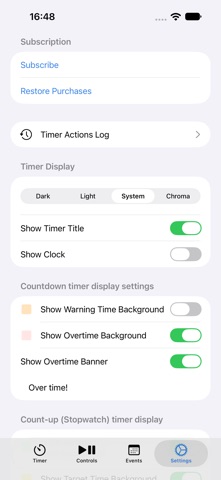
NEW: • Now also available in Japanese, Portuguese (Brazil and Portugal), Simplified Chinese and Traditional Chinese • Count-to timers get their own background color once the target time has passed (can be switched off in Settings) • Duration fields show a live preview of the time entered; the default warning time in Settings is now typed instead of picked • New subscription screen with plan details, clear feedback on purchases and restores, and Manage Subscription in Settings • Apple TV: improved Events, Schedules and Schedule Items lists, and a full-screen Timer Actions Log IMPROVEMENTS AND FIXES: • External displays: the timer fills the whole screen on TVs and projectors, without a black border • External displays: support for iOS 27 and iPadOS 27 • Timer digits stay clearly readable on colored backgrounds • A running timer keeps running when the app is quit and reopened • Changes to the duration or warning time of the running item take effect immediately; opening the event form no longer resets a running timer • A custom overtime banner text is no longer replaced when opening Settings • The running timer follows items that are edited or deleted on another device • Timers of a day or longer show days, hours and minutes, and no longer round the minutes up • The Default Timer Duration setting is gone: new items start with an empty duration • Many smaller fixes and translation improvements
In-app purchases · US
What this app sells inside itself, grouped by kind and priced for this storefront.
Screenshots



About
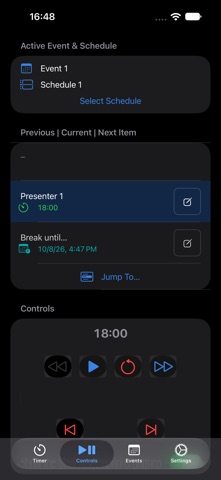
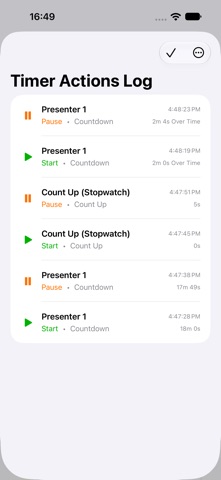
Display timers at your events. Show presenters, performers and event staff how much time is left. Each event can have multiple schedules. Each item on a schedule can contain a countdown timer, count to timer, count up timer or show a clock. Perfect for Toastmasters meetings! The count up timers with colored backgrounds (green for minimum, yellow for target, red for maximum time) make it easy to signal speakers. Hide the timer digits to show just the colors, and use the Timer Actions Log to track all speaker times. On iOS Devices, the timer can be shown full-screen on external displays (with option to turn this off), while the built-in display can be used for controls and editing schedules. Full-screen views are also available on Mac, iPad and Apple TV. Events and schedules automatically sync between devices using the same iCloud account. (Requires an active internet connection.) == Get started with the free version == The App is free for up to 5 Timers in one Schedule and one Event. Get unlimited Events, Schedules and Schedule Items with a subscription. == Subscription Pricing And Terms == Event Timers offers three auto-renewing subscription options: $4.99 per month $26.00 per 6 months (that is less than $4.35 per month) $36.00 per year (that is $3 a month) These prices are for United States customers. Pricing in other countries may vary and actual charges may be converted to your local currency depending on the country of residence. The subscription will automatically renew unless turned off in your iTunes Account Settings at least 24 hours before the current period ends. You can go to your iTunes Account settings to manage your subscription and turn off auto-renew. Your iTunes Account will be charged when the purchase is confirmed. Read the terms and conditions here: https://www.apple.com/legal/internet-services/itunes/dev/stdeula/ Read the privacy policy here: https://eventtimers.app/privacy-policy/
What's new · 1.3.0
NEW: • Now also available in Japanese, Portuguese (Brazil and Portugal), Simplified Chinese and Traditional Chinese • Count-to timers get their own background color once the target time has passed (can be switched off in Settings) • Duration fields show a live preview of the time entered; the default warning time in Settings is now typed instead of picked • New subscription screen with plan details, clear feedback on purchases and restores, and Manage Subscription in Settings • Apple TV: improved Events, Schedules and Schedule Items lists, and a full-screen Timer Actions Log IMPROVEMENTS AND FIXES: • External displays: the timer fills the whole screen on TVs and projectors, without a black border • External displays: support for iOS 27 and iPadOS 27 • Timer digits stay clearly readable on colored backgrounds • A running timer keeps running when the app is quit and reopened • Changes to the duration or warning time of the running item take effect immediately; opening the event form no longer resets a running timer • A custom overtime banner text is no longer replaced when opening Settings • The running timer follows items that are edited or deleted on another device • Timers of a day or longer show days, hours and minutes, and no longer round the minutes up • The Default Timer Duration setting is gone: new items start with an empty duration • Many smaller fixes and translation improvements
Details