

Pencil Bible: Journal & Study
Launchround Inc. · Reference
Independent analytics for this App Store listing. AppTracker is not affiliated with Launchround Inc.
Chart standing · US
What changed · US
Listing changes AppTracker has observed for this app in this storefront — new versions, price moves, rating shifts, and store copy.
What's new in Pencil Bible: • Reina-Valera 1960: the classic Spanish Bible, free. Tap Create a new Bible in the menu and pick it. • Zoom in on the page: tap "aA" to make the page twice as big, then drag to look around. On iPhone, drag with two fingers. • Side by side on iPad: open Pencil Bible next to another app and the page shrinks to fit. • Jump between your Bibles: tap ⇆ to go back to the Bible you were just reading, on the same chapter. • Your colour bar: three colour dots on the edge of the page. Tap one to switch colour, or press and hold to choose your own. You can turn it off in Settings. • Your Bibles on your Home Screen: add the Pencil Bible widget, then tap a Bible to keep reading. • Save a chapter as a PDF: tap +, then Export as PDF to save, print or share the chapter with your notes. • More room on iPhone: when the top buttons don't all fit, swipe the icons sideways or tap ‹ to see the rest. • Your Bibles as tiles: in the menu, swipe a Bible to rename or delete it. • iCloud sync you can see: a new card in Account shows how syncing is going, and syncing now carries on for a few moments after you leave the app.
Ratings breakdown · US
The star breakdown behind this app's rating in this storefront.
In-app purchases · US
What this app sells inside itself, grouped by kind and priced for this storefront.
Screenshots




About
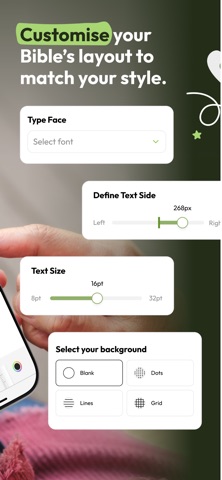
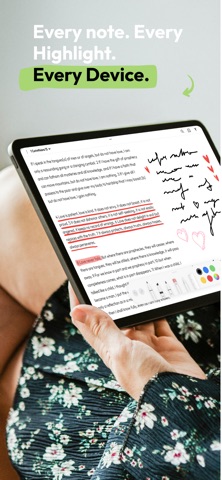
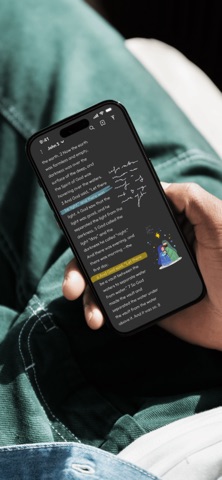
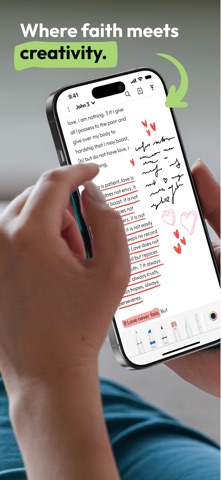
Since 2022. The Bible you can write in. -- Pencil Bible turns Scripture into a canvas. Highlight verses, sketch in the margins, journal your reflections, and let every reading become part of your story — all with the natural feel of Apple Pencil. Unlike iPad-only journaling apps, Pencil Bible works seamlessly on both iPhone and iPad — annotate on your tablet at home, then pick up right where you left off on your phone. Your Bible study goes everywhere you do. Whether you're deep in study, journaling a quiet morning, or capturing a sermon note in the pew, Pencil Bible is built for how you actually meet with God. 14 translations free, forever: Read NLT, NASB, AMP, TPT, KJV, ASV, WEB, OJB, WMB, DRA, LBLA, NBLA, RV1909, BSB and NBV — completely free, with no paywall on God's Word. Premium translations including ESV, NIV, CSB, and NVI are also available. Your Bible, your way: • Draw, highlight, and annotate directly on Scripture • Full Apple Pencil Pro and PencilKit support • Shapes, stickers, pictures and text box (NEW!) • Seamless on iPad and iPhone — annotate on both • Jesus' words in red • Built-in search to find any verse instantly • Dark Mode for late-night devotionals • Left-hand mode and customizable fonts, backgrounds, and layouts • Edit your Bible pages anytime — no need to start over Perfect for: • Daily devotionals and quiet time • Sunday sermon and study notes • Bible journaling, lettering, and creative worship • Students and pastors taking margin notes Free to read. Free to explore: Read the Bible free, forever. Annotate up to 10 pages at no cost — upgrade anytime for unlimited journaling. Your support helps us serve more believers around the world. Pencil Bible isn't just an app. It's your daily sanctuary, your digital journal, your space to meet with the One who wrote the Word. The Word is alive. Now your Bible can be too. Download Pencil Bible today. Apple Pencil features require a compatible iPad. Annotations are available on iPhone without a subscription. EULA: https://www.apple.com/legal/internet-services/itunes/dev/stdeula/
What's new · 3.0.57
What's new in Pencil Bible: • Reina-Valera 1960: the classic Spanish Bible, free. Tap Create a new Bible in the menu and pick it. • Zoom in on the page: tap "aA" to make the page twice as big, then drag to look around. On iPhone, drag with two fingers. • Side by side on iPad: open Pencil Bible next to another app and the page shrinks to fit. • Jump between your Bibles: tap ⇆ to go back to the Bible you were just reading, on the same chapter. • Your colour bar: three colour dots on the edge of the page. Tap one to switch colour, or press and hold to choose your own. You can turn it off in Settings. • Your Bibles on your Home Screen: add the Pencil Bible widget, then tap a Bible to keep reading. • Save a chapter as a PDF: tap +, then Export as PDF to save, print or share the chapter with your notes. • More room on iPhone: when the top buttons don't all fit, swipe the icons sideways or tap ‹ to see the rest. • Your Bibles as tiles: in the menu, swipe a Bible to rename or delete it. • iCloud sync you can see: a new card in Account shows how syncing is going, and syncing now carries on for a few moments after you leave the app.
Details