

Hi Sticky: Notes SE + Widget
haha Interactive · Productivity
Independent analytics for this App Store listing. AppTracker is not affiliated with haha Interactive.
Chart standing · US
What changed · US
Listing changes AppTracker has observed for this app in this storefront — new versions, price moves, rating shifts, and store copy.
Hi Sticky 4.0 • Added support for iPhone Duo. • Improved note paging, keyboard behavior, and toolbar layouts on iPhone and iPad, including when resizing windows or using Split View. • More reliable note opening and window handling when using multiple windows on iPad and Apple Vision Pro. • Better protection for text and formatting while editing and syncing. Conflicting versions are preserved in Sync Recovery in Trash. • Clearer feedback when changes cannot be saved, with safer note deletion and restoration from Trash. • Improved Hi Sticky+ purchases and purchase restoration, with clearer messages for unavailable prices, pending purchases, and errors. • Improved widget text layout and the widget settings preview. Thanks for using Hi Sticky!
Price & rating history · US
Reconstructed from the listing changes AppTracker has observed in this storefront. A field is charted once it has changed more than once, and each line starts at the value it moved from.
Average rating · ★ 4.57 now · 6 changes on record
Ratings breakdown · US
The star breakdown behind this app's rating in this storefront.
Screenshots



About
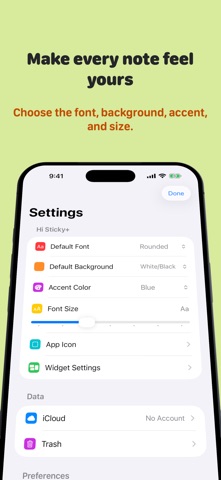
Hi Sticky is a fast, visual sticky notes app for iPhone, iPad, Mac, Apple Watch, and Apple Vision Pro. Capture an idea instantly, create a checklist, and keep every note synced with iCloud. Open Hi Sticky and start writing. Give each note its own font and background, recognize it at a glance in the visual note list, and keep Favorites above every sort order. Search across all notes or find matching text inside the note you are reading. On Mac, open notes in separate windows and keep important notes above other apps. On iPhone and iPad, use the controls above the keyboard to format text, manage lists, move the cursor, and copy or paste faster. Key Features - Fast, distraction-free note editor - Bold, italic, underline, and strikethrough formatting - Bulleted and numbered lists - Interactive checklists - Visual note previews with each note's font and background - Search across notes and Find in Note - Favorites that stay at the top - iCloud sync across Apple devices - Single-note and note-list widgets - Actions for Shortcuts and Siri - Link management - Multiple note windows with an always-on-top option on Mac - Support for iPhone, iPad, Mac, Apple Watch, and Apple Vision Pro Hi Sticky+ Unlock more ways to personalize Hi Sticky across your devices with a single one-time purchase. - Additional fonts and background colors - Adjustable font sizes - Custom app accent colors - More app icons - Customizable buttons above the iPhone and iPad keyboard - Advanced widget settings - Family Sharing support Hi Sticky was previously known as Notes SE.
What's new · 4.0
Hi Sticky 4.0 • Added support for iPhone Duo. • Improved note paging, keyboard behavior, and toolbar layouts on iPhone and iPad, including when resizing windows or using Split View. • More reliable note opening and window handling when using multiple windows on iPad and Apple Vision Pro. • Better protection for text and formatting while editing and syncing. Conflicting versions are preserved in Sync Recovery in Trash. • Clearer feedback when changes cannot be saved, with safer note deletion and restoration from Trash. • Improved Hi Sticky+ purchases and purchase restoration, with clearer messages for unavailable prices, pending purchases, and errors. • Improved widget text layout and the widget settings preview. Thanks for using Hi Sticky!
Details