

Remote for AdGuard DNS
RocketScience IT · Utilities
Independent analytics for this App Store listing. AppTracker is not affiliated with RocketScience IT.
Chart standing · US
What changed · US
Listing changes AppTracker has observed for this app in this storefront — new versions, price moves, rating shifts, and store copy.
v5.3.2 brings some minor improvements: - The 'Limits' section in settings now also shows your License Plan - Minor storage security improvements - Fixed chart sizing on future iPhone models and in resizable layouts v5.3.1: - Improved storage security of sensitive data - Faster chart rendering - Improved Live Log performance and reliability - Reduced memory usage when loading large Query Logs - Fixed an issue that could leave Save disabled after creating a device failed
Ratings breakdown · US
The star breakdown behind this app's rating in this storefront.
In-app purchases · US
No in-app purchases.
Screenshots




Keywords this app targets
Search terms AppTracker associates with this app — estimates, not search volume. ❝ = in the app's title; a highlighted number is its current position for that term.
Similar apps
Competitors and close alternatives, as estimated by AppTracker.
 Adguard Home Admin
GREG SCOTT MOORE
Adguard Home Admin
GREG SCOTT MOORE
 DNS Shield
ARETORI Solutions LTD
1 shared topic · 1 shared title word
DNS Shield
ARETORI Solutions LTD
1 shared topic · 1 shared title word
 Cloudflare Remote
Emre Keles
1 shared topic · 1 shared title word
Cloudflare Remote
Emre Keles
1 shared topic · 1 shared title word
 NextDNS
nextdns Inc.
NextDNS
nextdns Inc.
 DNS Security Pro
CHUNG-HO LEE
1 shared topic · 1 shared title word
DNS Security Pro
CHUNG-HO LEE
1 shared topic · 1 shared title word
 Ad And Stuff DNS Filter
LPSCI Software Inc
Ad And Stuff DNS Filter
LPSCI Software Inc
 AdGuard Ad Blocker for Safari
Adguard Software Limited
1 shared title word
AdGuard Ad Blocker for Safari
Adguard Software Limited
1 shared title word
 AdGuard Pro: Safari Ad Blocker
Adguard Software Limited
1 shared title word
AdGuard Pro: Safari Ad Blocker
Adguard Software Limited
1 shared title word
About
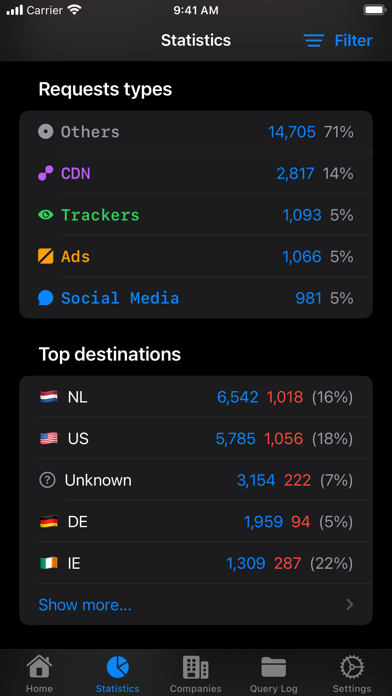
Take control of your AdGuard DNS setup from anywhere. Monitor DNS activity as it happens, inspect blocked requests, and adjust protection for servers and devices—all from a fast, native iOS app. *See What Your Network Is Doing* Follow requests in real time with Live Log, search your Query Log, and inspect detailed request and response information. Find the answers you need without digging through a web dashboard. *Control Protection in Seconds* Enable or disable protection for an entire server or fine-tune settings for individual devices. Manage blocklist filtering, user rules, parental control, and browsing security. Siri Shortcuts make common actions even faster. *Understand Your DNS Traffic* Explore clear statistics for your DNS activity, including top domains and destinations, and see what is being blocked at a glance. *Manage Servers and Devices* Add or edit servers, update device details, and keep important DNS settings within easy reach. *Built for Apple Devices* Enjoy a truly native iOS experience built with SwiftUI, plus Home Screen widgets for quick actions and status updates. Features: • Toggle protection for servers and individual devices • Control blocklist filtering, user rules, parental control, and browsing security • View basic and advanced DNS statistics • Search the Query Log with filters and detailed request information • Monitor requests in real time with Live Log • Use Home Screen widgets for quick actions and status • Automate common actions with Siri Shortcuts How it works: 1. Connect your AdGuard DNS account. 2. Select a server or device. 3. Monitor activity, review statistics, and manage protection. Remote for AdGuard DNS is an independent, third-party app and is not affiliated with or endorsed by AdGuard. An AdGuard DNS account is required. Learn more about AdGuard DNS at https://adguard-dns.io/.
What's new · 5.4
v5.3.2 brings some minor improvements: - The 'Limits' section in settings now also shows your License Plan - Minor storage security improvements - Fixed chart sizing on future iPhone models and in resizable layouts v5.3.1: - Improved storage security of sensitive data - Faster chart rendering - Improved Live Log performance and reliability - Reduced memory usage when loading large Query Logs - Fixed an issue that could leave Save disabled after creating a device failed
Details