

Teleprompter Automatic
APP BOX EOOD · Photo & Video
Independent analytics for this App Store listing. AppTracker is not affiliated with APP BOX EOOD.
Chart standing · US
What changed · US
Listing changes AppTracker has observed for this app in this storefront — new versions, price moves, rating shifts, and store copy.
In this version: • Remote control from another iPhone or iPad: connect by QR code and control your text, scrolling, and recording. • Color highlights in scripts: mark key words and important phrases to find your place more easily while reading. • Easier text area adjustment: move and resize it right on the screen. • See the full camera frame without cropping in the preview, and view finished videos at a larger size. • Fixed audio and video synchronization when mirroring your screen with AirPlay. Thank you for using Teleprompter Automatic! Questions or suggestions? Contact us: support@teleprompter.pw
Price & rating history · US
Reconstructed from the listing changes AppTracker has observed in this storefront. A field is charted once it has changed more than once, and each line starts at the value it moved from.
Average rating · ★ 4.71 now · 6 changes on record
Ratings breakdown · US
The star breakdown behind this app's rating in this storefront.
Screenshots


About
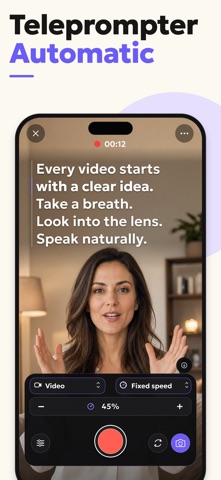
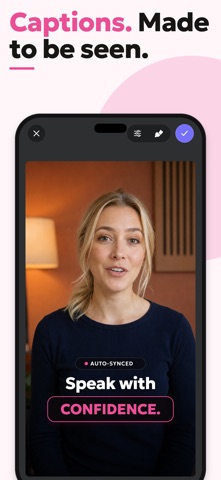
Record confident videos without memorizing your script. Teleprompter Automatic keeps your text near the camera and scrolls it by voice, fixed speed, reading time, or words per minute. Record, rehearse, edit, add subtitles, or stream live—all from one app. READ AT YOUR PACE • Voice Scrolling listens to your speech and advances the script as you speak. • Use Fixed Speed, set a total reading time with Timed Scrolling, or set your pace in words per minute. • Adjust speed during your take, set a countdown, and mirror text horizontally or vertically. • Customize fonts, size, color, alignment, line spacing, and the Reader’s size and position. • Control scrolling and recording from Apple Watch, Web Remote, a paired keyboard, or a game controller. RECORD, REHEARSE, OR GO LIVE • Record video with the front or rear camera while reading directly from your screen. • Capture audio-only sessions with microphone selection and a detailed playback waveform. • Fine-tune supported camera options including resolution, frame rate, HDR, stabilization, zoom, filters, and microphone input. • Use Practice mode for a private rehearsal, then decide whether to save or delete the recording. • Stream from the Reader with platform presets, direct YouTube setup, or a custom RTMP/RTMPS connection. BUILD A BETTER SCRIPT LIBRARY • Write or paste text, import PDF, DOCX, and text files, or create a first draft with AI. • Organize scripts in folders and personalize their formatting for easier reading. • Sign in to sync your script and recording library with the cloud. EDIT AND SHARE YOUR CONTENT • Trim, rotate, resize, change speed, combine clips, and prepare videos for different aspect ratios. • Add text, images, a logo, watermark, filters, or a blurred or replacement background. • Generate subtitles from speech, translate them into another language, and customize their style and placement. • Export your finished video or share audio recordings from the app. From quick social videos and lessons to presentations, product demos, interviews, sermons, and live broadcasts, Teleprompter Automatic helps you keep eye contact and deliver every line with confidence. Open your script, press record, and tell your story without losing your place. Privacy Policy: https://teleprompter.pw/privacy/ Terms of Use: https://teleprompter.pw/terms/ EULA: https://www.apple.com/legal/internet-services/itunes/dev/stdeula/
What's new · 4.5.9
In this version: • Remote control from another iPhone or iPad: connect by QR code and control your text, scrolling, and recording. • Color highlights in scripts: mark key words and important phrases to find your place more easily while reading. • Easier text area adjustment: move and resize it right on the screen. • See the full camera frame without cropping in the preview, and view finished videos at a larger size. • Fixed audio and video synchronization when mirroring your screen with AirPlay. Thank you for using Teleprompter Automatic! Questions or suggestions? Contact us: support@teleprompter.pw
Details