

Times Tables • Multiplication
Andreas Koegler · Education
Independent analytics for this App Store listing. AppTracker is not affiliated with Andreas Koegler.
Chart standing · US
What changed · US
Listing changes AppTracker has observed for this app in this storefront — new versions, price moves, rating shifts, and store copy.
Choose your color scheme • Three color schemes to pick from: White brings a bright, friendly look to the practice screen, Gray is the familiar appearance, and Black suits dark surroundings. Switch anytime in Settings under "Appearance" • Minor bug fixes – including how audio from other apps is handled – and stability improvements
Price & rating history · US
Reconstructed from the listing changes AppTracker has observed in this storefront. A field is charted once it has changed more than once, and each line starts at the value it moved from.
Average rating · ★ 4.40 now · 3 changes on record
Ratings breakdown · US
The star breakdown behind this app's rating in this storefront.
In-app purchases · US
What this app sells inside itself, grouped by kind and priced for this storefront.
Screenshots





About
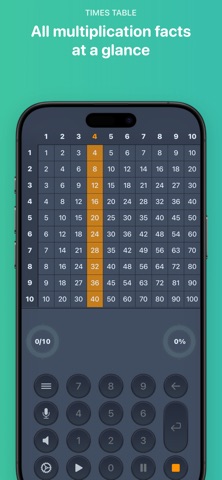
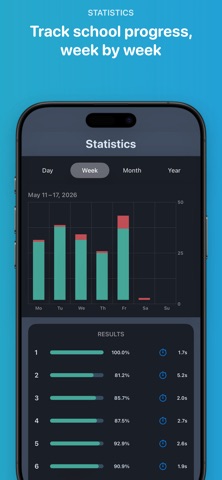
Know your times tables by heart – and really understand them. The app builds both: regular practice makes your answers fast and confident – you just say them instead of typing. And when you miss one, it shows you the right strategy, so you understand why the answer works. Whether you're just learning your times tables, brushing up after years away, or picking the app for your child: no ads, no tracking, no subscription – so screen time here is time well spent. WHAT THE APP CAN DO VOICE INPUT & HANDS-FREE CONTROL Say your answers instead of typing them, in over 10 languages – and control the whole round with your voice: repeat, skip, switch tables. VISUAL TIMES TABLES GRID Numbers alone don't tell you much about where you stand. A colorful grid shows every question at a glance – green for correct, red for incorrect. SMART RECOMMENDATIONS & STRATEGY TIPS Practicing at random doesn't get you far. The app tracks accuracy and answer time per table and looks at your results from recent weeks. After every round, it suggests exactly what to practice next. If there's a gap, the error analysis pairs it with the right strategy – as an array of colored tiles or as text. FEEDBACK AFTER EVERY ROUND After every round, you get your results, your improvement since the last round, and an assessment per table – on newer devices, phrased personally and encouragingly by Apple Intelligence. PRACTICE YOUR WAY Individual questions can be hidden from the grid – does 7×8 bug you? Skip it. Questions per round: 10, 20, 30, 40, 50 – or ∞ for the truly motivated. FREE & FAIR Tables 1–5 and 10 are free forever, with the full feature set, no ads, no time limit. Additional tables up to 12 (iPhone) or 20×20 (iPad) as a one-time purchase, with Family Sharing. No subscription. PRIVACY No tracking, no analytics services, no user account. Your progress stays on your device. When you say your answers, iOS may send the recording to Apple for recognition – voice input is optional. GOOD TO KNOW • Over 10 languages for voice input and voice output • Also works offline • iPhone and iPad – grid up to 20×20 on iPad • Appearance: White, Gray, or Black Download Times Tables • Multiplication for free now and get both: confident answers and real understanding of your times tables.
What's new · 2.7
Choose your color scheme • Three color schemes to pick from: White brings a bright, friendly look to the practice screen, Gray is the familiar appearance, and Black suits dark surroundings. Switch anytime in Settings under "Appearance" • Minor bug fixes – including how audio from other apps is handled – and stability improvements
Details