

Lunar Calendar Helper
翔宇 孙 · Productivity
Independent analytics for this App Store listing. AppTracker is not affiliated with 翔宇 孙.
Chart standing · US
What changed · US
Listing changes AppTracker has observed for this app in this storefront — new versions, price moves, rating shifts, and store copy.
• Solar terms are now shown on the correct day: terms that begin in the afternoon used to appear a day late in the solar term widgets • General bug fixes and stability improvements
In-app purchases · US
What this app sells inside itself, grouped by kind and priced for this storefront.
Screenshots


About
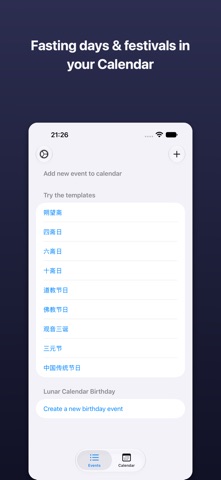
Never miss a lunar festival or fasting day again. Lunar Calendar Helper adds Chinese lunar dates directly to your native iOS Calendar — so traditional festivals, Buddhist and Taoist fasting days, and family celebrations appear right alongside your regular schedule. WHY IT'S DIFFERENT Most lunar calendar apps just display dates. This one puts them where you actually plan your life: Apple Calendar. Set it once, get reminders every year — even as Gregorian dates shift. BROWSE FOR FREE Flip through the full lunar calendar — solar terms (24 jieqi), lunar days, and an almanac-style month view — at no cost and with no account. A subscription is only needed to add events to your Calendar and unlock the premium widgets. WHAT YOU CAN ADD • Buddhist & Taoist fasting days — vegetarian (uposatha) observance schedules for practitioners • Traditional Chinese festivals & ancestor memorial days — Spring Festival, Qingming, Dragon Boat, Mid-Autumn, and more • Repeating lunar birthdays — automatically converted to the correct Gregorian date each year, with reminders • Custom lunar events — any date from the Chinese calendar WIDGETS • Lunar date and full month calendar — free for everyone, on the Home Screen and Lock Screen • Premium: Solar Terms, upcoming Festivals & Solar Terms, Daily Almanac (the day officer, what to do and avoid, and the day's clash), and Seasonal Wellness tips for each solar term HOW IT WORKS 1. Pick a pre-built template or create a custom event 2. The app converts lunar dates to Gregorian dates for the next several years 3. Events sync to your iOS Calendar with optional reminders 4. Done — your native Calendar now understands lunar dates SUBSCRIPTION Browsing the calendar is always free. Adding events and the premium widgets require a subscription — try free for 3 days or 1 month before deciding — or a one-time Lifetime Unlock. Terms of Use: https://www.apple.com/legal/internet-services/itunes/dev/stdeula/ Privacy Policy: https://github.com/xiangyu-sun/lunar-calendar-support/blob/main/PRIVACY.md
What's new · 1.7
• Solar terms are now shown on the correct day: terms that begin in the afternoon used to appear a day late in the solar term widgets • General bug fixes and stability improvements
Details